
Last updated: September 3, 2026
You can now describe a website in a sentence and watch an AI build it in minutes. Tools like Lovable and Cursor have made that real, and the results look polished. But “looks finished” and “can rank” are two different things. AI build tools optimize for shipping a working app, not for search, and they tend to leave two specific gaps: how the page is rendered, and what metadata it carries. Getting low code website seo right means closing both, and this guide shows you how — for Lovable, for Cursor-built sites, and for whatever you build next.
The pattern is consistent across the vibe-coding boom: a technically impressive site that Google is slow to rank and that ChatGPT will not cite. The cause is rarely the design. It is almost always rendering, metadata, or both. The encouraging part is that both are fixable without abandoning the tool you built with — you do not have to trade the speed of AI building for the visibility of a hand-coded site, as long as you know which two gaps to close.
Why AI-Built Sites Struggle With Low Code Website SEO
Two problems account for most low code website seo failures, and they are worth separating because they have different fixes.
The first is rendering. Many AI build tools generate client-side-rendered single-page applications: the server sends a near-empty HTML shell, and JavaScript builds the visible page in the browser afterward. Google can eventually render that, but on a delayed second pass, and most AI crawlers do not render JavaScript at all — they read the raw HTML and move on. So a client-side app can look perfect to you and be a blank shell to the crawlers that matter. Google’s own guidance on JavaScript SEO basics and the web.dev reference on rendering on the web both point to the same fix: get your content into the server’s initial HTML response through server-side rendering, static generation, or pre-rendering.
The second is metadata. Even when a page renders fine, AI build tools frequently ship the same default title and description on every route, omit canonical tags, and skip structured data and sitemaps. Google sees a set of pages that all look identical and cannot tell them apart, which quietly caps how well any of them rank. Rendering gets your content seen; metadata tells search and AI systems what each page is. You need both.
“Every AI-built site I see struggles for the same two reasons: how it renders, and what metadata it carries. Fix them in that order. Get your content into the served HTML, then make every page’s title, description and schema unique. The build is rarely the problem, the missing SEO layer is.” — Lee Agam, founder and CEO of NytroSEO.
Lovable Low Code Website SEO: What Breaks and How to Fix It
Lovable is a useful case study because it changed on exactly this axis. For most of its history, Lovable projects were React and Vite single-page apps — client-side rendered, which meant crawlers received a shell, meta tags were injected by JavaScript at runtime and invisible to non-rendering bots, and social previews came up blank. In a 2026 update, Lovable shipped server-side rendering for new projects, so new apps now return fully rendered HTML, while older projects remain client-side rendered unless you upgrade them, and continue to rely on pre-rendering served to verified crawlers.
That upgrade solves rendering, but it is only half of Lovable low code website seo. Lovable still does not automatically generate correct, unique metadata, sitemaps, or structured data — those have to be set explicitly, whether by prompting the builder or by managing them another way. So the practical fix has two parts. First, confirm your rendering path: if your project predates the server-side rendering update, either upgrade it or ensure pre-rendering is active, and verify by viewing the page source rather than the rendered DOM. Second, set unique titles and descriptions per page, add canonical tags, generate a sitemap and robots file, and add schema. Lovable’s built-in SEO and AI search review can flag the gaps, but you still have to fill them.
Cursor Low Code Website SEO: SEO for AI-Coded Sites
Cursor is a different animal, and that changes the SEO picture. Cursor is an AI-assisted code editor: it writes whatever you direct it to, in whatever framework you choose, and it does not impose a hosting or rendering model. That means Cursor low code website seo depends entirely on the stack you generate. Prompt it into a plain client-side React app and you inherit the same empty-shell rendering problem. Generate a server-rendered framework like Next.js with static or server rendering, and your content ships in the initial HTML from the start.
The catch is that an AI writes code, not an SEO strategy. A Cursor-built site will happily launch without per-page titles, without canonical tags, without a sitemap, and without structured data, because nothing in the prompt asked for them. So the fix for an AI-coded site is deliberate: choose a rendering approach that puts content in the server response, then explicitly implement the metadata layer — unique titles and descriptions, canonicals, sitemap, robots, and schema — and test what a crawler actually receives. Developers who want a reference implementation can start from our solutions for website developers.
How to Test What a Crawler Actually Sees
Before you trust any AI-built site, verify what a crawler receives, because the editor preview and a browser both run JavaScript and will hide the problem from you. Three quick checks tell the truth.
First, use View Source rather than the browser’s inspector. The inspector shows the rendered DOM after JavaScript has run; View Source shows the raw HTML the server actually sent, which is what a non-rendering crawler reads. Search that source for a sentence of your main content and for your title tag. If they are missing, crawlers are missing them too.
Second, fetch the page with a crawler user-agent — a request as GPTBot or a plain curl — and read the response. If your text, headings, and metadata are absent from that output, they are absent from what search and AI engines ingest.
Third, check Google Search Console. Use URL Inspection to see how Google renders and indexes the page, and watch the Page indexing report for pages that are excluded or crawled but not indexed. These three checks take minutes and turn “the site looks fine” into “the crawler actually sees it,” which is the only version of “fine” that earns traffic.
The Metadata Gap in Low Code Website SEO
Strip away the platform differences and the same gap remains. Whether you used Lovable, Cursor, a strict no code website seo builder, or hand-written code, the metadata layer is the part these tools most reliably get wrong. Default titles repeated across every page, missing or duplicated descriptions, absent canonicals, and no structured data are the rule, not the exception, on AI-built sites.
This matters more in 2026 than it used to, because the same metadata now feeds two audiences. Search engines use it to rank you, and AI answer engines use it — alongside your visible content — to decide what to cite. A page with a generic, duplicated title is harder to rank and harder to cite. And because the gap is systematic rather than one-off, fixing it page by page in the builder does not scale past a handful of URLs. What you want is a way to set correct metadata across every page at once, and keep it correct as the site grows.
The cost of leaving the gap open compounds over time. Every new page an AI builder generates inherits the same default title and blank description, so the problem grows with the site rather than staying fixed at launch. Worse, the failure is invisible in the tools founders actually look at: the live site looks perfect in a browser, the editor shows a clean design, and only a crawler-level check reveals that forty pages share one title. That gap between what you see and what a crawler sees is why so many AI-built sites are quietly stuck — technically live, visually polished, and effectively invisible to the systems that send traffic.
Closing the Low Code Website SEO Gap on Any Builder
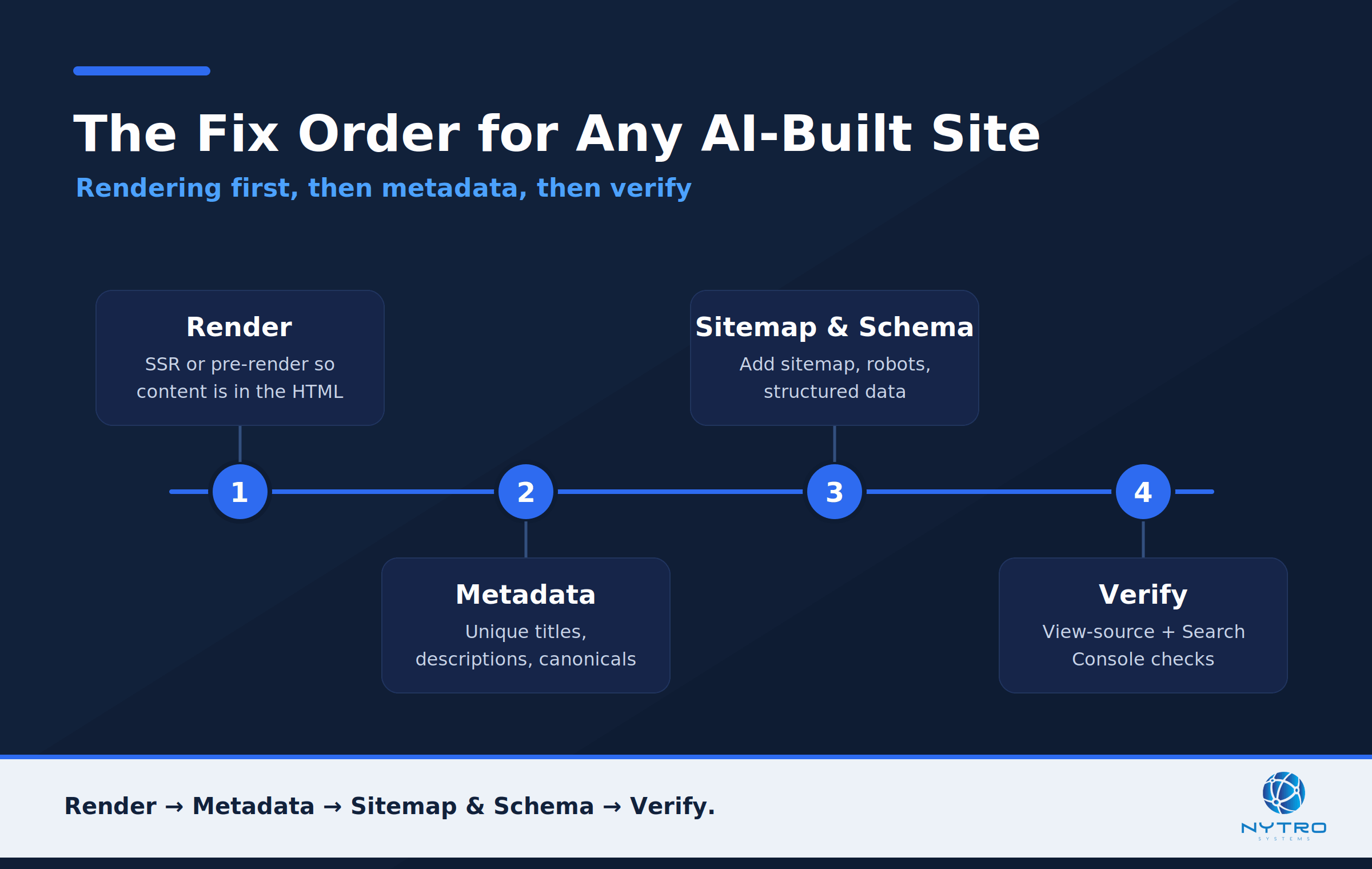
The fix order for any AI-built site: rendering first, then metadata, then verify.
This is the exact problem NytroSEO is built to solve. By adding one JavaScript snippet to your site’s header, you get programmatic control over titles, meta descriptions, canonical tags, and structured data across every page — without re-prompting the builder, migrating frameworks, or hand-editing routes. It is a metadata layer that works the same way on a Lovable app, a Cursor-built site, or any other platform.
An honest note on where this fits. The snippet manages the metadata and structured-data layer, and because it runs in the page, its output is read by engines that render — chiefly Google — and is captured whenever your site is server-rendered or pre-rendered, which is how Lovable serves pages to verified crawlers and how a Next.js Cursor build serves them by default. It does not, by itself, fix pure client-side rendering: if a non-rendering crawler is handed a raw shell, neither your body content nor any JavaScript-set tags reach it. So the order is rendering first, then metadata — and once rendering is handled, the snippet closes the metadata gap across the whole site at once. You can see how it is added in our guide to the NytroSEO snippet installation, and how the wider automation works on our Automatic SEO software page.
Which Is the Best Low Code or No Code Builder for SEO?
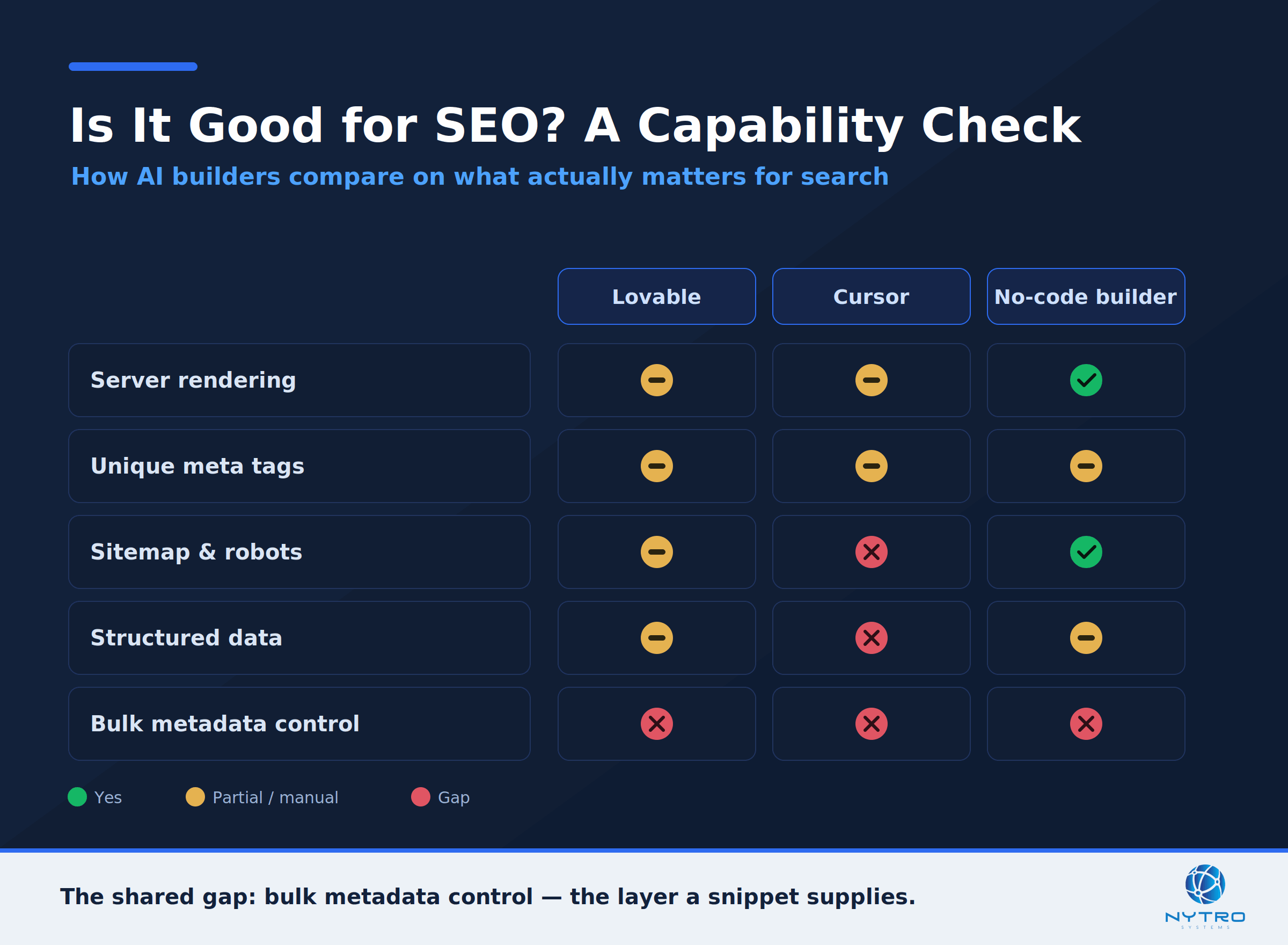
Judge any builder on two axes: does it render into HTML, and does it give real metadata control?
There is no single best low code website builder or best no code website builder for SEO, because the honest answer depends on two things: does the platform render content into the initial HTML, and does it give you real control over per-page metadata and schema? A builder that server-renders and lets you set unique tags per page has a high SEO ceiling; one that ships a client-side shell with locked, duplicated metadata has a low one, no matter how nice the editor feels.
Judged that way, the winners are the platforms that either render server-side by default or make pre-rendering easy, and that expose metadata, canonical, sitemap, and schema controls. Lovable’s move to server-side rendering raised its ceiling; a Cursor build can be excellent or poor depending on the framework you choose; and traditional no-code builders vary widely. Rather than chase a single “best” tool, evaluate any builder on those two axes — rendering and metadata control — and remember that a header snippet can supply the metadata half on whichever platform you land on. In practice this frees you to choose a builder for its speed, design, or developer experience, and then handle SEO as a separate, portable layer rather than being locked into whichever compromises the platform happens to make.
A Worked Example: An AI-Built Site That Wasn’t Ranking
Consider a founder who shipped a product site with an AI builder in an afternoon, submitted it to Google, and then saw nothing — no rankings, no AI citations, and blank previews when the link was shared. The diagnosis followed the two-gap model exactly. View Source revealed an almost empty HTML shell: the project predated the platform’s server-rendering update, so crawlers were receiving no real content. That was gap one.
Fixing rendering — by moving to the server-rendered path and confirming content now appeared in the raw source — brought the pages into eligibility, but rankings stayed flat. The reason was gap two: every route shared one default title and description, there were no canonical tags, and there was no schema or sitemap. The founder set unique, intent-matched titles and descriptions for each page, added canonicals and a sitemap, and included Organization and Product schema. Within a few weeks the pages began to index properly, social previews rendered, and the site started appearing for its target queries and getting cited in AI answers. Nothing about the build had been wrong; the SEO layer had simply never been added.
The Bottom Line on Low Code Website SEO
AI build tools removed the hard part of making a website. They did not remove SEO. To rank a low-code or AI-coded site, fix rendering so crawlers receive real HTML, then fix metadata so every page is unique and correctly described, and confirm both by checking what a crawler actually sees. Do that on a Lovable app, a Cursor project, or anything else, and a site you described in a sentence can compete in search and AI answers with sites that took months to hand-build. The tools changed how fast you can ship; the fundamentals of being found have not changed at all.
Not sure what search engines and AI agents actually see on your AI-built site? Run a free visibility check, or talk to us about controlling metadata across every page, whatever you built it with.
Frequently Asked Questions
No. Low-code is not inherently bad for SEO, but many AI build tools default to client-side rendering and generic metadata, which hurts visibility until you fix them. If the platform renders content into the initial HTML and lets you set unique titles, descriptions, canonicals, and schema per page, a low-code site can rank as well as any hand-coded one. The defaults are the problem, not low-code itself.
Lovable lets you set meta tags and structured data, but it does not generate correct, unique ones automatically — you have to specify them, by prompting or by managing them separately. New Lovable projects also server-render pages, which fixes the rendering half, while older projects rely on client-side rendering or pre-rendering. Confirm both your rendering path and your per-page metadata rather than assuming the defaults are right.
First choose a rendering approach that puts content in the initial HTML, such as server-side rendering or static generation in a framework like Next.js, since a plain client-side app ships an empty shell to crawlers. Then implement the metadata layer explicitly: unique titles and descriptions, canonical tags, a sitemap and robots file, and structured data. Finally, verify by viewing the raw page source and checking Search Console.
Often not through the builder, which is why the metadata gap is so common. Editing tags page by page does not scale, and many platforms lock or auto-generate them. A header snippet that sets titles, descriptions, canonicals, and schema programmatically lets you manage metadata across every page at once and keep it correct as the site grows, without migrating off the platform.
They can, if the content is in the served HTML and the metadata is clean. AI answer engines mostly read the raw HTML and do not execute JavaScript, so a client-side low-code site is invisible to them until it is server-rendered or pre-rendered. Once crawlers receive real HTML and each page has unique, accurate metadata and schema, a low-code site can be cited in AI answers like any other.