Last updated: August 26, 2026
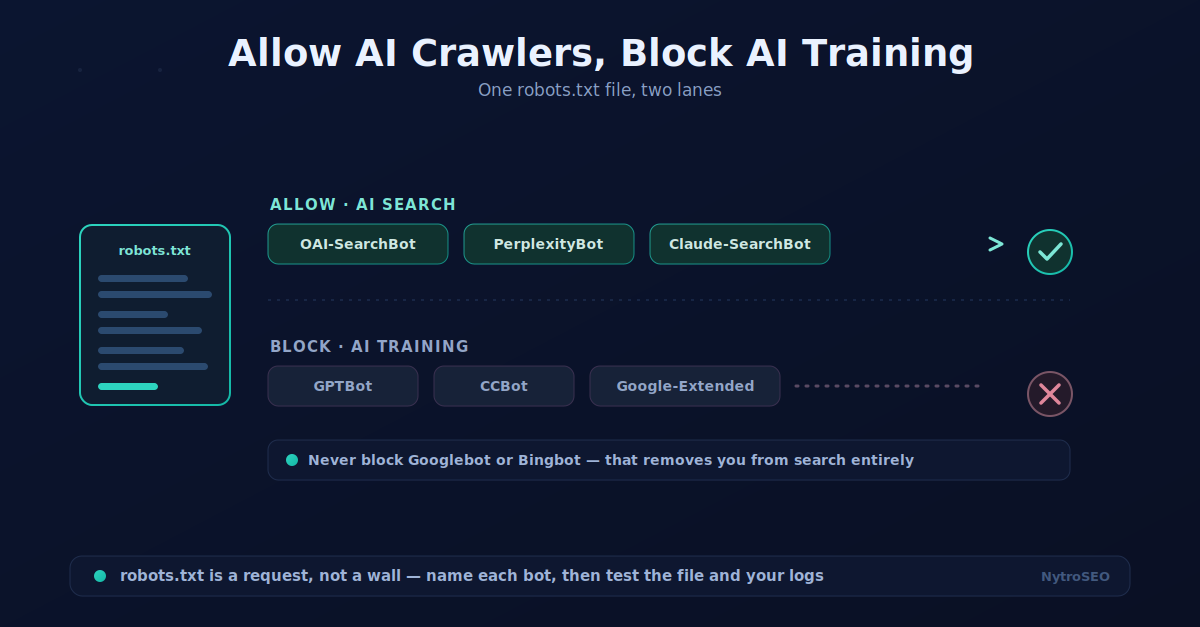
There is a choice most site owners do not realize they can make: you can let AI engines read your site so they cite you in their answers, while opting out of having your content used to train their models. Those are two different activities, handled by two different sets of crawlers, and your robots.txt file is where you draw the line. Learning to allow AI crawlers but block AI training lets you stay visible in AI search without feeding the training corpus, if that is the balance you want.
This guide is practical and current. It covers which bots belong to which family, the trade-off you are actually making, a copy-ready configuration, the one mistake that quietly erases your AI visibility, and how to test that your file does what you intended. Bot names change a few times a year, so treat the tokens here as current-as-of-writing and confirm them against each provider’s documentation before you deploy.
The AI Bots and Who Owns Them
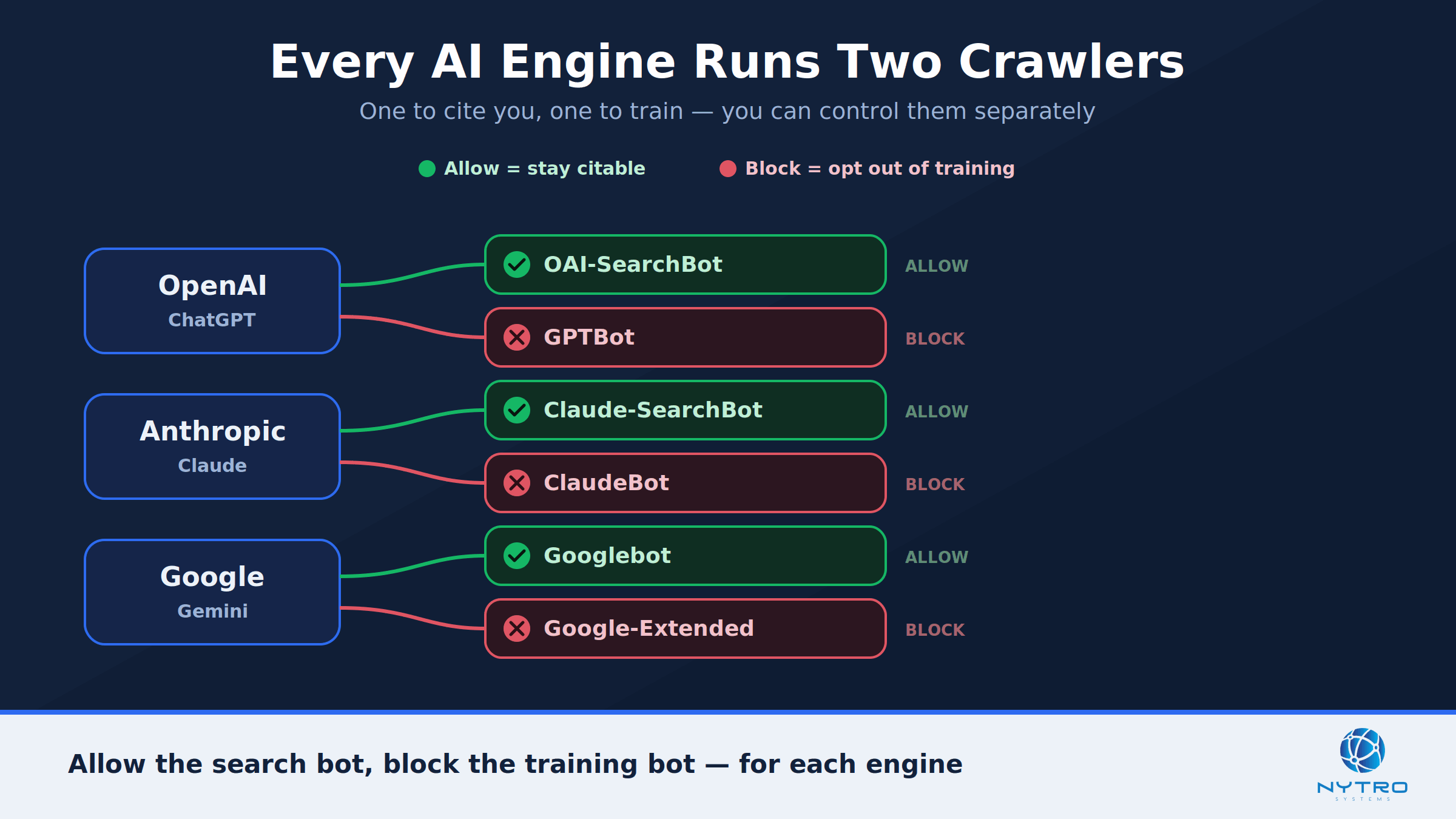
The single most important idea is that most AI providers run two separate crawlers: a training crawler that collects data to build their models, and a search or retrieval crawler that fetches pages so the engine can cite them in live answers. They use different user-agent names, so you can treat them differently.
On the training side, the common crawlers are GPTBot (OpenAI), ClaudeBot (Anthropic), Google-Extended (Google’s Gemini and Vertex AI training), CCBot (Common Crawl, whose dataset feeds many models), and Bytespider (ByteDance). On the search-and-citation side are OAI-SearchBot and ChatGPT-User (OpenAI’s ChatGPT search and live fetches), PerplexityBot and Perplexity-User (Perplexity), and Claude-SearchBot and Claude-User (Anthropic’s search and user-directed fetches). Standing apart from both are your traditional search crawlers, Googlebot and Bingbot, which you must never block — doing so removes you from Google and Bing entirely.
| Family | Example bots | What blocking them does |
|---|---|---|
| Training crawlers | GPTBot, ClaudeBot, Google-Extended, CCBot, Bytespider | Opts your content out of model training |
| AI search / citation | OAI-SearchBot, PerplexityBot, Claude-SearchBot, ChatGPT-User | Removes you from that engine’s cited answers |
| Traditional search | Googlebot, Bingbot | Removes you from Google or Bing — never do this |
One clean detail worth knowing: Google-Extended controls only whether your content trains Gemini. Blocking it does not affect Googlebot, your Google Search ranking, or your eligibility for AI Overviews, which run on the main Google index. That makes it the one training opt-out with no search cost.
“The mistake I see most is treating every AI bot as one thing and blocking them all. Separate the crawlers that cite you in AI answers from the ones that only train models, allow the first, block the second. Blanket-blocking to protect your content quietly removes you from the fastest-growing discovery channel there is.” — Lee Agam, founder and CEO of NytroSEO.
Why Allow AI Crawlers but Block AI Training?
The reason to allow AI crawlers but block AI training is that the two activities have very different value to you. Being crawled by a search-and-citation bot means you can appear as a cited source when someone asks ChatGPT, Perplexity, or Claude about your topic — direct visibility and referral traffic. Being crawled by a training bot means your content may be absorbed into a model’s weights, with no citation, no link, and no direct return.
For many brands, the first is clearly worth it and the second is optional. So the question how to block AI training but allow AI search? has a real answer: allow the retrieval bots, disallow the training bots. That said, this is a genuine trade-off, not a free win, and honest guidance should say so. Allowing training crawlers can build long-term familiarity with your brand inside the models themselves, which some businesses value highly. Blocking them forgoes that. There is no universally correct choice — it depends on whether you would rather protect your content from training or maximize every avenue of model familiarity. This guide shows you how to execute the “block training, keep search” configuration; whether it is right for you is a strategic decision. Our guide to allowing AI crawlers while blocking training bots at the Cloudflare level covers the same choice from the CDN side.
A simple way to decide is to ask what your content is for. If your site is a marketing and education asset whose whole purpose is to be found and referenced, being included in training may actually help long-term brand familiarity, and blocking it buys you little. If your content is proprietary — original research, a paid knowledge base, or anything you would not want reproduced from a model’s memory without attribution — then opting out of training while staying citable is the sensible default. Many organizations split the difference by policy rather than absolutes, and the next section shows how.
How to Allow AI Crawlers but Block AI Training in robots.txt
The mechanics are straightforward. In your robots.txt file, you add a group for each bot with either Allow or Disallow. To allow AI crawlers but block AI training, you allow the retrieval bots and disallow the training bots. Here is a copy-ready starting point — the core of any GPTBot robots.txt configuration and its retrieval-bot counterparts.
# Allow AI search and citation crawlers
User-agent: OAI-SearchBot
Allow: /

User-agent: ChatGPT-User
Allow: /

User-agent: PerplexityBot
Allow: /

User-agent: Perplexity-User
Allow: /

User-agent: Claude-SearchBot
Allow: /

User-agent: Claude-User
Allow: /

# Block AI training crawlers
User-agent: GPTBot
Disallow: /

User-agent: ClaudeBot
Disallow: /

User-agent: Google-Extended
Disallow: /

User-agent: CCBot
Disallow: /

User-agent: Bytespider
Disallow: /

# Never block traditional search
User-agent: Googlebot
Allow: /

User-agent: Bingbot
Allow: /
That is the essence of AI crawler blocking robots.txt done selectively rather than with a blunt allow-all or block-all. Place the file at the root of your domain, at yourdomain.com/robots.txt, and remember that each directive is a separate group. The answer to how to allow AI bots in robots.txt? is simply to name each retrieval bot and give it Allow, which is exactly what the block above does.
The Recommended Config to Allow AI Crawlers but Block AI Training
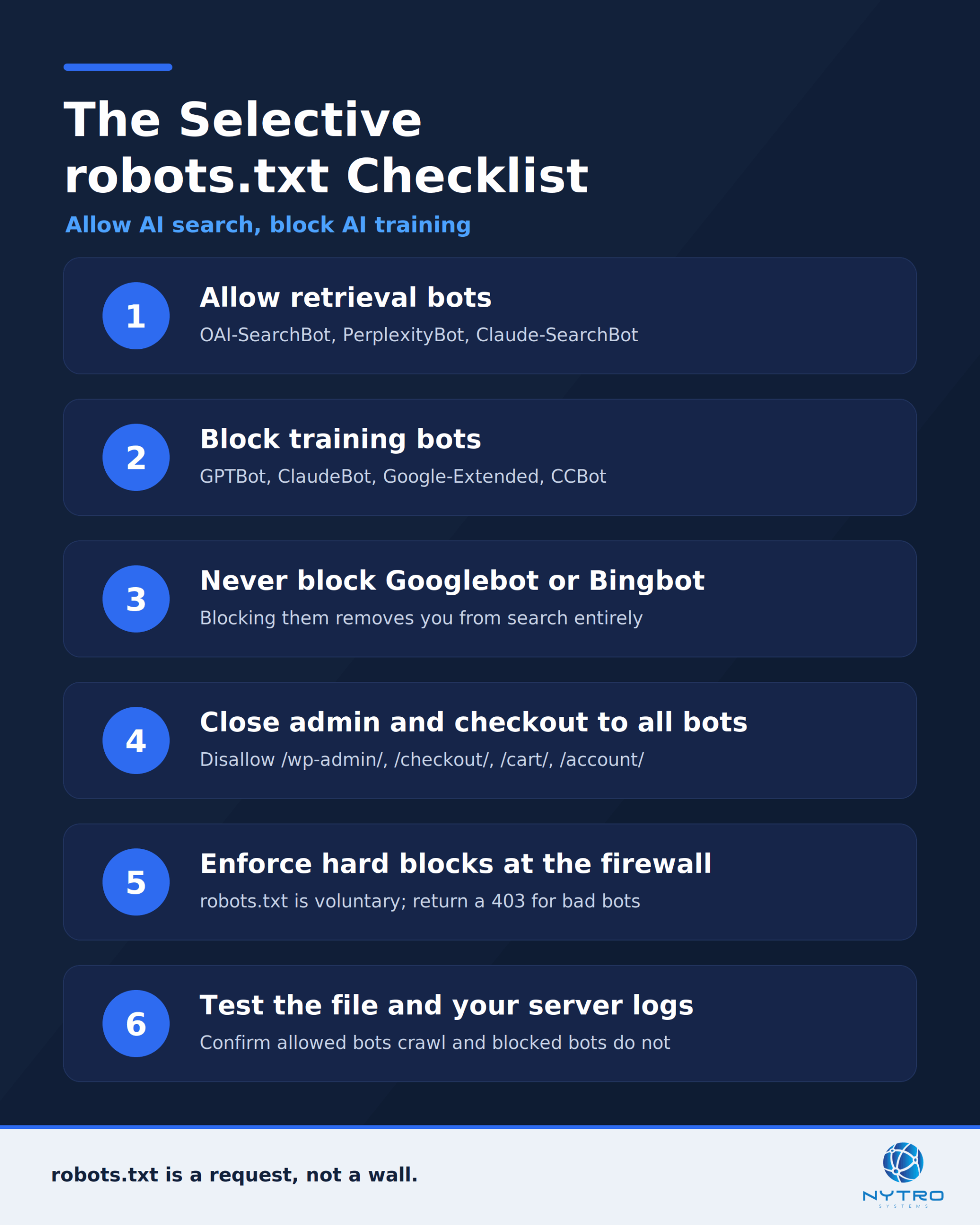
A production robots.txt should do more than the core allow-and-block. Two additions make the recommended configuration to allow AI crawlers but block AI training safer and more complete.
First, keep sensitive paths closed to everyone. Regardless of which AI bots you permit, no crawler should reach your admin, login, checkout, cart, or account pages. Add a universal group for that.
User-agent: *
Disallow: /wp-admin/
Disallow: /checkout/
Disallow: /cart/
Disallow: /account/
Second, be honest about enforcement. Robots.txt is a polite request, not a lock. Reputable providers — OpenAI, Anthropic, Google, and Perplexity — publish their bots and honor the file, but some crawlers have historically ignored it, and a user-agent string can be spoofed. For any bot you truly must stop, back the robots.txt rule with server-level or firewall blocking that returns a 403, and confirm a bot’s identity with a reverse DNS lookup or the provider’s published IP ranges rather than trusting the header. There is also a gray area worth flagging: when a person asks an assistant to summarize a specific URL, the tool often fetches that page on the user’s behalf, and providers may treat that user-directed fetch differently from routine crawling, so your rules may not apply the way you expect.
You can also apply different policies to different parts of your site rather than treating it as one decision. A common pattern is to allow training crawlers on your public marketing and blog content, where model familiarity helps, while disallowing them on a gated app, documentation portal, or paid knowledge base you would rather keep out of training. Because robots.txt rules are path-based, you can scope a Disallow to a directory — for example, disallowing a training bot only under /app/ or /docs/ — instead of blocking it site-wide. That lets you keep the marketing benefit of training exposure while protecting the content that actually matters to you.
The One Mistake That Undoes Allow AI Crawlers but Block AI Training
Here is the error we see most often, and it silently erases AI visibility: a broad, copy-pasted block that catches the wrong bots. Many robots.txt files written before 2023 — or generated by a security plugin, CDN, or Cloudflare rule — quietly disallow the very retrieval crawlers you now want. A single stray rule that blocks OAI-SearchBot or, worse, Googlebot can remove you from AI answers and traditional search at once, undoing every effort to allow AI crawlers but block AI training.
The failure is asymmetric, which is what makes it dangerous. Block a training bot you meant to allow and you lose a little model familiarity. Block a retrieval bot or Googlebot by accident and your brand disappears from the answers and results where buyers are looking. Because many hosting platforms and CDNs block AI crawlers by default, the problem is often invisible until you check. This is the same class of issue we describe in our post on how one robots.txt mistake can block your indexed pages and kill search visibility, and it is a frequent cause of the symptoms in our guide to why your website isn’t showing in search or AI results.
How to Test That You Allow AI Crawlers but Block AI Training
Never deploy a robots.txt change blind. After editing, confirm it behaves as intended in three ways.
First, fetch the file directly at yourdomain.com/robots.txt and read it to be sure the groups are correct and nothing contradicts them. Second, use a robots.txt tester — Google Search Console includes one for Googlebot — to check that your important pages are crawlable by the bots you want and blocked for the ones you do not. Third, watch your server logs over the following days for the user-agent strings you care about: seeing OAI-SearchBot and PerplexityBot fetch pages confirms your allow rules work, while continued hits from a bot you disallowed tell you it is ignoring the file and needs firewall-level blocking. This is how a correct allow AI crawlers robots.txt setup is verified rather than assumed. Google’s own documentation on robots.txt explains the syntax and testing, OpenAI documents its crawlers and how to control them, and Perplexity publishes its crawler details so you can confirm the current tokens.
A Quick Worked Example
Consider a B2B software company that noticed it was never cited in ChatGPT or Perplexity answers about its category, while competitors were. An audit found the cause immediately: a Cloudflare managed rule was blocking OAI-SearchBot and PerplexityBot as if they were scrapers, and an old robots.txt line disallowed anything matching “bot.”
The fix was precise. They removed the blanket block, added explicit Allow groups for OAI-SearchBot, ChatGPT-User, PerplexityBot, and the Claude retrieval agents, and added Disallow groups for GPTBot, ClaudeBot, Google-Extended, and CCBot to opt out of training. They kept Googlebot and Bingbot fully allowed and closed admin and checkout paths to everyone. Within a couple of weeks, server logs showed the retrieval bots crawling normally, and the brand began appearing as a cited source again. Nothing exotic happened — they simply stopped accidentally blocking the crawlers that create AI visibility.
Common Mistakes to Avoid
A handful of errors recur.
Blocking with a broad pattern. A rule aimed at “bots” can catch retrieval crawlers and Googlebot. Name bots explicitly instead.
Forgetting the CDN or plugin. Your robots.txt can be perfect while a Cloudflare or security-plugin rule blocks AI crawlers upstream. Check both layers.
Trusting robots.txt as enforcement. Compliance is voluntary. Use firewall-level blocking for bots that ignore the file.
Blocking Google-Extended by mistaking it for Googlebot. They are different. Blocking Google-Extended only opts you out of Gemini training; blocking Googlebot removes you from Search.
Never testing. Deploying without checking the file and your logs is how silent visibility losses happen. Always verify.
The Bottom Line on How to Allow AI Crawlers but Block AI Training
You do not have to choose between total exposure and total lockout. By naming the retrieval crawlers and allowing them, naming the training crawlers and disallowing them, protecting sensitive paths, and never touching Googlebot, you can allow AI crawlers but block AI training with precision — staying citable in AI search while opting out of model training. Just remember that robots.txt is a request, not a wall, and that the real risk is not the training bot you meant to block but the retrieval bot you blocked by accident. Audit your file whenever you change hosts, add a CDN, or install a security plugin, because those are the moments a well-tuned configuration quietly gets overwritten.
Getting crawler access right is only half the job. Once AI engines can reach your pages, those pages still have to be clear, well-structured, and optimized to be understood and cited — which is exactly what our Automatic SEO software handles across your whole site. Not sure whether your site is quietly blocking the crawlers that matter, or whether your pages are ready to be cited once they are let in? Run a free visibility check and we will flag crawler-access problems and the on-page gaps standing between you and AI search visibility.