Last updated: October 6, 2026
Shopify seo is a short list of platform behaviours to understand, a slightly longer list of settings to fix, and one structural gap to close. The platform handles more of the technical foundation than most store owners realise: it generates the XML sitemap, sets canonical tags, serves every store over HTTPS, hosts fast, and lets you edit robots.txt. What it does not do is give you a way to set titles and descriptions by pattern across thousands of products, which is why most stores either leave the defaults or pay someone to edit products one at a time. This guide explains what Shopify handles and what it leaves to you, the settings to fix first, how to add FAQ schema without breaking the theme, the three routes to bulk metadata, and a ten-point checklist for owners running a store with no developer.
Shopify’s own documentation is the reference for the built-in behaviour. Its SEO help pages describe the automatic sitemap, the per-item “Edit website SEO” fields for title and description, and the ability to edit robots.txt through a robots.txt.liquid template, whose default already disallows the tag-filtered collection URLs that join filters with a plus sign. The duplicate-URL behaviour that every Shopify SEO guide mentions is real and partly self-correcting: as Search Engine Land’s technical Shopify guide explains, themes build collection-contextual product links with the Liquid within filter, producing /collections/name/products/handle alongside /products/handle, and Shopify points the canonical of the collection version at the product page.
If you want the gap closed, titles, descriptions, alt text and schema applied to every product by rule without editing the theme, sign up for free and NytroSEO will inventory the store from its sitemap and preview the rules it would apply.
This page replaces an earlier post on this site that reproduced a general article about Shopify SEO tools and listed apps as they stood in 2022. Several of those apps have changed, merged or gone; more importantly, a list of tools is the wrong shape for the question store owners actually have, which is what the platform already does for them and what they still have to do themselves.
Lee Agam, founder and CEO of NytroSEO, sees Shopify stores arrive with the same three problems in roughly the same order. The collection pages are thin, a title and a product grid, so the pages that should rank for category terms have nothing to rank with. The product metadata is the platform default, product name plus store name, on every product, because Shopify offers no template and nobody edited two thousand products by hand. And the structured data is whatever the theme shipped, often a Product block with no identifiers, sometimes duplicated by an app. His view is that none of these is a Shopify flaw; they are what any no-code platform leaves to the owner, and the owner’s job is to recognise which ones a setting fixes, which ones need words written, and which ones need a rule applied across the catalogue.
Is Shopify good for seo? What the platform handles and what it does not
Is Shopify good for seo? Yes, for the foundation, with four limits that decide where your effort goes.
What Shopify handles. An XML sitemap at /sitemap.xml, generated automatically and split into products, collections, pages and blogs, listing canonical URLs only. Canonical tags on every page, including the collection-contextual product URLs, pointing at /products/handle. HTTPS on every store. Fast, managed hosting and a CDN. A default robots.txt that blocks tag-filtered collection URLs and known duplicate paths, editable through robots.txt.liquid if you need more. Per-item title and description fields under “Edit website SEO” on every product, collection, page and post. Mobile-responsive themes. Structured data for products in most current themes.
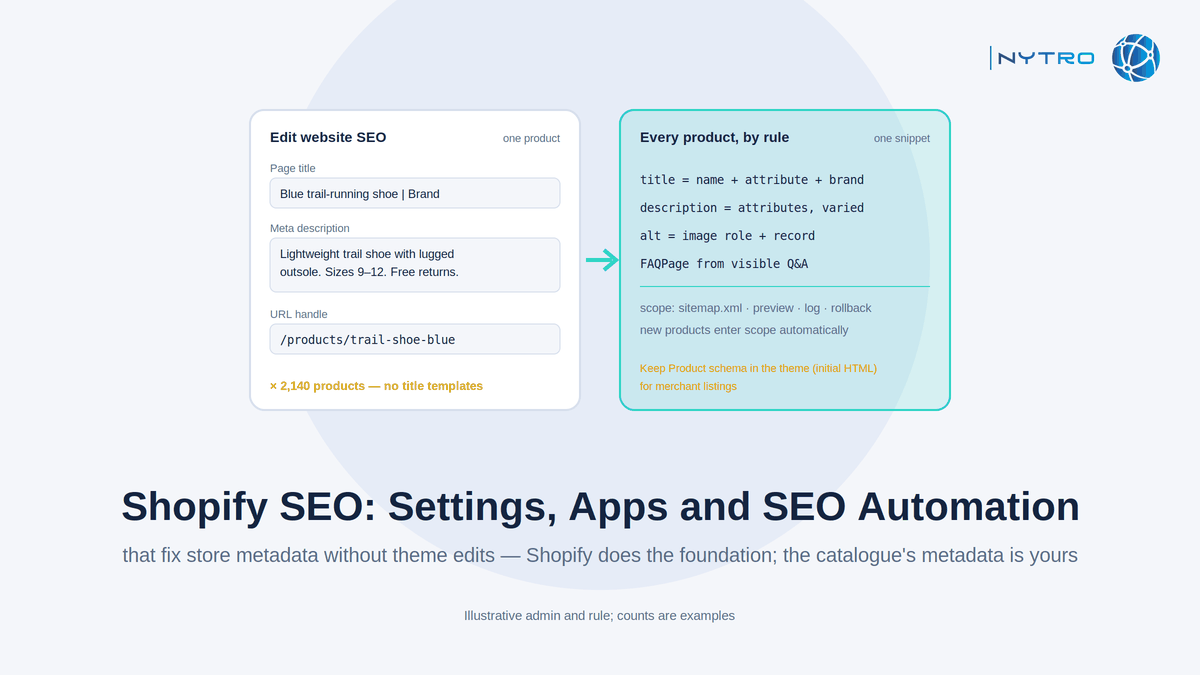
What it does not handle. The URL structure is fixed: /products/, /collections/, /pages/ and /blogs/ cannot be removed from paths. Two URLs exist for every product in a collection, and although the canonical resolves them, internal links from collection grids point at the duplicate unless the theme is edited. There are no title or description templates: every product, collection and page carries either the default or a hand-typed value, and there is no native way to apply a pattern across the catalogue. Collection pages are thin by default. Theme-dependent metadata and schema vary by theme and can be overwritten by an update or an app.
The honest summary: Shopify is a good platform for ecommerce seo as long as you treat its defaults as a starting point rather than a finished state, and as long as you have a plan for the one thing it will never do, which is write and maintain metadata across the catalogue for you.
Shopify seo settings to fix first
Six settings account for most of the difference between a default store and an optimised one, and all six are available without a developer.
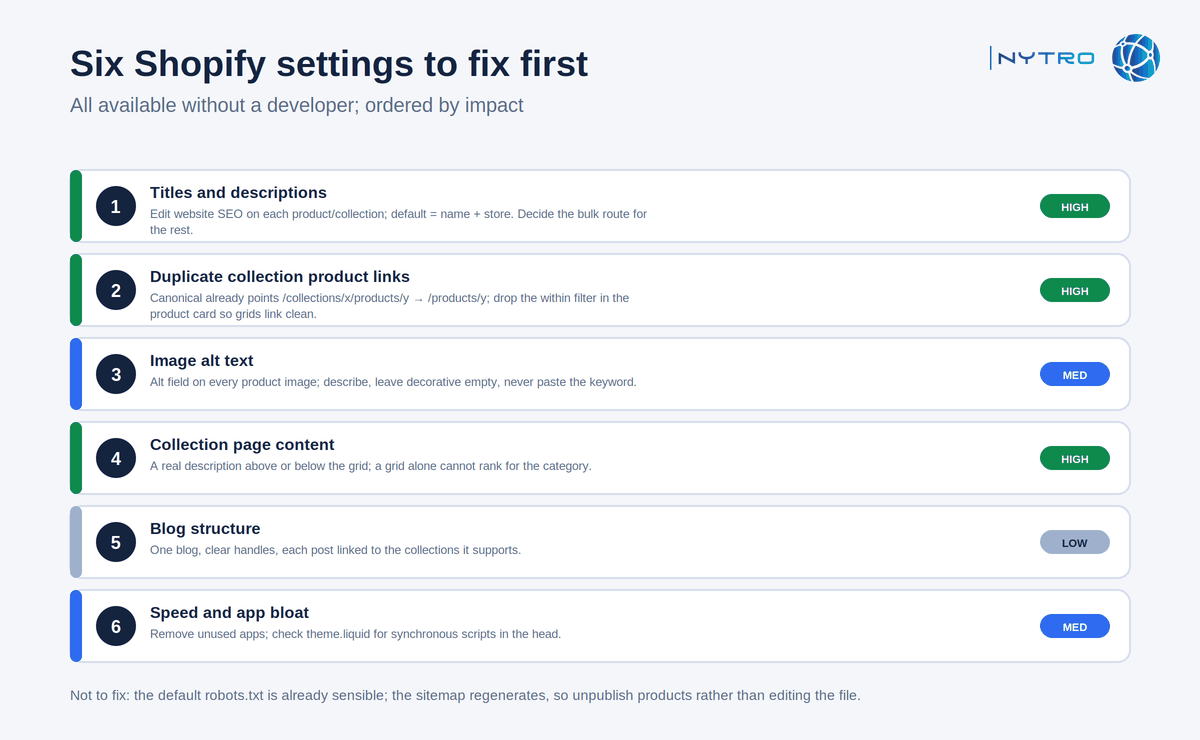
The six settings above are ordered by impact; the first two are where most stores lose the most.
- Titles and descriptions. Open each product and collection, scroll to “Edit website SEO”, and replace the default with a title that leads with what the item is and the attribute buyers search for, within the length Google displays, and a description that says why this one. On a store with more than a few hundred items this is the task that does not get done by hand, which is the subject of the bulk section below.
- Duplicate collection product links. Confirm the canonical on a collection-contextual product URL points at /products/handle; it should by default. Then, if you want internal links to carry weight to one URL, have the theme’s product-card snippet drop the within filter so grids link to the clean URL. If you cannot edit the theme, the canonical alone keeps you safe; the fix is an improvement, not a rescue.
- Image alt text. Shopify exposes an alt field on every product image. Describe what the image shows; leave decorative images empty; never paste the product keyword into every image. Our guide to image alt text covers the rules and the automation.
- Collection page content. Add a description that says what the collection is for and who it serves, above or below the grid depending on the theme. A collection with real text can rank for the category term; a grid cannot.
- Blog structure. Shopify’s blog is adequate for the guides and comparisons that earn citations; keep one blog, use clear handles, and link each post to the collections it supports.
- Speed and app bloat. Review installed apps; each adds scripts. Remove the ones you do not use, and check theme.liquid for scripts loading synchronously in the head.
Two things not to fix: Shopify’s default robots.txt is already sensible, so edit robots.txt.liquid only for a specific reason, and do not try to “clean” the sitemap by hand, because it regenerates; delete or unpublish the products you do not want listed instead.
Faq schema shopify: adding it to shopify seo without breaking the theme
Faq schema shopify questions usually arrive with the wrong expectation, so the expectation comes first: Google retired the FAQ rich result for all sites in May 2026, so adding FAQPage markup to a Shopify page will not produce a dropdown in Google. What the markup still does is give every system a clean map of visible questions and answers, and the visible questions themselves are what earn citations in AI answers. Our guide to FAQ schema best practices covers the position in detail.
With that settled, three routes add it on Shopify.
A theme section. Many current themes include a collapsible-content or FAQ section; some emit FAQPage JSON-LD from it automatically. Check the rendered page source for a script of type application/ld+json containing FAQPage before adding anything else, so you do not end up with two blocks.
An app. Several SEO apps write FAQPage and Product markup to the page. Verify what the app emits, confirm the theme is not already emitting the same type, and prefer an app that generates markup from the visible section rather than from a separate form, so the two cannot drift apart.
A header snippet. A JavaScript snippet installed once in theme.liquid or through a tag manager can generate FAQPage markup from visible question headings on any page, including pages where the theme has no FAQ section. The same snippet applies the metadata rules below; the next section covers the install.
Whichever route, the rules are the same: visible questions and answers in the page, 40 to 60-word answers, one FAQPage per page, no promotional questions, validated with the Schema Markup Validator.
Bulk metadata for shopify seo: apps, CSV and a header snippet
The structural gap, no title or description templates, has three remedies, and they differ in what they can change and who maintains them.
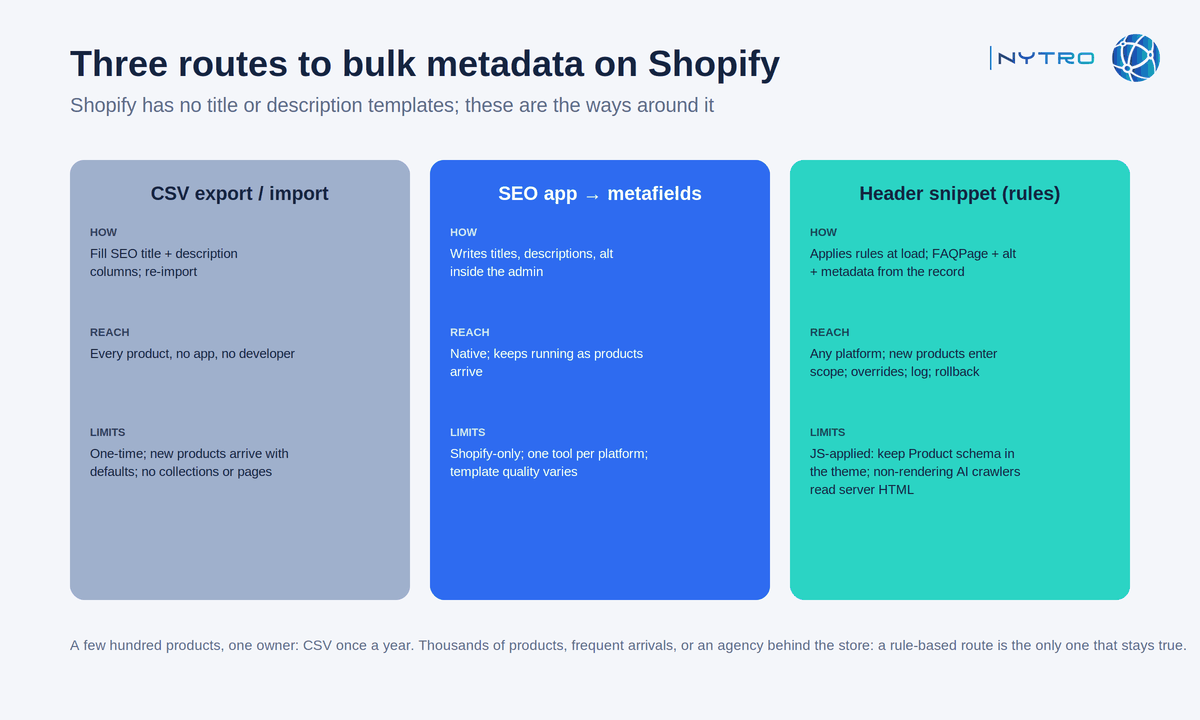
The three routes above trade off reach against maintenance; the snippet route is the only one that does not require re-running when products change.
CSV export and import. Export products, fill the SEO title and SEO description columns in a spreadsheet, re-import. It reaches every product, needs no app and no developer, and it is a one-time act: new products arrive with defaults, and the next change means another export. It cannot touch collections or pages, which have no CSV.
An SEO app writing to metafields. Apps that run inside the Shopify admin can write titles, descriptions and alt text across products, sometimes from templates, and can keep doing so as products are added. They are native and convenient; they are also Shopify-only, so an agency running stores on several platforms maintains a separate tool per platform, and their templates vary in how much they understand about what the product is.
A header snippet. One tag in theme.liquid’s head, or in a tag manager, applies rules at page load: titles and descriptions generated from the product’s name, attributes and the queries the page earns; alt text from image context; Product, ProductGroup and FAQPage markup from visible fields. New products enter scope as they appear in the sitemap; overrides persist for hero products; every change is logged and reversible; and the same tag works on every platform an agency runs. This is how NytroSEO delivers on Shopify. Two limits are stated plainly: Google reads JavaScript-applied head elements once the page renders, but recommends Product structured data in the initial HTML for shopping surfaces, so stores that depend on merchant listings should keep Product markup in the theme and use the snippet for the rest; and AI crawlers that do not execute scripts read only the server’s HTML. Our explainer on what an SEO automation snippet is covers both, and our guide to SEO automation for ecommerce catalogs covers the rules themselves, which are the same on Shopify as on any platform.
For a store with a few hundred products and one owner, the CSV route is enough once a year. For a store with thousands of products, frequent new arrivals or an agency behind it, a rule-based route is the only one that stays true. Our note on using a no-code ecommerce website builder when the site is not indexed covers the indexing side of the same problem, and our general e-commerce seo guide covers the parts that are not Shopify-specific. Book a strategy meeting with the NytroSEO team if you run a large Shopify store or an agency portfolio of them and want the rules and the delivery route set up as one project.
Shopify as a no code ecommerce website builder: the ecommerce seo checklist
Shopify is a no code ecommerce website builder in the full sense: a merchant can launch and run an ecommerce website without coding, and most do. The trade-off is less control over URL structure and metadata than a custom build, which is why the checklist below exists. Ten items, in order, for an owner without a developer.
- Confirm the sitemap is submitted in Search Console and Bing Webmaster Tools, and that it lists only the products you want indexed.
- Check a collection-contextual product URL’s canonical points at /products/handle.
- Rewrite titles and descriptions on your twenty best-selling products and all collections by hand; decide how the rest will be done.
- Add real descriptions to every collection page.
- Fill alt text on product images; leave decorative images empty.
- Check the rendered source of a product page for Product JSON-LD with offers, price and availability; if the theme does not emit it, add it through an app or the theme, in the initial HTML.
- Add visible FAQ sections to the pages where buyers ask questions; mark them up once, from the visible text.
- Remove unused apps; check for scripts loading synchronously in the head.
- Decide the bulk route for the rest of the catalogue: CSV once a year, an app, or a rule-based snippet, and apply it.
- Baseline Search Console’s Generative AI report and Bing’s AI Performance report, then review monthly.
The list is short because Shopify has already done the long part. What remains is words on collection pages, which only you can write, and metadata across the catalogue, which a rule can keep true.