Last updated: August 27, 2026
Here is a trap that catches modern sites: your page ranks fine in Google, so you assume every crawler can read it. Then you notice you are never cited in ChatGPT, Perplexity, or Claude answers about your own category. The reason is almost always the same. Google renders JavaScript; most AI crawlers do not. If your content is built in the browser after the page loads, Google may still see it, but the AI engines reading raw HTML see an empty shell. JavaScript SEO is the discipline of closing that gap so both search and AI agents can actually read your site.
We build Automatic SEO tools and work with developer teams on exactly this problem, so this guide is practical: how rendering really works, why client-side pages go invisible to AI, a concrete checklist to fix it, and how to repair your metadata layer without a full rebuild.
Why JavaScript SEO Matters More in the AI Era
For years, JavaScript SEO was a Google problem: make sure Googlebot can render your single-page app. Google solved most of that on its side by rendering pages with a headless, evergreen Chromium engine, so a well-built JavaScript site can rank. That success bred a dangerous assumption — that if Google can see your JavaScript site, everything can.
The rise of AI search broke that assumption. The crawlers behind the major answer engines behave nothing like Googlebot. A widely cited 2024 server-log analysis by Vercel and MERJ, based on hundreds of millions of real crawler requests, found that none of the major AI crawlers render JavaScript — including OpenAI’s GPTBot and OAI-SearchBot, Anthropic’s ClaudeBot, and PerplexityBot. They fetch the HTML your server returns and read only what is already in it. That is why JavaScript SEO now matters more than it did in the Google-only era: the fastest-growing discovery channel cannot run your code. If you want the background on why crawlability is the precondition for everything else, our piece on how your best pages cannot rank if Google never indexes and sees them sets the foundation.
“Teams assume that because Google can render their JavaScript, everyone can. AI crawlers can’t, they read the HTML your server returns and nothing else. If your content only appears after JavaScript runs, it’s invisible to the answer engines. Get it into the initial HTML first; everything else in SEO depends on that one fact.” — Lee Agam, founder and CEO of NytroSEO.
How JavaScript SEO Works: Rendering, the DOM, and the Accessibility Tree
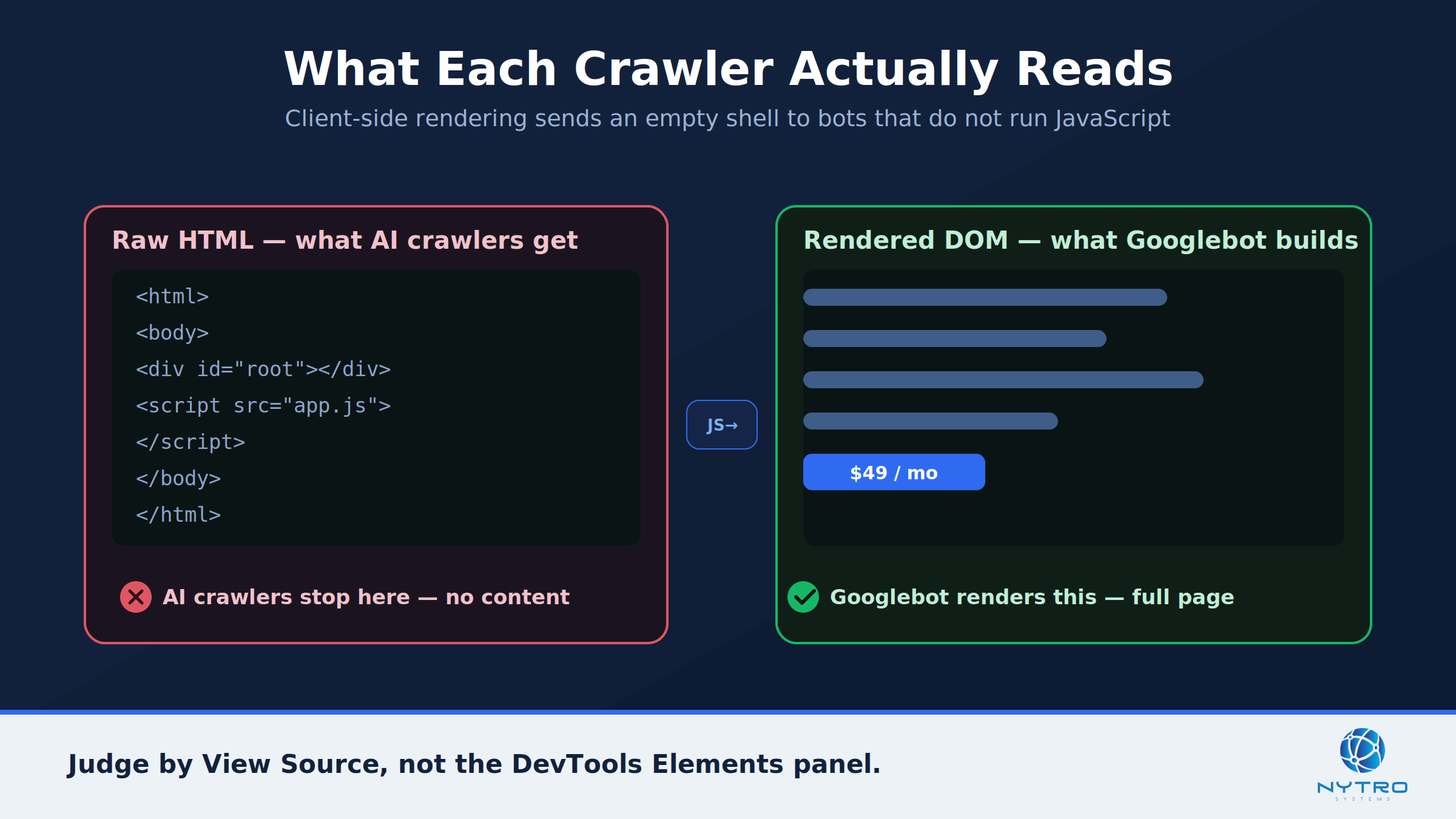
An AI crawler reads the raw HTML on the left; the browser and Googlebot build the full page on the right.
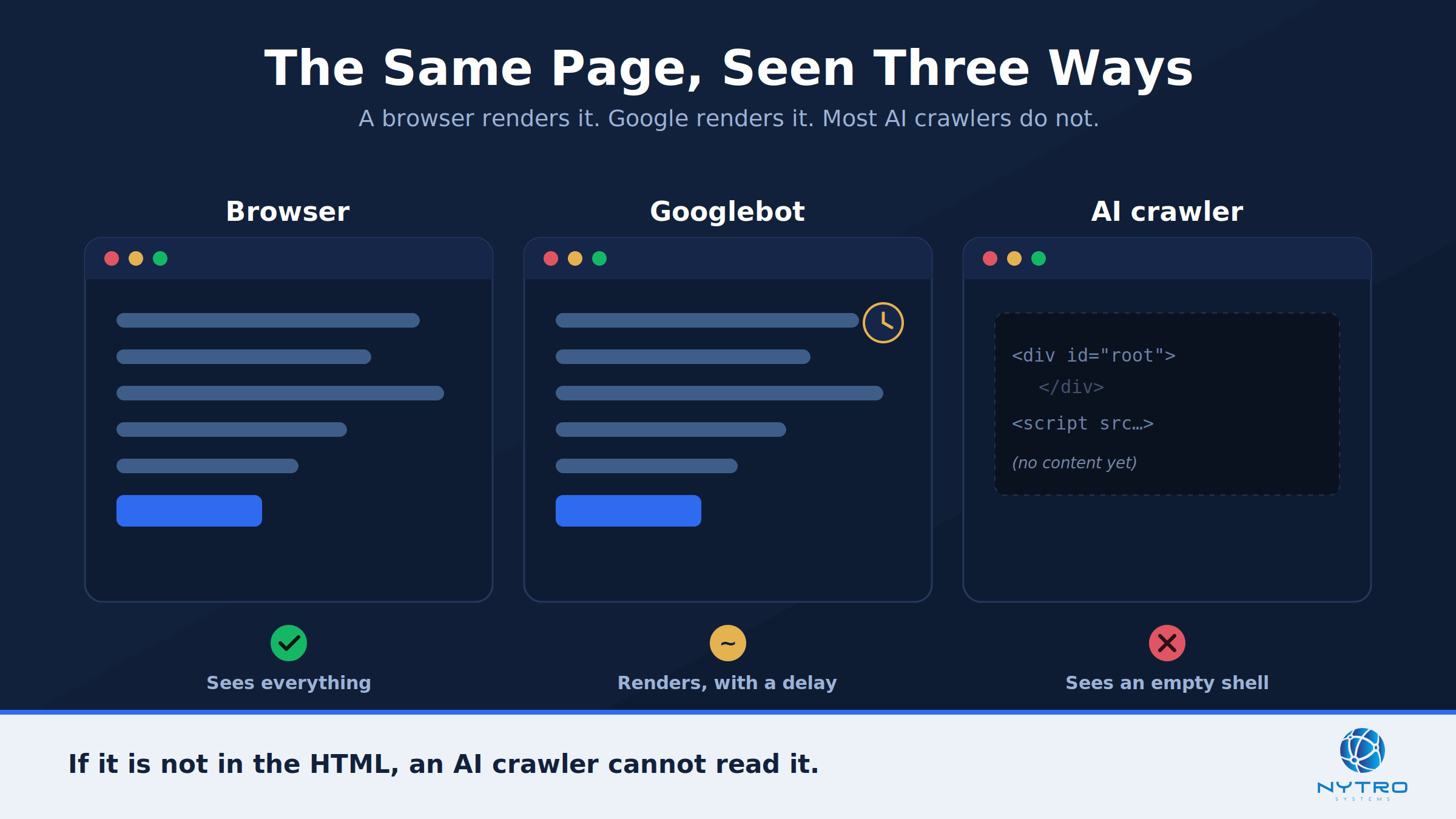
To fix the problem you need to picture what a crawler actually receives. When any bot requests your page, your server returns an initial HTML response. For a server-rendered site, that response already contains your content. For a client-side-rendered app, it is a near-empty shell: some navigation, a root div, and script tags that will build the page later in a browser.
From there, the paths diverge. Googlebot passes that shell to its Web Rendering Service, executes the JavaScript, builds the full Document Object Model, and indexes the rendered result — though this rendering is deferred and subject to timing and resource limits, which is documented in Google’s JavaScript SEO basics. Non-rendering AI crawlers skip all of that; they parse the raw HTML and stop. Agents that do interact with pages often rely on the semantic structure and the accessibility tree — the same structured representation assistive technology uses, defined by MDN — which only exists meaningfully when your HTML is semantic. Understanding this split between the raw response, the rendered DOM, and the accessibility tree is the core of good JavaScript SEO, and it is why the concept of JS rendering sits at the center of this topic. For a deeper look at rendering strategies, web.dev’s guide to rendering on the web is the canonical reference.
The comparison below shows the split in concrete terms — the raw HTML a non-rendering AI crawler reads on the left, and the fully rendered DOM a browser and Googlebot build on the right.
Why JS-Only Pages Fail Without JavaScript SEO
A purely client-side-rendered page sends the same minimal shell to everyone. Your browser runs the scripts and shows a rich page; a non-rendering crawler receives the shell and sees almost nothing. There is no partial credit here — the content is either in the initial HTML or it is invisible to that crawler.
This is the failure mode behind most “why am I not cited in AI search” questions. The site owner sees a full page in their browser and assumes the crawler does too, but the crawler got the empty shell. The same issue explains a lot of the symptoms we cover in why your AI-friendly page isn’t showing up in AI search. The fix for seo for javascript sites starts with getting your real content into that first HTML response, not building it on the client afterward. Anything essential — product descriptions, pricing, specifications, FAQ answers, comparison tables — has to be in the raw HTML, or the engines reading raw HTML will never see it.
The reason so many teams miss this is that the tools they check with lie to them. The DevTools Elements panel shows the rendered DOM — the page after JavaScript has run — which always looks complete. What a non-rendering crawler receives is the view-source HTML, the untouched server response. Those two can be wildly different: a page that looks full in Elements can be nearly empty in view source. Because a large share of the modern web is built with client-side frameworks, this gap is not an edge case; it is the default state of a great many React, Vue, and Angular sites until someone deliberately fixes it. The practical takeaway is simple but easy to forget: judge your JavaScript SEO by what is in view source, because that is exactly what the AI crawlers judge you by.
A JavaScript SEO Checklist: Semantic HTML and Stable Selectors
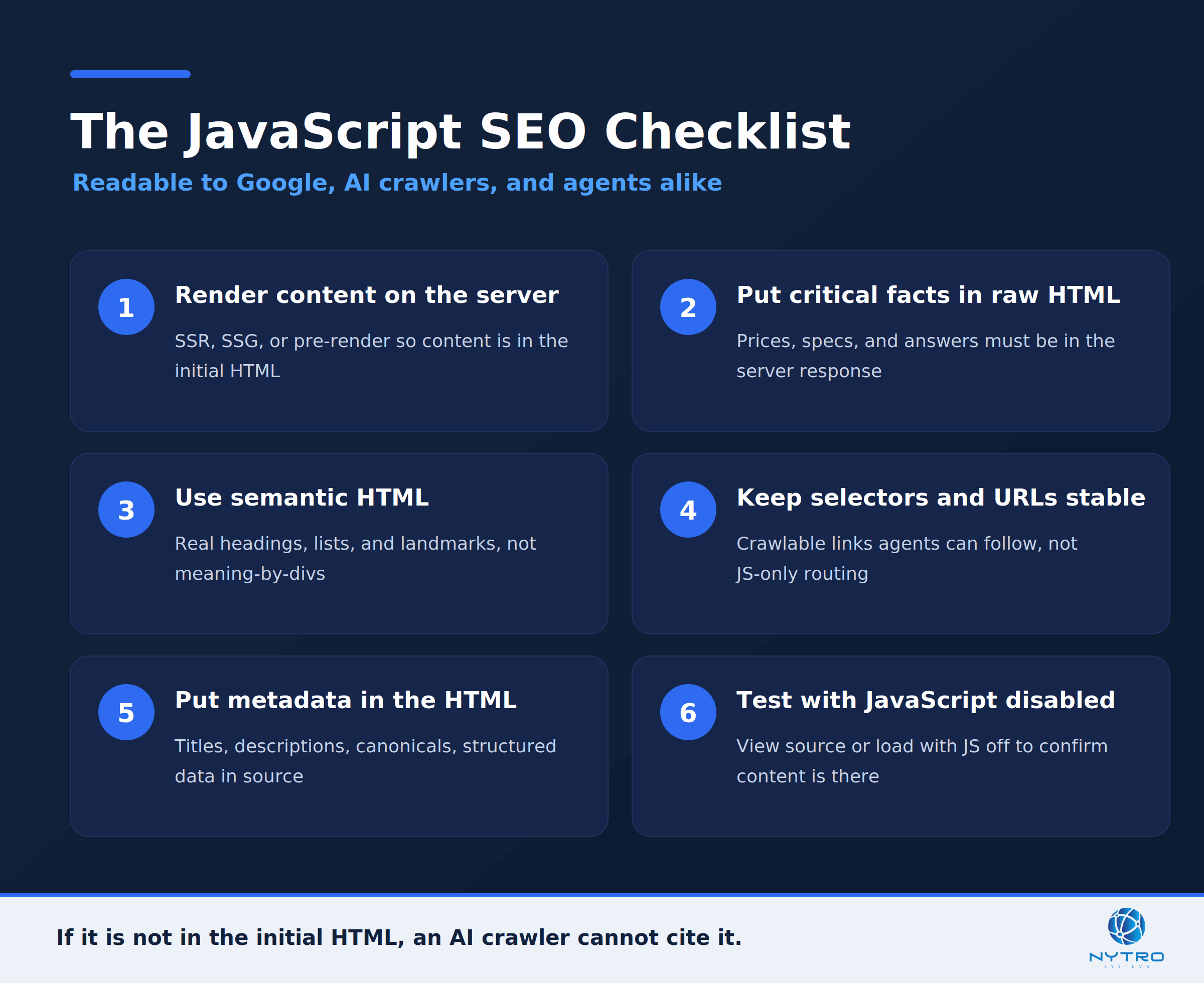
The JavaScript SEO checklist for AI agents and search, in six steps.
Here is the practical checklist. Work through it and your pages become readable to Google, AI crawlers, and agents alike. This is the heart of javascript seo optimization.
- Render content on the server. Use server-side rendering, static generation, or pre-rendering so your real content is present in the initial HTML response, not assembled in the browser.
- Put critical facts in the raw HTML. Product names, prices, specs, and answers must be in the server response. Inline JSON, structured-data markup, and server-rendered payloads count too — what fails is content the browser builds after load.
- Use semantic HTML. Real headings, lists, tables, and landmarks give crawlers and the accessibility tree a structure to read. A page built from generic divs is far harder to parse.
- Keep selectors and URLs stable. Stable, crawlable links and predictable structure let agents navigate; client-side-only routing that generates links in JavaScript can hide your internal links from non-rendering crawlers.
- Put metadata in the HTML. Titles, meta descriptions, canonical tags, and structured data should be present in the raw source, not injected later by client-side script for engines that never run it.
- Test with JavaScript disabled. Load your key pages with JS off, or view the raw source, and confirm the important content is still there.
Here is the same checklist as a single reference you can share with your team.
For teams building on modern frameworks, our solutions for website developers go deeper on implementing this without slowing delivery.
The good news is that most modern frameworks make server rendering a configuration choice rather than a rewrite. Next.js, Nuxt, SvelteKit, and Astro all support server-side rendering or static generation out of the box, and framework-level pre-rendering can turn a client-only build into one that ships real content in the initial HTML. If a full migration is not feasible immediately, pre-rendering your highest-value pages — pricing, key product and category pages, and cornerstone content — captures most of the benefit for the least effort, because those are the pages most likely to be cited and compared. The goal is not to abandon JavaScript; it is to make sure the browser is enhancing content that already exists in the HTML rather than being the only thing that creates it.
JavaScript SEO Without a Rebuild: Fixing Metadata via a Snippet
Rebuilding a site for server-side rendering is the right long-term fix, but it is a project. The metadata layer, at least, can be fixed much faster. Our Automatic SEO software optimizes titles, meta descriptions, alt text, and structured signals across an entire site through a JavaScript header snippet, without editing your CMS or codebase. You install it once — as shown in our snippet installation guide — and it keeps your tags optimized sitewide.
Be precise about scope, because honesty matters here. This kind of seo optimization via javascript is read by search engines that render JavaScript, chiefly Google, which sees the optimized tags after rendering. For crawlers that do not render, the durable answer for your body content remains server-side rendering, so the content itself sits in the raw HTML. In other words, use a snippet to fix and maintain the metadata layer quickly and without a rebuild, and use server rendering so your core content reaches every crawler. The two are complementary: metadata optimization and content delivery solve different halves of the same problem. This distinction is also the crux of google javascript SEO — Google will render and reward good metadata, but you should not assume non-rendering engines will.
A Quick Worked Example
Consider a SaaS company on a React single-page app. Its pricing and feature pages rank respectably in Google, but the brand is never mentioned when buyers ask AI engines to compare tools in its space. An audit explains why: viewing the raw HTML shows an almost empty shell — the pricing, features, and copy are all built client-side.
The team makes two moves. First, they enable server-side rendering for the marketing and pricing pages so the real content ships in the initial HTML. Second, they install a snippet to optimize titles and descriptions sitewide without waiting on a broader rebuild. Within weeks, the raw HTML of the key pages contains the pricing and feature content, AI crawlers begin fetching real text instead of a shell, and the brand starts appearing in AI comparisons. Nothing here was exotic — they simply stopped hiding their most important content behind client-side rendering.
They also made the result measurable. Before the change, viewing source on a pricing page showed no prices; after it, the prices were in the HTML, which they confirmed in seconds. They watched server logs for OAI-SearchBot and PerplexityBot and saw those crawlers now receiving content-rich responses. And they kept a short list of buyer questions and checked monthly whether the brand appeared in AI answers, watching the citation rate climb as more pages moved to server rendering. That simple before-and-after — empty source to full source, absent to cited — is the clearest proof that the rendering fix, not luck, drove the change.
Common JavaScript SEO Mistakes
A few errors account for most invisibility.
Assuming Google visibility equals AI visibility. Google renders JavaScript; most AI crawlers do not. Ranking in Google is not proof an AI engine can read you.
Checking the rendered DOM instead of the source. The DevTools Elements panel shows the page after JavaScript runs. View source shows what a non-rendering crawler actually gets. Always check the source.
Building internal links in JavaScript. Links generated client-side can be invisible to non-rendering crawlers, cutting off discovery of your deeper pages.
Injecting metadata client-side for every engine. Tags added by script are seen only by engines that render. Put critical metadata in the HTML.
Treating llms.txt as a substitute. A summary file does not fix content hidden behind JavaScript. The underlying content still has to be in your HTML.
How to Test Your JavaScript SEO
Testing is quick and decisive. Open a key page and view its raw source, then search for a sentence of your main content; if it is missing from the source but present in the DevTools Elements panel, it is client-rendered and invisible to non-rendering crawlers. Reload with JavaScript disabled and confirm your content, links, and metadata survive. Use Google’s URL Inspection tool in Search Console to see how Googlebot renders the page. Finally, watch your server logs for AI crawler user-agents and confirm they receive content-rich HTML with a 200 status rather than an empty shell. Run these checks on your highest-value pages first, since those are the ones you most need cited.
The Bottom Line on JavaScript SEO
The rendering gap is the quiet reason many strong sites are invisible in AI search. Google renders your JavaScript; the AI crawlers driving the fastest-growing discovery channel do not. Get your real content into the initial HTML with server-side rendering, use semantic markup and stable links, keep critical metadata in the source, and fix the tag layer quickly with a snippet where a rebuild would be too slow. Do that and your pages become readable everywhere that matters.
Want to know what crawlers actually see when they hit your site? Run a free visibility check and we will show you whether your content and metadata are in the raw HTML — and the fastest fixes to make your site readable to search and AI alike.