Last updated: August 30, 2026
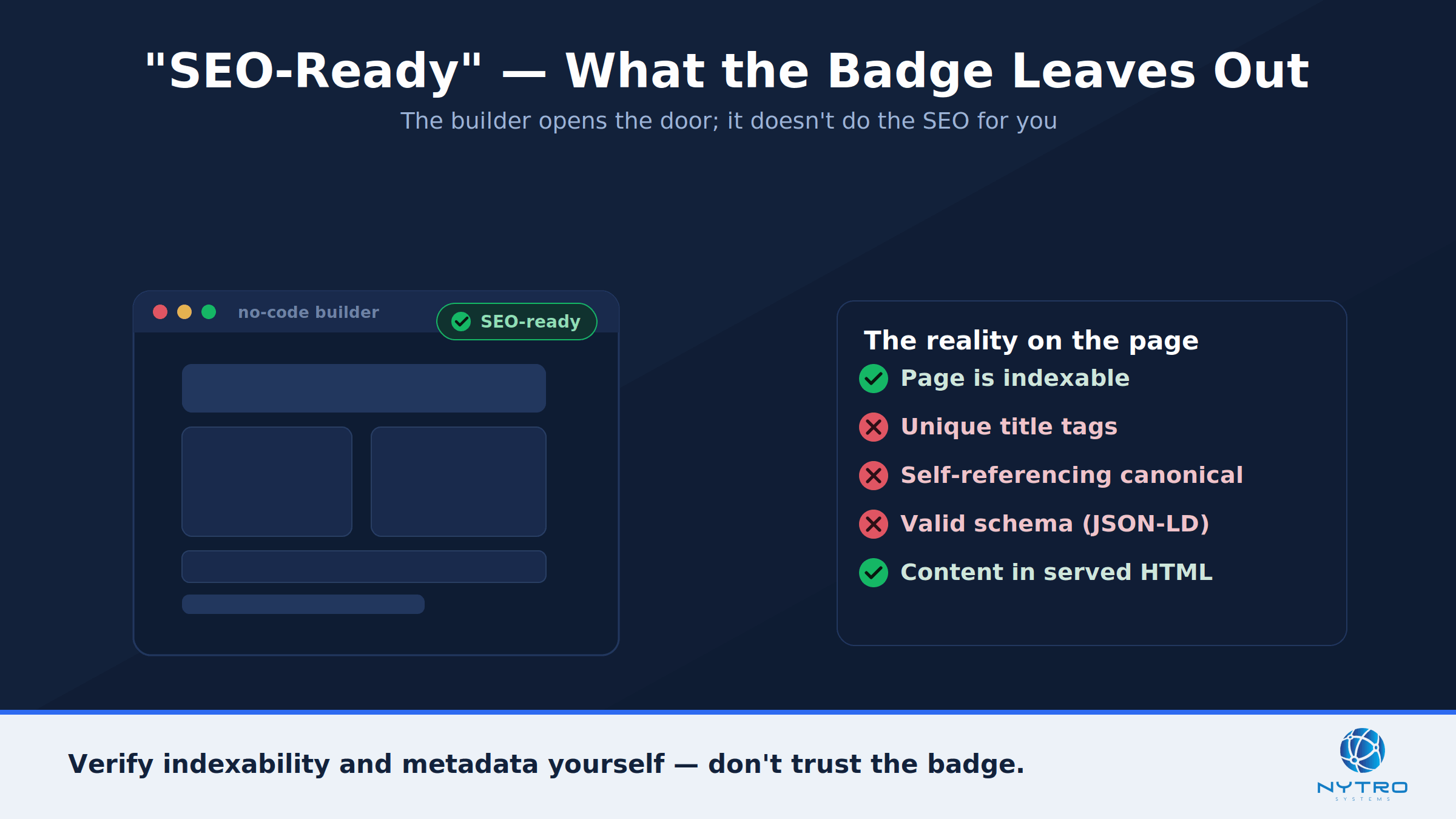
No code builders promise you an “SEO-ready” site out of the box. In practice, that badge means the platform will not stop you from doing SEO — not that it has done SEO for you. The platform sets a ceiling on what is possible; your setup and content decide how close you get to it. And several builders quietly break the fundamentals along the way, shipping pages that are noindexed by default, overwriting your title tags, or hiding the settings you need. This checklist walks through what to verify, in order, so a site you did not hand-code can still rank in search and get cited in AI answers.
It is a common and frustrating gap: the builder says you are ready, and Google disagrees. We covered that exact disconnect in why the best free no code website builder often fails at search visibility. Here is how to close it.
The checklist below groups the work into four areas to verify, in order from indexability to AI readiness.
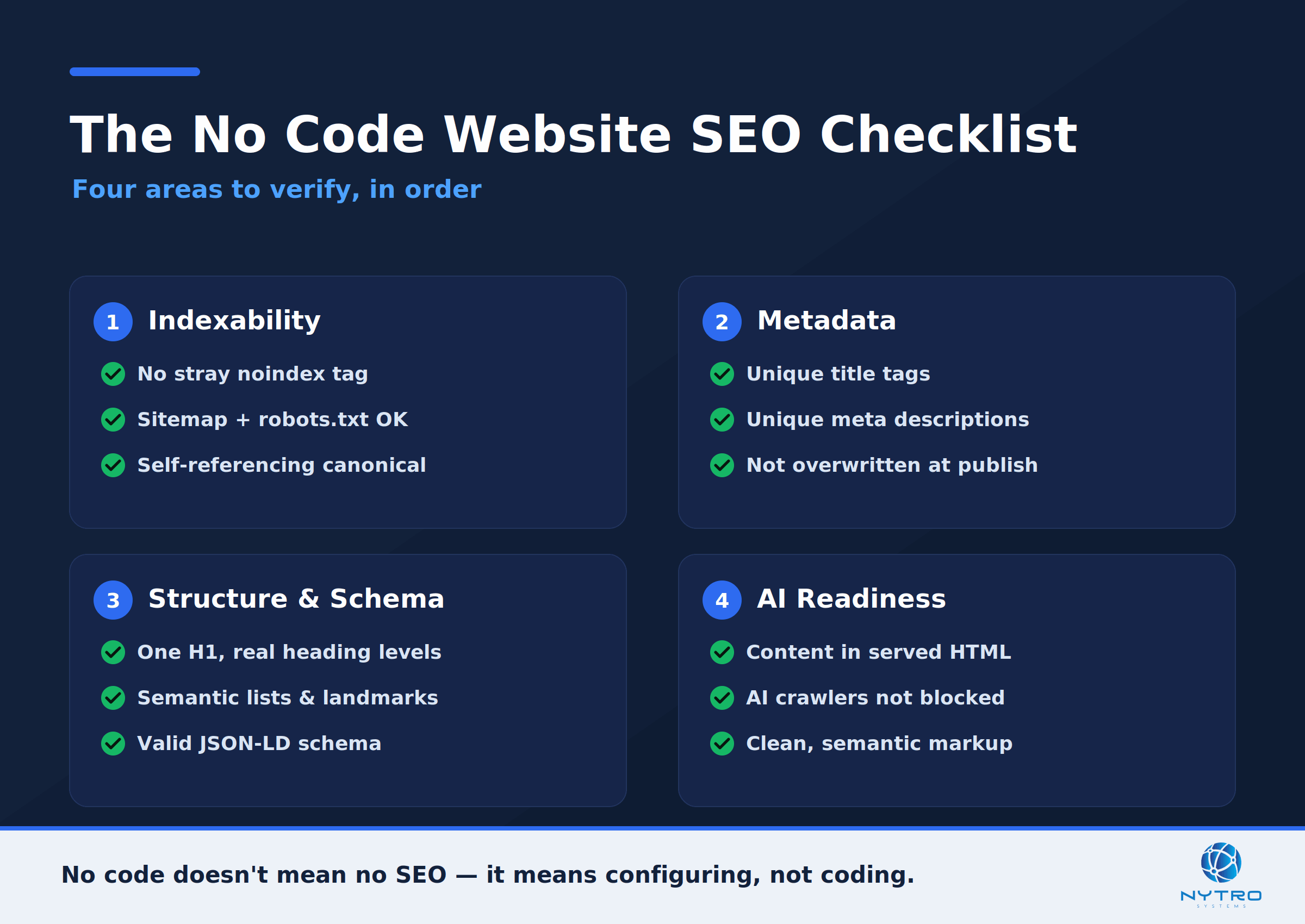
The no code website SEO checklist: four areas to verify, in order from indexability to AI readiness.
Start With Indexability: The Foundation of No Code Website SEO
Nothing else in no code website seo matters if Google cannot crawl and index the page. This is the first and most common failure point on builder sites, so check it first.
Confirm pages are indexable. Some builders ship staging or new pages with a noindex tag, or leave a site-wide “discourage search engines” switch enabled after launch. Open a few key pages, view source, and make sure there is no stray noindex. Then check the Page indexing report in Google Search Console for pages excluded by noindex or sitting crawled but not indexed.
Verify the crawl basics. Make sure your builder is generating an XML sitemap and that robots.txt is not blocking sections you want crawled. Confirm each important page has a single, self-referencing canonical, because duplicate or conflicting canonicals are a frequent builder default that quietly removes pages from search. Google’s Search Essentials is the baseline every builder site should meet. If your builder site is not appearing at all, our guide to using a no code ecommerce builder but your website is not indexed walks through the usual culprits.
A fast way to check indexability on any builder is the site search operator. Type site:yourdomain.com into Google and compare the number of results to the number of pages you expect. A large gap is a signal that pages are being excluded, whether by a noindex tag, a robots block, or a quality decision. Then use the URL Inspection tool on a few specific pages to see exactly how Google treats each one — indexed, excluded, or crawled but not indexed. Do this before you touch content or design, because a beautifully optimized page that Google cannot index earns nothing, and no amount of metadata work will fix a page that is blocked at the door.
“With no-code builders, the problem is almost never that you can’t do SEO, it’s the defaults. A stray noindex, a conflicting canonical, a missing sitemap, and beautiful pages simply never reach search. Check indexability before you touch design. A page Google can’t index earns nothing, no matter how good it looks.” — Lee Agam, founder and CEO of NytroSEO.
Metadata Reality: Where No Code Website SEO Silently Breaks
Once pages are indexable, metadata is the next place no code website seo tends to fall apart. Builders differ enormously in how much control they give you, and some actively work against you.
The problems cluster into a few patterns. Some builders auto-generate title tags from the page name and offer no way to override them, so every page competes with a near-identical title. Others let you set a title in the editor but then overwrite or truncate it at publish. Many apply one site-wide meta description to every page, or leave descriptions blank so Google writes its own. And a surprising number make per-page control a paid or hidden feature. The result is duplicated, missing, or mismatched tags — the invisible tax that undermines otherwise good no code website search optimization. If your pages recently vanished from Google after a template or platform change, this is the first thing to check, as we describe in why metadata generation broke your no-code SEO and your page disappeared.
The checklist here is simple: every important page needs a unique, intent-matched title tag within display limits, a unique meta description, and a clean canonical — and you need a reliable way to set all three that the builder will not overwrite.
Structure and Schema for No Code Website SEO
Search engines and AI systems both read structure, so the next layer of no code website seo is semantic markup and schema. Two things matter.
Use real semantic HTML. Headings should form a logical hierarchy — one H1, then H2s and H3s that actually describe sections — rather than large styled text that only looks like a heading. Lists, tables, and landmark elements give machines a clean structure to parse, and they build a sound accessibility tree, which Mozilla documents in its reference on the accessibility tree. Many no code builders let you set heading levels in the editor; use them deliberately instead of styling by eye.
Add structured data where you can. Article, Product, FAQ, and Organization schema help search and AI systems understand what a page is. The catch on no code platforms is delivery: some builders offer a native schema field or a custom-code embed, while others give you no way to inject JSON-LD at all. Where your builder allows a custom-code block, add valid JSON-LD following the vocabulary at schema.org; where it does not, you will need a snippet-based approach, covered below. Whatever you do, keep the markup valid, because invalid schema sends confusing signals that can hurt more than help.
Which No Code Website Builder Is Best for SEO?
There is no single best no code website builder for every goal, but they do differ meaningfully on SEO control. The honest summary from testing across the market in 2026 is that the platform sets your ceiling, and some ceilings are much higher than others.
For maximum SEO control, a builder that outputs clean HTML and gives per-page control over titles, descriptions, headings, URLs, and page speed sits at the top — Webflow is the common pick here, and it doubles as a low code website seo option because it lets you inject custom code. For speed and ease of launch, Wix and Squarespace are the friendliest, though Wix has historically lagged on page performance and both give you less low-level control. For design-led landing pages, Framer is popular and its SEO is decent. Single-page and budget tools like Carrd and Dorik are fine for simple sites but limited for content-heavy SEO. The practical takeaway: pick the builder whose SEO ceiling matches your ambition, because moving later is painful — and whatever you choose, the platform only sets the ceiling. Your content, structure, and metadata discipline determine how close you get to it.
No Code vs Low Code: What Changes for Your SEO
It is worth being clear about a distinction that affects your options. No code means everything is visual and you never write code; low code means mostly visual, but you can drop in custom HTML, CSS, or JavaScript when you need to. Several popular builders sit on the low code side of the line — Webflow, for instance, is technically low code because it lets you inject custom code — which quietly gives you more SEO headroom.
That headroom matters, because the exact things builders tend to lock down on the no code side — injecting JSON-LD, adding a canonical, overriding a stubborn title — are usually the things a custom-code block unlocks. If you are on a strict no code builder with no custom-code option, you are not stuck; a header snippet, covered below, restores that control. But if you are choosing a platform and SEO matters, a low code website seo setup that permits custom code gives you a higher ceiling and fewer walls to work around later.
AI Readiness: No Code Website SEO for AI Search
Ranking in Google is no longer the whole job. The same content now has to be readable by the crawlers behind ChatGPT, Perplexity, and Claude, which makes no code website ai search optimization part of the checklist. The good news for builder sites is that most no code platforms server-render their pages, so your body content is present in the raw HTML that non-rendering AI crawlers read — the failure mode that hits custom client-side apps is less common here.
That leaves three things to verify for AI readiness. First, confirm your important content — including prices and specifications — is actually in the served HTML and not loaded only by a client-side widget. Second, make sure your robots rules do not accidentally block the AI search crawlers you want to reach you, a frequent side effect of security plugins and CDN defaults. Third, keep your structure semantic and your metadata clean, because the same clarity that helps Google helps an answer engine decide what to cite. Indexing remains the gate for both surfaces: a page Google never indexes cannot be cited by the AI features built on that index either.
The Fix When the Builder Fights Your No Code Website SEO
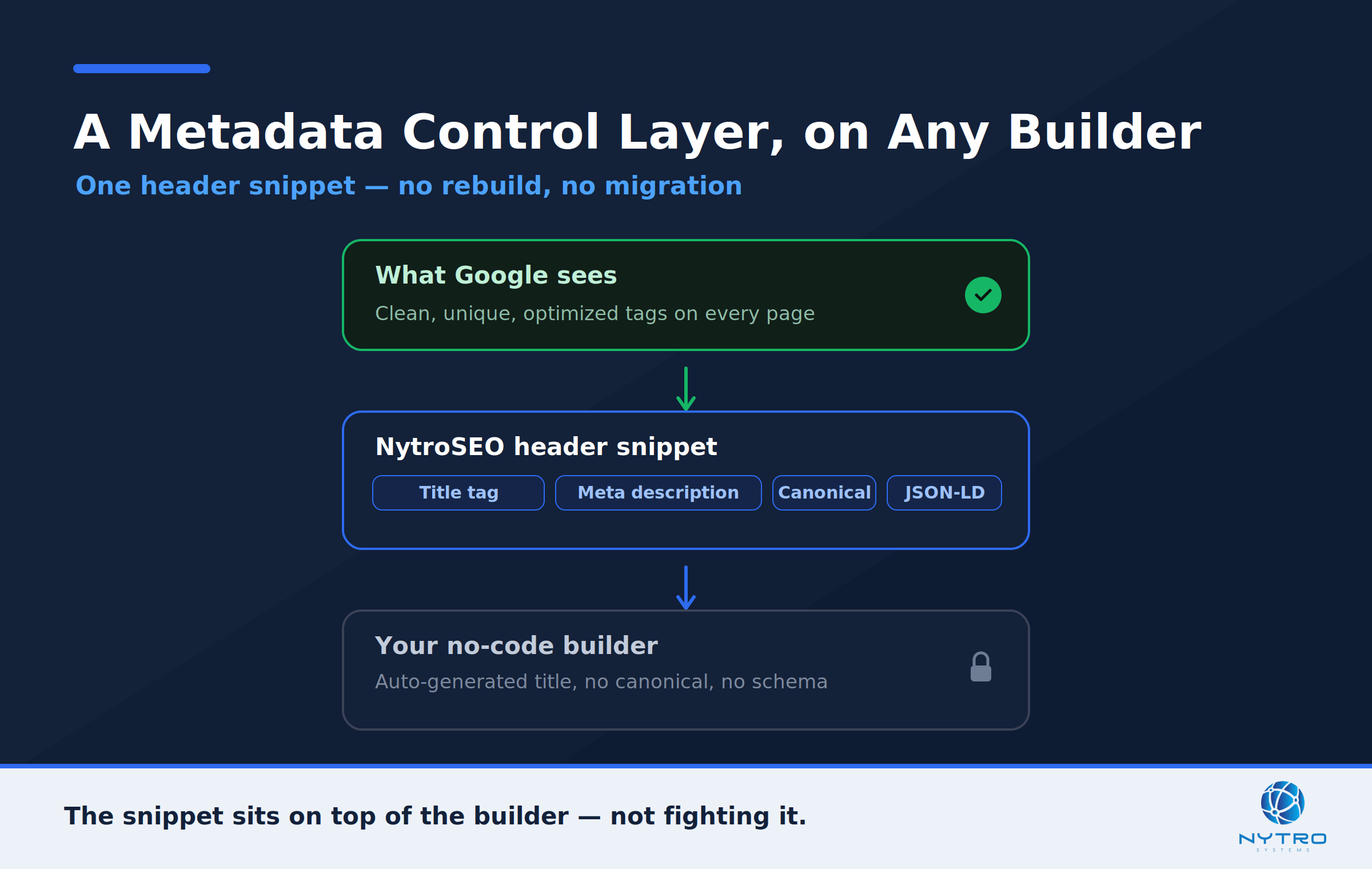
A header snippet adds a metadata control layer on top of any builder, without a rebuild.
Sometimes you do everything right and the builder still will not let you set a clean title, add a canonical, or inject schema. This is the exact gap NytroSEO was built to close. By adding one JavaScript snippet to your site header — no CMS migration, no rebuild — you get programmatic control over titles, meta descriptions, canonical tags, and structured data across every page, on whatever platform you are using. It is metadata control that sits on top of the builder rather than fighting it, which is why the same approach works for a strict no code builder or a low code website seo setup like Webflow with custom code.
An honest note on how this works: the snippet manages your metadata and structured-data layer, and because it runs in the page, it is processed by engines that render pages — chiefly Google. Since most no code builders already server-render your body content, that content is visible to non-rendering AI crawlers on its own, and the snippet handles the metadata layer the builder locked down. You can see how it is added in our guide to the NytroSEO snippet installation, and how the wider automation works on our Automatic SEO software page.
Common No Code SEO Mistakes to Avoid
A few habits sink otherwise good builder sites.
Trusting the “SEO-ready” badge. It means the door is open, not that the work is done. Verify indexability and metadata yourself.
Leaving default titles and descriptions. Auto-generated, duplicated tags are the most common reason builder pages underperform. Make each one unique.
Ignoring the sitemap and canonicals. Builder defaults here quietly remove pages from search. Check them after every major change.
Styling headings instead of structuring them. Big text is not an H2. Use real heading levels so machines can parse your page.
Assuming AI search takes care of itself. Confirm content is in the served HTML and that AI crawlers are not blocked.
A Worked Example: A Builder Site That Wasn’t Ranking
Consider a small services business that launched on a popular drag-and-drop builder and, months later, had almost no organic traffic despite a polished design. Working the checklist in order surfaced the problem quickly. Indexability came first: a site: search returned a fraction of the pages, and URL Inspection showed several key pages carrying a leftover noindex from the staging phase. Removing it brought those pages back into eligibility.
Metadata was next. Every service page shared one auto-generated title built from the business name, and the builder applied a single site-wide meta description. The team wrote unique, intent-matched titles and descriptions for each page. Structure came third: headings had been styled by eye rather than set as real heading levels, so they rebuilt the hierarchy with proper H1 and H2 elements and added Organization and Service schema through the builder’s custom-code block. Finally, they confirmed the content was in the served HTML and that no plugin was blocking AI crawlers. None of this required new code or a migration — just working the same checklist, in order, and fixing what the builder had quietly gotten wrong.
No code does not mean no SEO — it means the SEO work moves from writing code to configuring a platform and controlling what it outputs. Work the checklist in order: make pages indexable, get metadata unique and correct, structure content semantically with valid schema, and confirm AI crawlers can read what matters. When the builder fights you on metadata, a header snippet gives you the control it withholds. Do that, and a site you never wrote a line of code for can compete in both search and AI answers. The builder gave you a fast start; the checklist is what turns that start into visibility.
Want to see exactly what search engines and AI agents can read on your no code site? Run a free visibility check, or talk to us about taking control of your metadata across every page.
Frequently Asked Questions
No. No code is not inherently bad for SEO; the platform simply sets a ceiling on what you can control. Builders that output clean HTML and allow per-page titles, descriptions, headings, and schema can rank as well as hand-coded sites. Problems arise when a builder hides those controls or overwrites your tags, which is where a snippet-based metadata layer helps.
There is no universal winner, but builders that give clean HTML and full per-page control over metadata, headings, URLs, and speed offer the highest SEO ceiling, with Webflow a common choice. Wix and Squarespace are easier to launch but give less low-level control. Match the builder’s ceiling to your ambition, since migrating later is difficult.
Common causes are a stray noindex tag left on after launch, a canonical pointing elsewhere, or a template or platform change that rewrote your metadata. Check the page’s source for noindex, confirm a self-referencing canonical, and review the Search Console Page indexing report. Restoring correct, unique tags usually brings the page back over time.
Sometimes directly, sometimes not. Some builders offer a native schema field or a custom-code block where you can paste valid JSON-LD; others give no way to inject it. Where the builder blocks custom code, a header snippet can add and manage structured data across your pages without a rebuild, keeping the markup valid and consistent.
First use the builder’s native SEO settings to set unique titles, descriptions, and canonicals per page. If the builder overwrites your tags, offers no per-page control, or hides it behind a paywall, add a JavaScript snippet to your header that sets metadata programmatically across every page. That gives you reliable control the platform withholds, without migrating off it.