Last updated: September 22, 2026
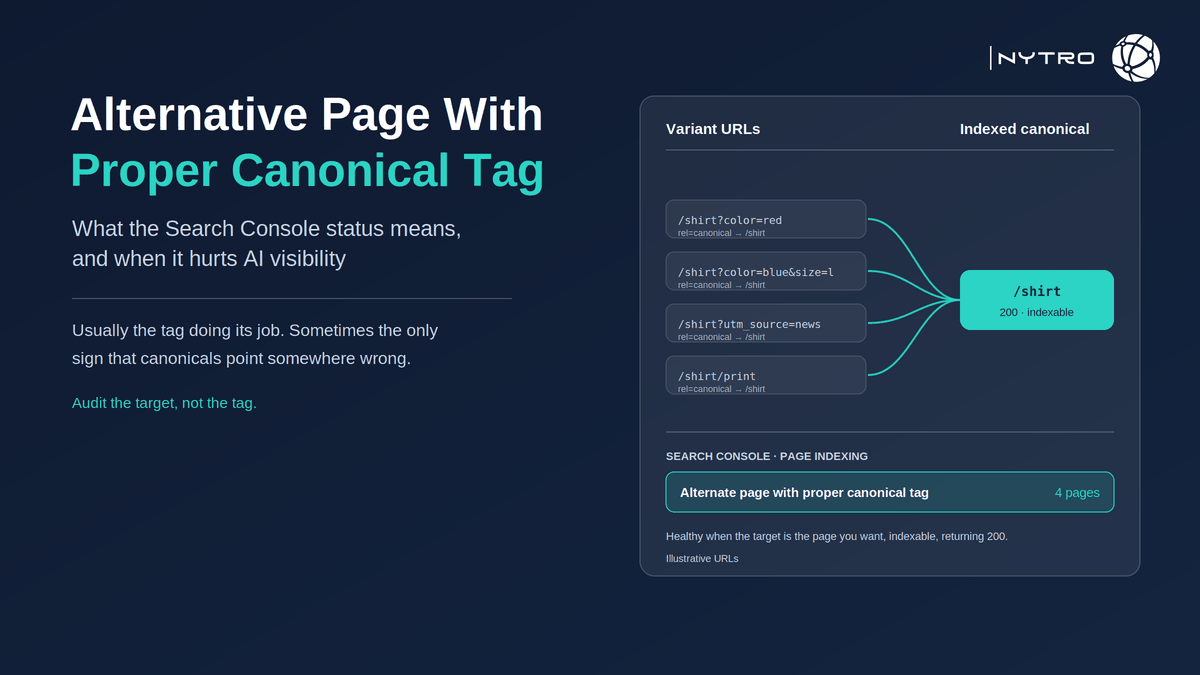
Alternative page with proper canonical tag, shown in Search Console as “Alternate page with proper canonical tag”, is the status Google gives a URL that it recognised as a duplicate or variant of another page and left out of the index because the page’s own canonical tag pointed to the version Google indexed instead. In most cases it is confirmation that your canonical setup is working. In a minority of cases it is the only visible symptom of a real problem: a canonical pointing at the wrong page, at a URL that no longer exists, or at a page that is itself not indexable, or a site generating so many variants that the crawl never reaches the pages that matter. This guide explains what the status means, how to tell the healthy cases from the harmful ones, how it differs from its neighbour “duplicate without user-selected canonical”, how to audit canonical tags across thousands of URLs, and why the status now has a cost in AI Overviews and AI Mode as well as in classic search.
The status is usually good news. As SEOTesting’s guide to the status puts it, Google found duplicate URLs, chose the canonical version and did not index the duplicates; product variants, filtered URLs, print pages, AMP pages, RSS feeds and language or region pages commonly trigger it as normal site behaviour, and the warning signs to act on are a large volume of alternates relative to the size of the site, important pages missing from search results, and canonical tags pointing to URLs that do not exist.
If you want canonical tags and the rest of the metadata layer checked and kept consistent across every page automatically, sign up for free and NytroSEO will start with an inventory of your sitemap.
Google’s own documentation is the reference for the mechanics. Its guide to specifying a canonical for duplicate URLs explains that the rel=”canonical” link element is one of several signals Google uses to pick the canonical, alongside redirects, sitemap inclusion and internal links, and that it treats the tag as a strong hint rather than a directive. That is why the status can appear on pages you did not expect and can fail to appear on pages you did: Google is weighing your tag against everything else it sees.
Lee Agam, founder and CEO of NytroSEO, treats the status as a report on tagging discipline rather than a report on content. In his experience with large sites, the row is healthy nine times out of ten and the tenth case is expensive: a theme update or builder release that rewrote canonicals to a template default, a migration that left canonicals pointing at the old domain, or a parameter-handling rule that canonicalised every filtered listing to a category page that itself carried a noindex. None of those announce themselves; they surface weeks later as pages that used to rank and no longer exist in Google’s index, and as AI impressions attributed to the wrong URL because Search Console credits impressions to the canonical. His rule is to audit the target, not the tag: for every row in the report, confirm that the canonical URL is indexable, returns 200, and is the page you would want a person or a model to land on.
What alternative page with proper canonical tag means
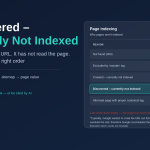
Search Console lists the status in its Page indexing report under Indexing, then Pages, in the group of reasons pages are not indexed. It applies to a URL when three things are true: Google crawled it, Google judged it a duplicate or close variant of another URL, and the page declared a canonical URL that Google agreed with and indexed instead. The word “proper” is Google’s: the canonical you set was honoured.
Compare it with the two neighbouring statuses and the distinctions become useful.
“Duplicate without user-selected canonical” means Google found duplicates but the page declared no canonical, so Google chose one itself and did not tell you which until you inspect the URL. That is a page missing a tag.
“Duplicate, Google chose different canonical than user” means the page declared a canonical and Google overrode it, because other signals pointed elsewhere. That is a conflict between your tag and your links, sitemap or redirects.
“Alternate page with proper canonical tag” means the tag was there and Google followed it. The question is only whether it pointed somewhere sensible.
Because the page in this status is not indexed, it cannot rank and cannot be selected for an AI Overview or AI Mode answer; that is by design. Everything the page might have earned is consolidated to the canonical. Our guide to canonical tags for SEO covers the basics of the tag itself, and our explainer on canonical pages and URLs covers how Google selects between candidates.
When alternative page with proper canonical tag is a problem (and when to leave it alone)
The decision rule is short: check the target, check the volume, check for missing pages.
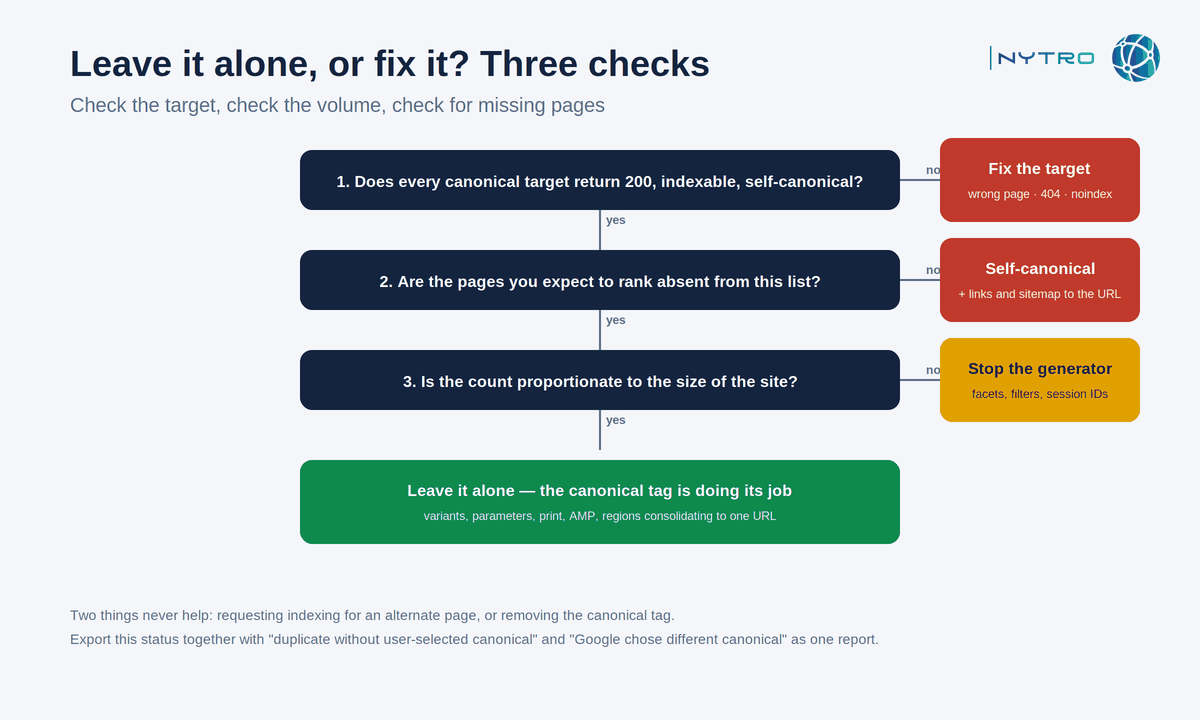
The flow above separates the healthy majority of cases from the harmful minority in three checks.
Leave it alone when the listed URLs are the variants you expect, the canonical targets are the pages you want indexed, those targets are in fact indexed, and the count is proportionate to the site. Colour and size variants pointing to a parent product, tracking-parameter URLs pointing to the clean URL, print and AMP versions pointing to the main page, paginated comment pages pointing to the article, and region or language variants correctly declared: these are the system working.
Fix it when any of the following is true.
The canonical target is wrong. A variant points to a different product, a category page, the homepage, or the previous version of a migrated URL. This is the migration and template failure mode: a global canonical set in a layout file that tells Google every page is a duplicate of the homepage, or canonicals left pointing at the old domain.
The canonical target is not indexable. It returns a 404 or a redirect, carries a noindex, is blocked in robots.txt, or is itself canonicalised onward in a chain. Google will not index the duplicate and may not index the target either, so the content disappears from search entirely.
Important pages are missing from the results. If a page you expect to rank is in this status, its canonical is claiming it is a duplicate of something else. Set the canonical to itself, make sure internal links and the sitemap point to the URL, and re-validate.
The volume is out of proportion. A site with a few thousand pages and hundreds of thousands of alternates has a URL-generation problem, usually faceted navigation, sort and filter parameters or session identifiers. The canonicals are working, but the crawl budget they consume is not free, and the discovered and crawled-not-indexed queues grow alongside. Our guide to crawled currently not indexed and its causes covers what happens downstream when the variants crowd out the real pages.
Two things do not fix it. Requesting indexing for an alternate page does nothing, because Google has deliberately chosen not to index it. And removing the canonical tag turns a resolved duplicate into an unresolved one, which is worse.
Duplicate without user selected canonical vs the proper-canonical status
The two statuses are often confused because both involve duplicates and both leave the URL out of the index. They ask for different work.
Duplicate without user selected canonical is a missing tag. Google found two or more URLs with the same or very similar content and none of them declared a preference, so Google picked one. Its pick may be the one you would have chosen, or it may be the URL with the tracking parameter or the HTTP version. The fix is to add a canonical to every duplicate pointing at the preferred URL, make the preferred URL indexable and consistently linked, and re-validate. Until you do, Google’s choice can change between crawls, and impressions in both the classic and the AI reports will be credited to whichever URL it picked that week.
Alternate page with proper canonical tag is a present tag that was honoured. The fix, if one is needed, is to change where it points or to reduce the number of variants being generated.
A useful audit habit is to export both statuses together with “Google chose different canonical than user” and treat the three as one canonical-health report: missing tags, honoured tags and overridden tags. The overridden set is the one most sites never look at, and it is where conflicts between tags, links and sitemaps hide.
How to audit canonical tags seo at scale
An audit of canonical tags seo on a large site is a join between two data sets: what your pages declare and what Google decided.
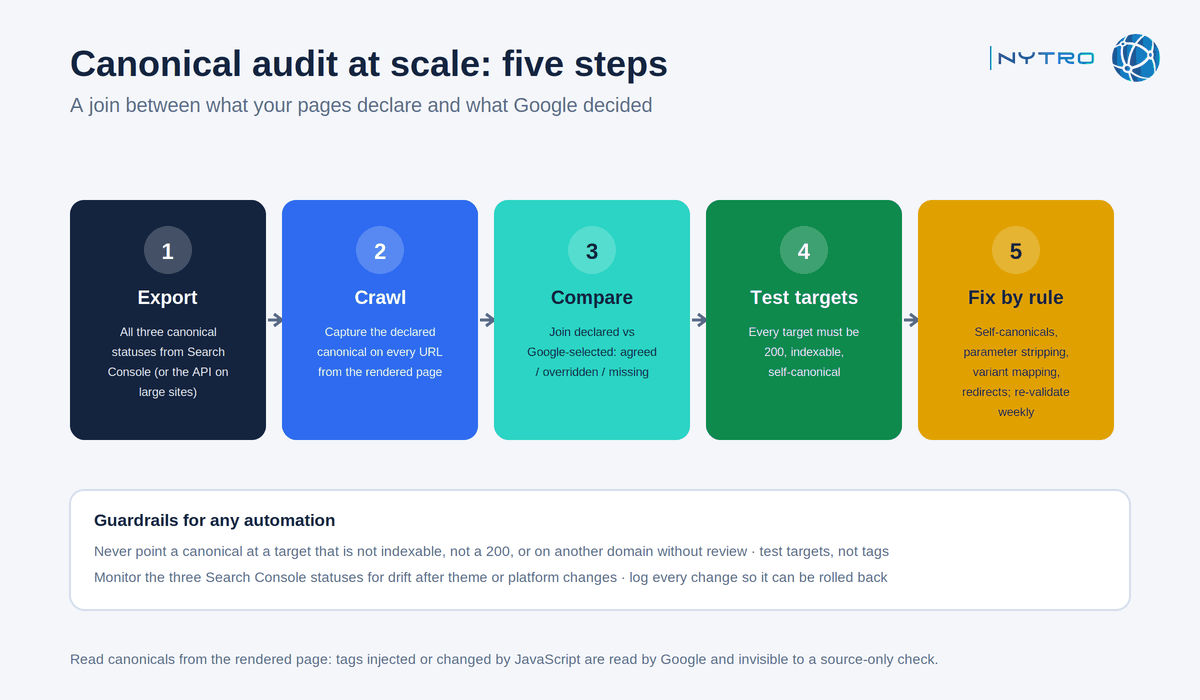
The five steps above produce a list of canonical targets that fail, which is the only list worth fixing by hand.
- Export from Search Console. Take the URL lists for all three canonical-related statuses. The interface caps exports at a thousand rows per status; on large sites, filter by directory or use the API to cover the rest.
- Crawl the site and capture the declared canonical on every URL, from the rendered page rather than the raw HTML, because canonicals injected or changed by JavaScript are invisible to a source-only check and are read by Google, which renders JavaScript.
- Compare declared with selected. For each URL, join your crawl’s declared canonical with the Google-selected canonical from the URL Inspection API. Agreement is healthy. Disagreement is the overridden set. Absence is the missing set.
- Test every canonical target. Fetch each distinct target URL and record status code, indexability and whether it redirects or is itself canonicalised onward. Any target that is not a 200, indexable, self-canonical page is a fault, and every alternate pointing at it inherits the fault.
- Apply fixes by rule and re-validate. Self-referencing canonicals where a page should stand alone; parameter stripping to a clean URL; variant-to-parent mapping for products; redirects for retired URLs; and, where variants should never have been generated, blocking or noindexing the generator. Then validate the fix in Search Console and monitor the three statuses weekly.
The join is the part that does not scale by hand, which is why most sites audit canonicals once, at migration, and never again. That is also why the status quietly accumulates faults between audits.
Canonical tag automation: keeping thousands of pages consistent
Canonical tag automation is the practice of setting and maintaining canonical hints by rule rather than by editing each page, so that a theme update, a plugin change or a new batch of product variants cannot silently repoint them. On a large site it is the only way the audit above stays true for longer than a week.
The rules are simple to state. Every indexable page declares itself as canonical unless a rule says otherwise. Tracking and session parameters are stripped to the clean URL. Product variants map to their parent. Paginated and filtered listings follow one documented policy. Retired URLs redirect rather than canonicalise. And no rule may point a canonical at a URL that is not indexable, not a 200, or on another domain, without a person approving the exception.
The guardrails matter as much as the rules, because automation applied without them is how the harmful cases in this article are created at scale. A rule that canonicalises every filtered listing to its category is correct until the category page carries a noindex; a rule that maps variants to a parent is correct until the parent is retired. Automation therefore has to test its own targets, monitor the three Search Console statuses for drift, and log every change so it can be rolled back.
NytroSEO applies seo canonical tags as part of the metadata layer it manages through its header snippet, scoped by sitemap, with the target checks, drift monitoring and change log described here; it does not change URL structure or stop a platform generating variants, which remain platform work. Our guide to meta-tag automation for large websites shows how the canonical rules sit alongside titles, descriptions and structured data. Book a strategy meeting with the NytroSEO team if you manage a large site or a client portfolio and want the canonical audit run and the rules set up as one project.
Why alternative page with proper canonical tag now affects AI visibility
Two developments give a tagging status a new cost. Search Console’s Generative AI performance report, available to all sites worldwide since 31 August 2026, attributes impressions in AI Overviews and AI Mode to the canonical URL, exactly as the classic report does; a wrong canonical therefore misattributes AI visibility as well as classic visibility, and a page canonicalised to a non-indexable target earns none. And Google’s AI features draw on the same index as Search, so a page that is out of the index because of a mistaken canonical is out of every AI answer too. The healthy version of the status consolidates that visibility onto one URL; the harmful version deletes it.
Frequently Asked Questions
Usually no. It means Google found a duplicate or variant URL and indexed the canonical you specified instead, which is the canonical tag doing its job. It needs action only when the canonical points to the wrong page, to a URL that is not indexable or does not return 200, when important pages are missing from results, or when the volume of alternates is out of proportion to the site.
A canonical tag is a link element in the page head that tells search engines which URL is the preferred version when several URLs carry the same or similar content. Google treats it as a strong hint, weighed with redirects, internal links and sitemap inclusion, to consolidate indexing and ranking signals onto one URL.
Add a canonical tag on each duplicate pointing to the preferred URL, make sure that URL is indexable and returns 200, and keep internal links and the sitemap pointing to the same URL. Then re-validate in Search Console. Until a canonical is declared, Google’s own choice can change between crawls and impressions will follow it.
Yes, with rules and guardrails. Automation can set self-referencing canonicals, strip tracking parameters and map variants to a parent, but it must never point at a target that is not indexable, not a 200 or on another domain without review, and it must monitor Search Console’s canonical statuses for drift after theme or platform changes.
Google treats the tag as a hint, not a directive. It may choose a different canonical when other signals conflict, for example when internal links, the sitemap or redirects point elsewhere, when the pages are not truly duplicates, or when the declared canonical is blocked, redirects or returns an error. Search Console reports those cases as “Google chose different canonical than user”.
Ready to check every alternative page with proper canonical tag?
The status is healthy until a template, a migration or a rule points it somewhere wrong, and nothing tells you when that happens except the target itself. Sign up for free to have NytroSEO test canonical targets and keep the metadata layer consistent across every page, or book a strategy meeting if you manage a large site or a client portfolio and want the full canonical audit run as one project.