Last updated: October 4, 2026
Image alt text is the text alternative carried in an image’s alt attribute: the words a screen reader announces in place of the picture, the words a browser shows when the file fails to load, and the words search engines and AI systems read to understand what the image is. It exists for accessibility first. Everything else it does for a site, image search visibility, a cleaner accessibility tree for agents, a page that machines can interpret fully, follows from writing it for the person who cannot see the image. This guide explains what alt text is and who it serves, how to write it well, how the alt attribute differs from titles, captions and filenames, why it matters more in a year when the search box accepts images and agents read the DOM, and how to fill the thousands of missing attributes on a large site without turning the fix into keyword spam.
The two authorities on the subject agree on the fundamentals. The W3C’s Web Accessibility Initiative images tutorial sets out the decision that governs every image: informative images need a text alternative that conveys their meaning or function, decorative images need an empty alt attribute so assistive technology skips them, and images of text need the text itself. Google’s image SEO best practices add the search side: Google uses alt text along with computer vision and the contents of the page to understand an image’s subject, alt text serves as anchor text when an image is a link, and filling alt attributes with keywords results in a negative user experience and may cause a site to be seen as spam.
If you have more missing alt attributes than anyone can write by hand, sign up for free and NytroSEO will show you how many there are and what descriptive drafts it would apply, page by page, before anything changes.
This page replaces an earlier post on this site that reproduced an accessibility consultancy’s guide to alt text. The principles in that guide were sound and are kept here; what has changed is the reader. In 2022 the audiences for alt text were people using assistive technology and Google Images. In 2026 they also include the intelligent Search box, which accepts images as input, and the AI agents that read a page through its accessibility tree, where the alt attribute is often the only description of an image they will ever see.
Lee Agam, founder and CEO of NytroSEO, treats alt text as the clearest test of whether a site’s automation is honest. In his experience, large sites arrive with two problems at once: thousands of images with no alt attribute at all, and a smaller number with alt text that was generated years ago by a plugin that pasted the page’s target keyword into every image. The first problem is an accessibility failure and a gap in what machines can read; the second is worse, because it fails the reader and reads as spam to Google. His rule for automation is that generated alt text must describe the image a sighted person would see, in the context of the page it sits on, with a keyword only where the keyword is the honest description, and that any rule which cannot meet that test should leave the attribute empty rather than fill it.
What is image alt text and why is it important?
What is image alt text and why is it important? Alt text is the value of the alt attribute on an HTML image element. It is the image’s text equivalent: what the page would say in that spot if the image could not be shown.
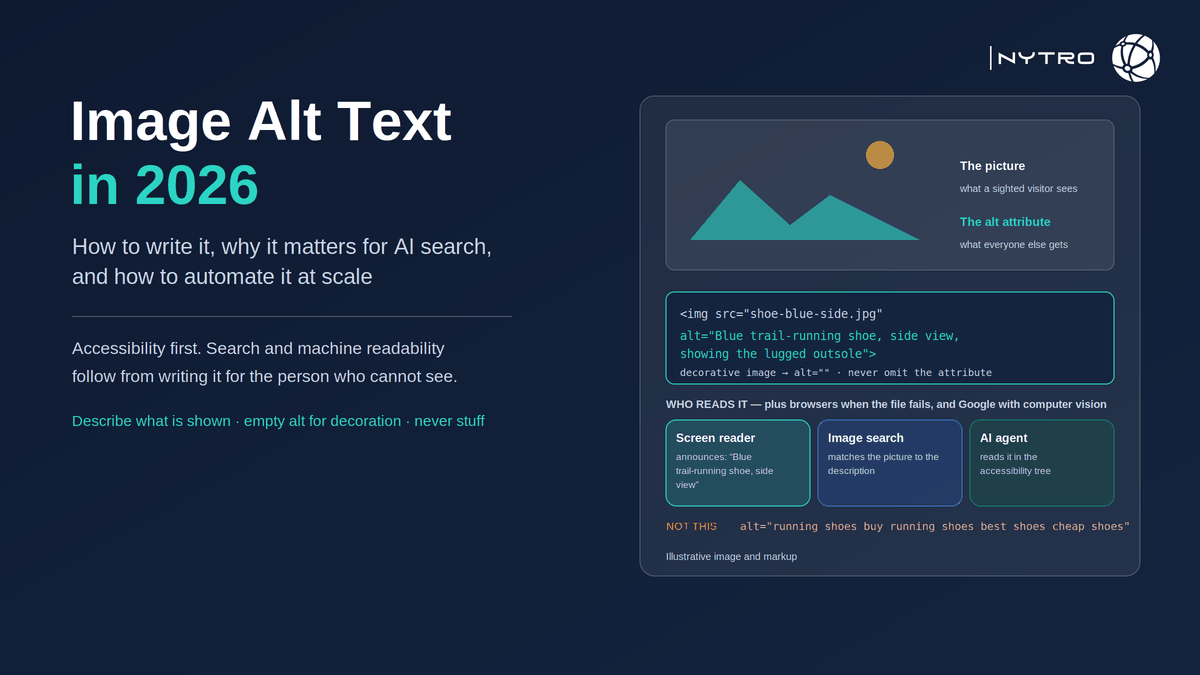
Four groups depend on it. People using screen readers hear it read aloud or rendered in braille; without it, they hear “image” or, worse, the filename. People on slow or failed connections see it in place of the picture. Search engines read it, with computer vision and the surrounding page, to understand the image and to decide whether it belongs in image results; Google says alt text is the most important attribute for providing image metadata. And AI agents and assistants that read a page through its DOM or accessibility tree see alt text as the description of every image on the page, which means a chart with no alt text is a chart that does not exist to them.
The importance is therefore layered, and the order matters. Accessibility is a legal and ethical obligation under WCAG in most jurisdictions, and it is the purpose the attribute was designed for. Search visibility is a consequence of doing that well: Google states that alt text contributes to its understanding of images and functions as anchor text for linked images, and that it is a factor for image search. Machine readability for AI is the newest layer and follows the same rule: an honest description serves every reader; a stuffed one serves none.
Our earlier note on why Google says alt text is a factor for image search covers Google’s exact position on ranking; this page covers how to write and maintain the attribute itself.
How to write image alt text that works
Writing image alt text well comes down to six decisions, made in order, for each image.
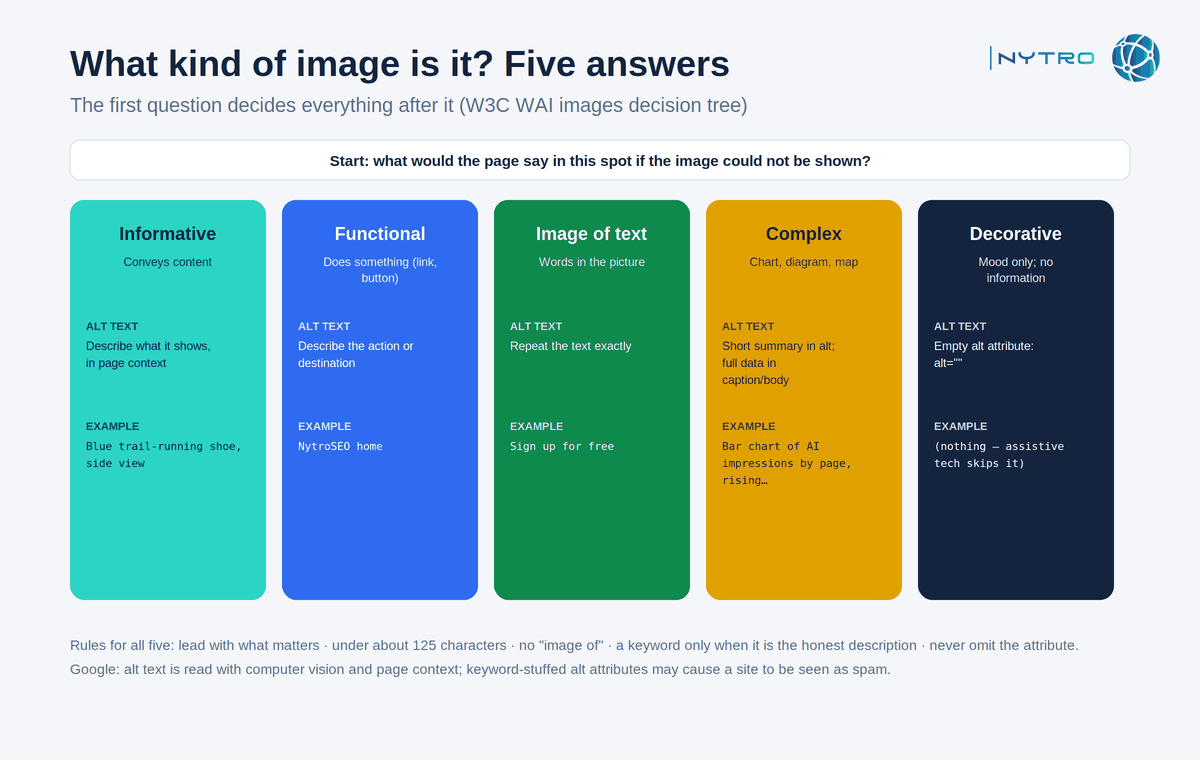
The diagram above follows the W3C decision tree; the first question, what kind of image is this, decides everything after it.
- Decide what kind of image it is. Informative images convey content: describe what they show. Functional images do something, a linked logo, a search button: describe the action or destination, not the picture. Images of text: use the text. Complex images, charts and diagrams: give a short summary in the alt attribute and the full data in the page or a caption. Decorative images, spacers, flourishes, a stock photo that adds mood and nothing else: use an empty alt attribute, alt=””, so assistive technology skips them. Never omit the attribute entirely, because a missing attribute makes screen readers fall back to the filename.
- Describe content and function in context. The same photograph needs different alt text on different pages. A picture of a person at a laptop on a page about remote work is “Employee working from a kitchen table on a laptop”; on a page about a software product it is “Dashboard of the product open on a laptop screen”. Context decides what matters.
- Lead with what matters and keep it short. Many screen readers stop announcing after roughly 125 characters, so put the essential description first and keep most alt text to a sentence or two. If more is needed, it belongs in a caption or the body, not the attribute.
- Do not say “image of” or “picture of”. Assistive technology announces the element type already; the words waste the reader’s time. Describe the subject directly.
- Use a keyword only when it is the honest description. If the page’s target phrase is the name of what the image shows, it belongs in the alt text because it is accurate. If it is not, it does not, and Google’s guidance on keyword stuffing applies.
- Match images of text exactly. Where an image contains words, a logo, a quote, a button label, the alt text repeats those words so that a reader hears what a sighted visitor sees.
Three examples make the rules concrete. A product photo: “Blue trail-running shoe, side view, showing the lugged outsole”. A chart: “Bar chart of monthly AI impressions by page, rising from January to June; data table below”. A linked logo in the header: “NytroSEO home”.
Alt Attribute for Images vs title, caption and filename
The alt attribute for images is one of four pieces of text that can accompany an image, and confusion between them produces most of the mistakes.
The alt attribute is the text alternative. It is required on every image element, empty for decoration, descriptive otherwise. It is what screen readers announce, what shows when the image fails, and what Google reads for understanding.
The title attribute is a tooltip. It is not announced by most screen readers, is not a substitute for alt, and is largely ignored for search. Use it rarely, and never instead of alt.
The caption is visible text beside the image. It is read by everyone, sighted or not, so the alt text should not repeat it; where a chart needs a full data description, the caption or the body is where the detail goes, with the alt text giving the summary.
The filename is read by search engines as a weak signal and by screen readers only when alt is missing. Keep it short and descriptive, “trail-running-shoe-blue-side.jpg” rather than “IMG_4471.jpg”, and never rely on it to describe the image.
A fifth element, structured data, describes images to search engines at the page level: an Article’s image property, a Product’s image, an ImageObject with a caption and licence. It supports understanding and features such as image licence badges; it does not replace the alt attribute, which remains the only thing a screen reader uses.
Alt tags for images is the phrase many people search for, and it is worth saying once that there is no alt tag: alt is an attribute of the img tag. The distinction matters only because audit tools and CMS fields label it inconsistently; what they all mean is the alt attribute.
Why image alt text now matters for multimodal and AI search
Two developments make the alt attribute more consequential in 2026 than when the earlier version of this page was written.
The first is image input. At I/O in May 2026 Google described an intelligent Search box that accepts text, images and files, and Lens-style image search has become an ordinary way to begin a query. When a person searches with a picture, the systems that match it to results use what they know about the images on the web, and Google’s own documentation says that knowledge comes from computer vision, alt text and the page around the image together. Images without alt text are understood less well, and understood less well means matched less often.
The second is agents. AI assistants that browse on a person’s behalf read pages through the rendered DOM and the accessibility tree, the same structure assistive technology uses, which is why Google’s guidance for generative AI features asks sites to use the same semantic HTML structure for people and for AI agents. In that structure the alt attribute is the image. An agent comparing two products from their pages sees “Blue trail-running shoe, side view” on one and nothing on the other; a chart with no alt text is a chart the agent cannot cite. Our guide to JavaScript SEO for AI agents covers how agents read a page; alt text is the image half of that story.
Neither development changes how alt text should be written. Both raise the cost of the two failures that dominate large sites: the missing attribute and the stuffed one.
Auto generate image ALT’s at scale, with guardrails
Auto generate image ALT’s is the practical question on any site with more than a few hundred images, because nobody is going to write ten thousand descriptions by hand, and the backlog grows with every upload. Automation is the right answer. Automation without guardrails is how sites acquire ten thousand instances of the same keyword.
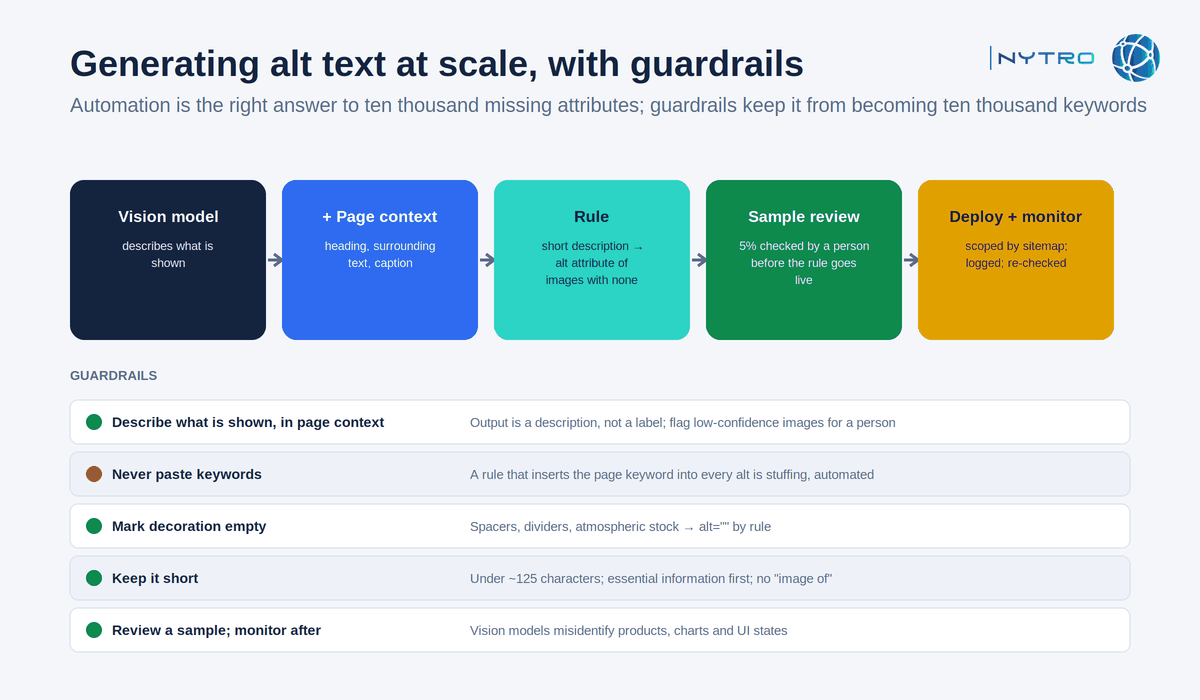
The guardrails above are the ones that separate an accessibility fix from an automated spam problem.
How generation works. A vision model describes what the image shows; the page’s heading, surrounding text and existing caption supply the context; a rule combines the two into a short description and writes it to the alt attribute of images that have none. Images that already carry alt text are left alone unless a separate rule targets a known bad pattern, such as the page keyword repeated on every image.
The guardrails:
- Describe what is shown, in the context of the page. The output is a description, not a label. If the model cannot identify the image with confidence, the rule should flag it for a person rather than guess.
- Never paste keywords. The page’s target phrase appears only if it is the honest description of the image. A rule that inserts a keyword into every alt attribute is the stuffing Google warns against, automated.
- Mark decoration empty. Spacers, dividers, background textures and purely atmospheric stock images get alt=”” by rule, not a generated sentence.
- Keep it short. Under about 125 characters, essential information first, no “image of”.
- Review a sample before each rule goes live, and monitor afterwards. Vision models misidentify products, charts and interface states; a five-per-cent sample reviewed by a person catches the systematic errors before they are applied to thousands of images.
Delivery is the same question as for any on-page element. A CMS plugin writes the attribute into the media library; a JavaScript header snippet applies it at load on any CMS without CMS access, which is how NytroSEO delivers alt text alongside titles, descriptions and structured data, scoped by sitemap with a preview, a change log and rollback; an API writes it server-side. Google reads JavaScript-applied attributes once the page renders; screen readers read the rendered DOM and see them too; crawlers that do not execute scripts see only the server’s HTML, so sites that depend on those systems should also write the values into the CMS. Our guide to meta-tag automation for large websites shows alt text as one rule in a set, and our guide to automated SEO software covers how to evaluate any tool that offers it. Book a strategy meeting with the NytroSEO team if you manage a large site or a client portfolio and want the alt-text audit and the generation rules set up as one project.
What is the importance of using alt attribute for images? A one-page audit
What is the importance of using alt attribute for images? Enough that it should be audited like any other on-page element. Five checks, run with a crawler or the automation platform’s inventory:
- Count images with no alt attribute at all; these are the accessibility failures and the first fix.
- Count images with identical alt text across many pages; these are usually templated keywords and the second fix.
- Count decorative images carrying descriptive alt text, and informative images carrying alt=””.
- Sample twenty informative images and ask whether the alt text describes what is shown, in context, in under 125 characters.
- Confirm that linked images describe the destination and that images of text carry the text.
Frequently Asked Questions
Alt text is the text alternative in an image’s alt attribute. Screen readers announce it, browsers show it when images fail to load, search engines use it with computer vision and page context to understand images, and AI agents read it through the accessibility tree. It serves accessibility first and search and machine readability second.
Aim for a concise description, typically under about 125 characters, that conveys what the image shows or does in context, with the essential information first. Longer descriptions belong in captions or surrounding text; purely decorative images should use an empty alt attribute so assistive technology skips them.
Only when the keyword is a natural, accurate description of the image. Google’s image guidance says filling alt attributes with keywords results in a negative user experience and may cause a site to be seen as spam. Describe the image honestly and let relevant terms appear where they belong.
Directly it mainly influences image search, where Google confirms it is a factor. Indirectly it helps search engines and AI agents interpret page content, serves as anchor text for linked images, supports accessibility compliance and is part of the semantic HTML that agents rely on when reading a site. Missing alt text is one of the most common gaps on large sites.
Yes. Automation can draft descriptive alt text from image content and page context and fill thousands of missing attributes, with a review sample to check accuracy before each rule goes live. Generated text must describe the image rather than repeat keywords, decorative images should be marked empty, and uncertain cases should be flagged for a person.
Ready to fix the image alt text gap without creating a stuffed one?
Alt text is the one on-page element whose honesty a screen reader will test on every page. Sign up for free to see how many images on your site have no alt attribute and what descriptive drafts NytroSEO would apply, or book a strategy meeting if you manage a large site or a client portfolio and want the audit and the generation rules designed as one project.