Last updated: September 16, 2026
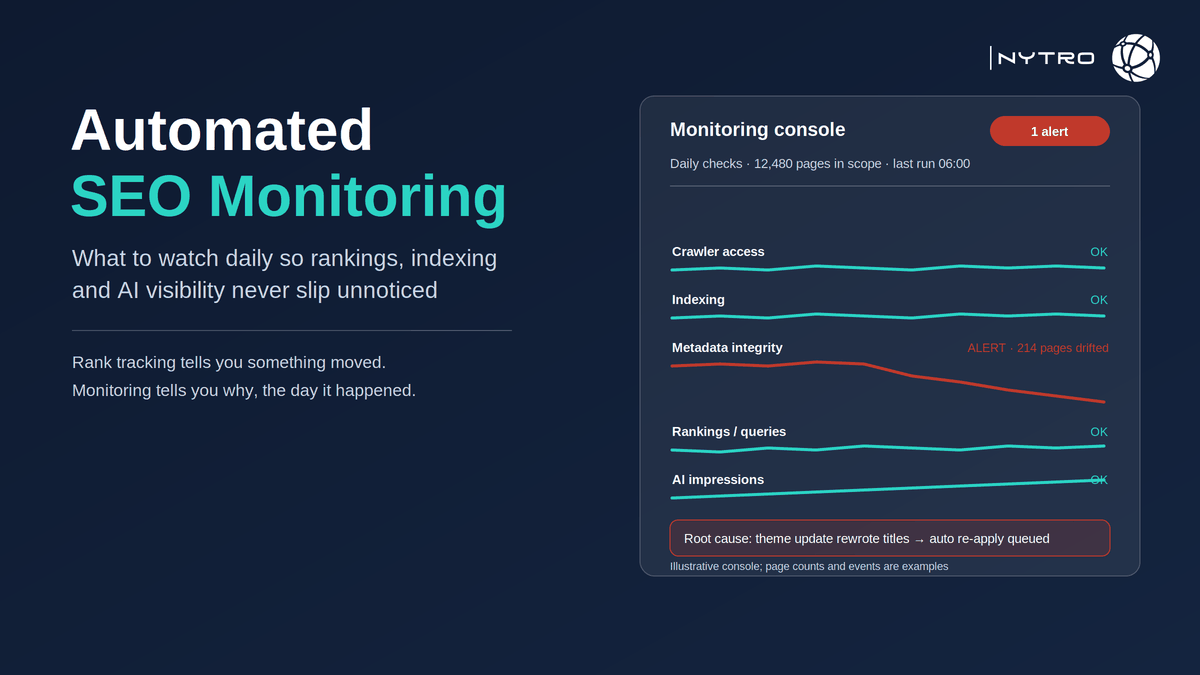
Automated seo monitoring is the continuous, scheduled checking of the signals that decide whether a website can be found: whether its pages are indexed, whether search and AI crawlers can reach them, whether the titles, descriptions and canonical tags on those pages are still the ones you approved, how they rank, and, since this summer, how often they appear in Google’s AI features. Rank tracking tells you that something moved. Monitoring tells you why, and it tells you the day it happened rather than the month you noticed. This guide sets out what to monitor, the difference between monitoring and the rank tracker most teams already run, the checks that catch silent losses, and what should happen in the hours after an alert.
Google’s own reporting shows why the scope has widened. The Search Console Generative AI performance report, available to all sites worldwide since 31 August 2026, reports impressions in AI Overviews and AI Mode by page, country, device and date, but no clicks or queries, so a drop in AI visibility shows up only if someone is trending that number. And Google’s own guidance on the Crawl Stats report, as Search Engine Journal summarised it, is that crawl health is a concern for large sites rather than sites with fewer than about a thousand pages, which is a useful rule for deciding how much of this a given site actually needs.
If you want the monitoring below run for you, with the metadata layer repaired automatically when it drifts, sign up for free and NytroSEO will start with an inventory of every page in your sitemap.
The cost of not monitoring is rarely a dramatic outage. It is a theme update that rewrites two thousand titles overnight, a CDN rule that starts challenging a search crawler, a plugin that flips a canonical to the wrong URL, or a section of the site that slides from indexed to “crawled, currently not indexed” over six weeks. None of those produce an error message. Each one shows up in Search Console eventually, and by then AI Overviews and AI Mode have stopped selecting the affected pages and the ranking loss has compounded for a month.
Lee Agam, founder and CEO of NytroSEO, sees monitoring without remediation as a way of documenting decline in high resolution. In his experience the teams that get value from monitoring are the ones that decide in advance what happens when each alert fires: an indexing drop goes to a person, a blocked crawler goes to whoever owns the CDN, and metadata drift goes straight back to the automation that re-applies the approved values, because a person re-typing two thousand titles is not a response, it is a backlog. He also argues that the alert most sites never configure is the one that matters most for AI search, which is a change in the page itself: if the page that earned a citation last month has a different title and description this month, the citation was earned by a page that no longer exists.
What automated seo monitoring covers in 2026
Automated seo monitoring watches six families of signal, on a schedule, and raises an alert when one of them changes beyond a threshold you set. The families are, in order of how quickly a problem in each one costs you visibility:
- Crawler access. Whether Googlebot, Bingbot and the AI search crawlers you rely on can fetch your pages, checked against robots.txt, CDN and bot-management rules, and confirmed in your logs.
- Indexing status. The count of indexed pages and the count in each non-indexed state in the Search Console Page indexing report, trended daily, with the URLs that changed state.
- Metadata integrity. Whether each page’s title, description, canonical and structured data still match the approved value, checked against a stored baseline.
- Rankings and impressions. Position and impression movement for a defined keyword set and for the site’s most valuable pages.
- AI impressions. Page-level impressions in AI Overviews and AI Mode from the Generative AI report, trended weekly.
- Page and site changes. Deploys, template changes, plugin updates and redirects that explain why any of the above moved.
The first three are the causes; the fourth and fifth are the effects; the sixth is the annotation layer that connects them. A monitoring setup that only covers the fourth is a rank tracker, and that is where most teams stop.
Ranking monitoring vs SEO keywords monitoring vs an automated rank tracker
The three terms are used interchangeably and they are not the same tool.

The comparison above shows how the three widen in scope; most sites run the first, some the second, few the third.
An automated rank tracker records the position of a fixed list of keywords, usually daily, and charts the movement. It is precise, cheap and necessary, and it is blind to everything that is not on the list. A page that loses its title, drops out of the index or stops being fetched by a crawler will show up as a ranking fall days later, with no indication of cause.
SEO keywords monitoring widens the lens to Search Console query data: impressions, clicks and average position across all the queries a page earns, not only the ones you chose to track. It catches new queries appearing, striking-distance terms, and losses on keywords nobody added to the list. It is still measuring effects.
Ranking monitoring, in the sense this article uses it, is the combination of both with the cause layers above: the tracker and the query data tell you what moved, and the access, indexing and metadata monitors tell you why. On a site where one deploy can change thousands of pages, that is the only configuration in which an alert arrives with enough context to act on. Our note on how NytroSEO’s Search Console integration pulls query and page data into the same view explains the mechanics.
Indexing and crawler-access monitors that catch silent losses
These two monitors catch the failures that produce no error and cost the most.
For indexing, export the Page indexing report daily and diff it against the previous day. The number to alert on is not the total; it is any movement of URLs from indexed into a non-indexed state, and any growth in “crawled, currently not indexed” or “discovered, currently not indexed” beyond a threshold. Our guide to crawl efficiency and prioritising non-indexed URLs explains what each state means and which ones matter. Google’s Crawl Stats report, under Settings in Search Console, adds host status and response-time trends for large sites.
For crawler access, monitor three layers. The robots.txt file itself, with an alert on any change, because a single misplaced directive can remove indexed pages; our note on how one robots.txt mistake can block indexed pages shows how quickly. The CDN and bot-management rules, which can override robots.txt and which change when plans, defaults or vendors change. And the logs: a daily count of fetches by Googlebot, Bingbot, OAI-SearchBot, PerplexityBot and ClaudeBot on your most important pages, with an alert when any of them drops to zero. A crawler that stops fetching is the earliest signal of a block, and it appears in your logs days before it appears anywhere in Search Console.
Add the Google Search Status Dashboard as an annotation feed, so that ranking movement during an announced update is labelled as such and not mistaken for a site problem. The dashboard lists ranking, crawling, indexing and serving incidents with start and end times; the August 2026 spam update, for example, ran for two days and sixteen hours, and any monitoring series without that window marked will attribute the movement to the wrong cause.
Two thresholds deserve care. For indexing, alert on the URLs that changed state rather than on the total count, because totals absorb new pages and mask losses. For crawler fetches, alert on a fall to zero for any single bot on your top pages rather than on the aggregate, because a CDN rule typically blocks one crawler while the others continue and the total barely moves.
Metadata drift: the monitor most sites do not run
Metadata drift is the silent overwriting of a page’s title, description, canonical tag or structured data by something other than a deliberate edit: a theme update that regenerates titles from a template, a builder that reverts descriptions when a page is republished, a plugin that changes canonical logic, a migration that drops FAQ markup. It is the most common cause of a gradual visibility decline that nobody can explain, because every individual page still looks fine when someone opens it.
The monitor is simple in principle: store the approved value for each element on each page, re-fetch the rendered page daily, and alert on any difference. In practice it needs three things. A baseline, which means the approved values have to exist somewhere as a source of truth rather than only in the CMS field that just got overwritten. Rendered fetches, because a tag injected or changed by JavaScript is invisible to a raw HTML check. And a remediation path, because on a large site the alert is worthless if the fix is manual.
This is the monitor where automatic site monitoring and automatic repair belong together. NytroSEO holds the approved metadata and structured data as rules scoped by sitemap, applies them at load through its header snippet, and re-applies them when the underlying page changes, so drift is corrected rather than reported. It does not fix rendering problems or write body content; it keeps the layer it manages stable, which on a site with thousands of pages is the layer that drifts most. Our guide to meta-tag automation for large websites walks through the setup.
A worked example makes the scale clear. A site with 4,000 pages updates its theme; the new template builds titles from the page heading alone and drops the brand suffix and the descriptions. Every page still renders, every page still ranks for a while, and the Search Console impressions chart looks normal for two weeks. Then click-through falls, AI impressions fall as the shortened titles stop matching the queries that used to trigger them, and by week four the loss is visible but no longer traceable to the deploy. A rendered-page drift check on day one would have raised 4,000 alerts and one root cause; automated re-application would have closed all of them before the first crawl.
Drift now has a second cost. Search Console attributes AI impressions to the canonical URL, and AI systems select pages partly on their titles and descriptions, so a drifted page corrupts your AI visibility measurement and weakens its retrieval at the same time.
From monitoring to action: automated seo reports and adaptive fixes
Monitoring produces alerts; the value is in what happens next, and the cadence should be decided before the first alert fires.
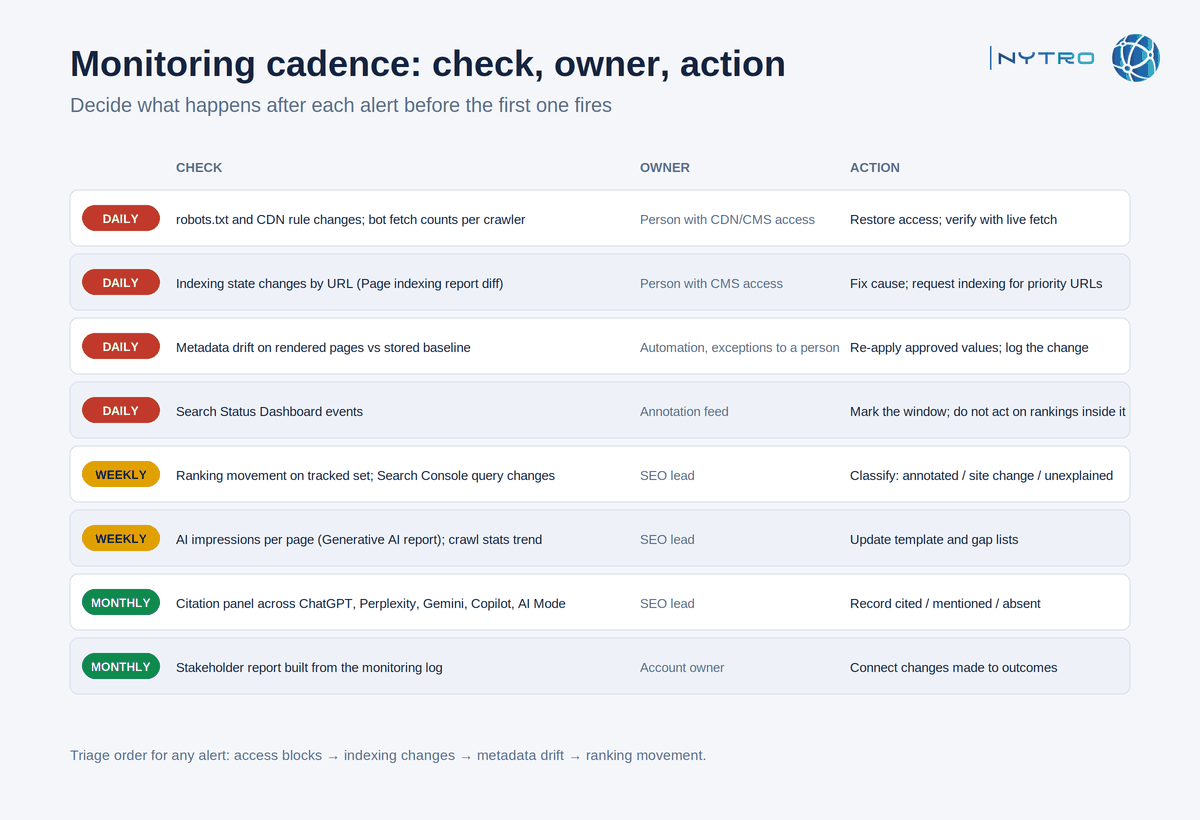
The cadence above assigns each check to a frequency and each alert to an owner and an action; adjust the thresholds to your site’s size.
Daily: crawler access (robots.txt change, CDN rule change, bot fetch count), indexing state changes, metadata drift, and any Search Status Dashboard event. These are the alerts that can cost a site its visibility in a day. Response: access and indexing alerts go to a named person with CDN and CMS permissions; drift alerts go to automated re-application, with a person reviewing the exception list.
Weekly: ranking movement on the tracked set, Search Console query changes, AI impressions per page from the Generative AI report, and the crawl stats trend for large sites. Response: a short review that classifies movement as explained by an annotation, explained by a site change, or unexplained and needing investigation.
Monthly: the citation panel across ChatGPT, Perplexity, Gemini, Copilot and AI Mode, the striking-distance keyword list, and the automated seo reports that go to stakeholders. Response: the report should connect the month’s changes to outcomes, using the month’s alerts and the exported original and optimized values as the evidence.
Triage rule of thumb for any alert: access blocks first, because they remove eligibility entirely; indexing changes second; metadata drift third; ranking movement last, because it is usually a symptom of one of the first three or of an update you can annotate. NytroSEO’s adaptive automation handles the updating automatically and dynamically. When you export the data, it shows the original and optimized values for each page, and ranking changes are tracked separately in your keywords. Book a strategy meeting with the NytroSEO team if you want the daily and weekly tiers configured across an agency portfolio or a large site.
Setting up automated seo monitoring in a week
- Day 1: inventory pages from the sitemap; define the tracked keyword set and the top fifty pages by value.
- Day 2: export and file the original titles, descriptions, canonicals and structured data for every page as your baseline, dated by the day you ran it; connect Search Console and the Generative AI report.
- Day 3: set up robots.txt change detection, CDN rule alerts and daily bot fetch counts from logs.
- Day 4: schedule the daily indexing diff and the drift check on rendered pages.
- Day 5: define thresholds and owners for each alert type; route drift to automated re-application.
- Day 6: add annotation feeds: deploys, plugin updates, Search Status Dashboard.
- Day 7: run the first weekly review; set the monthly report template.