Last updated: September 28, 2026
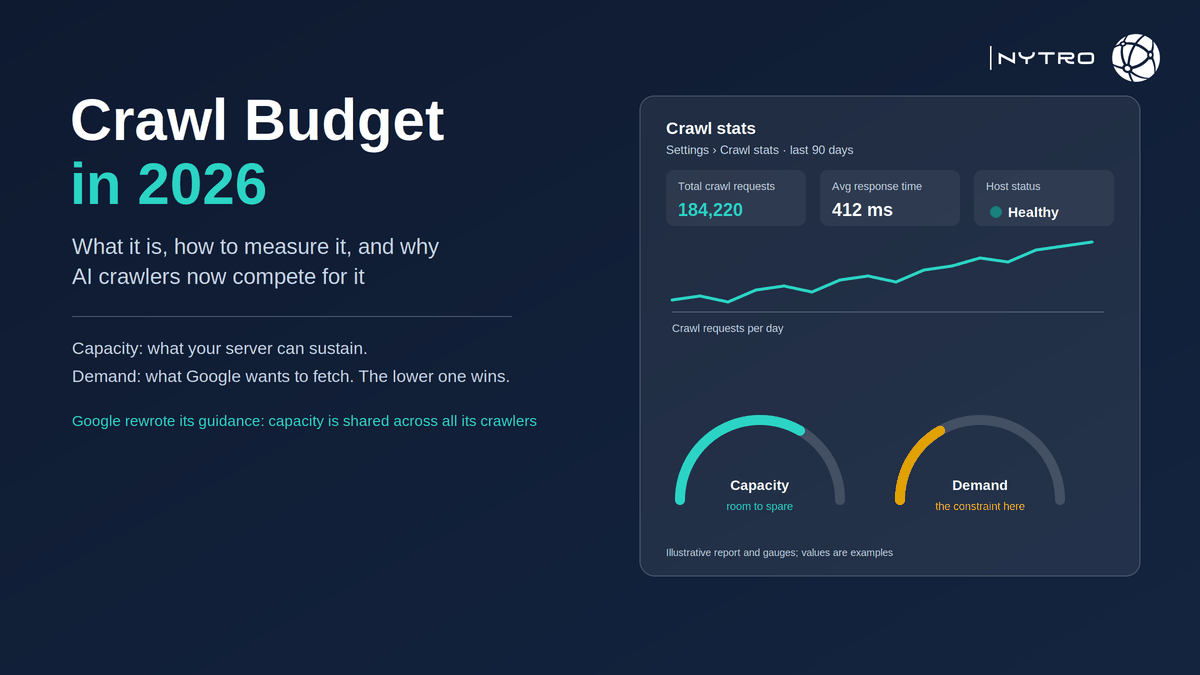
Crawl budget is the set of URLs Googlebot can and wants to crawl on a site within a given period. Google defines it through two elements: the crawl capacity limit, the number of parallel connections and the delay between fetches that your server can sustain without degrading, and crawl demand, how much Google wants to fetch given the site’s popularity, freshness and the value of its content. Whichever is lower sets the ceiling. For most sites neither is a constraint, and Google says so in the first paragraph of its own guidance. For very large sites, sites with millions of auto-generated URLs and sites whose “discovered, currently not indexed” queue keeps growing, it is the constraint that explains why good pages never appear. This guide explains how Google’s freshly rewritten documentation describes the mechanism, how to tell whether the problem is yours, how to measure it in Search Console and in server logs, the seven fixes that move the number, and why AI crawlers now compete for the same capacity.
The reference has changed under everyone’s feet. Google rewrote its crawl budget documentation on 22 July 2026 and moved it into its crawling-infrastructure guidance. The new text states that every site starts with the same default, conservative crawl capacity limit, which Google’s systems raise over time when there is demand to crawl more and the site responds quickly and without errors; that crawling infrastructure treats each unique hostname as a separate site with its own budget; and that the sites which should care are those with more than a million unique pages whose content changes weekly, medium or larger sites of ten thousand or more pages whose content changes daily, and any site with a large portion of its URLs classified as discovered, currently not indexed. Google adds that those numbers are rough estimates for classifying a site, not exact thresholds.
If you would rather have the URL inventory that decides crawl demand kept honest automatically, the canonical hints, the sitemap scope and the metadata on every page in it, sign up for free and NytroSEO will start with what your sitemap currently exposes.
Two things in the rewrite deserve emphasis because they are new. The first is the shared-capacity point: Google now states that a site’s crawl capacity is shared across all of its crawlers, so heavy fetching by one Google crawler can reduce what remains for Googlebot’s search crawling. The second is the default: because every site starts from the same conservative limit and earns more through health and demand, a site cannot buy or request a higher crawl rate; it can only serve fast, stay healthy and be worth crawling. The Search Console crawl-rate limiter tool that used to exist was retired in 2024, and Google does not honour a crawl-delay directive in robots.txt.
Lee Agam, founder and CEO of NytroSEO, treats “we have a crawl budget problem” as a claim to be tested before it is fixed. In his experience with large sites, the phrase is used for three different situations that need three different responses: a server that genuinely throttles Googlebot, which is an infrastructure fix; a URL inventory so bloated with parameter variants and thin pages that demand for the whole site has collapsed, which is a subtraction fix; and a small site with an indexing problem that has nothing to do with budget at all, where the phrase is a distraction. His test is the Crawl Stats report read alongside the discovered queue: if response times are fine and the queue is large, the problem is demand and inventory; if response times are poor, it is capacity; if the queue is small, it is something else. He also notes that the rewrite’s shared-capacity language makes an old point official: every crawler you allow onto the server, including the AI crawlers you want, spends the same capacity Googlebot needs, so bot management is now part of crawl budget optimization rather than adjacent to it.
What is crawl budget in SEO?
Crawl budget in SEO is the practical limit on how many of a site’s URLs Google will fetch in a period, set by the lower of two values. The crawl capacity limit is what your server can sustain: Google measures how quickly and reliably the site responds and raises or lowers the number of simultaneous connections and the delay between them accordingly. Crawl demand is what Google wants to fetch: URLs that are popular, that change often, or that Google has never seen have higher demand; URLs that are stale, unpopular or duplicative have lower demand, and a site-wide event such as a migration can spike demand temporarily.
Two consequences follow from the definition. Even a fast server with high capacity will be crawled little if demand is low, because Google sees no reason to spend the fetches. And a site with high demand will be crawled less than it deserves if the server is slow or returns errors, because Google backs off to protect it. Most crawl problems on large sites are demand problems: the inventory is full of URLs Google has learned are not worth the fetch, and the pages that matter are crowded out.
The unit is the hostname. A subdomain has its own budget, which is why moving a large low-value section to a separate host sometimes helps the main domain, and why an AI crawler hammering one hostname does not directly deplete another’s allocation.
Crawl budget google: how Google decides how much to crawl
Crawl budget google allocates through the two mechanisms above, and the inputs to each are observable.
Capacity rises when the site responds quickly and consistently for a period, and falls when response times climb or the server returns 5xx errors or times out. Google’s own documentation also notes that its crawling resources are finite, so capacity is bounded by Google’s side too. The new default is deliberately conservative: a new site, or a site that has been unhealthy, starts low and earns its way up.
Demand rises with popularity, measured partly through links and user value; with freshness, since Google wants to avoid stale copies of URLs that change; and with novelty, since URLs it has never fetched carry a discovery incentive. Demand falls when URLs are duplicative, when they return the same content as other URLs, when they have not changed in a long time, and when Google’s past fetches of similar URLs found little value.
Google’s guidance is blunt about the levers. The only ways to increase crawl budget are to increase serving capacity for crawls and, more importantly, to increase the value of the content to searchers. There is no setting, no submission trick and no sitemap field that does it.
Measuring crawl budget search console and in logs
Measuring crawl budget search console gives you two views, and the logs give you the third.
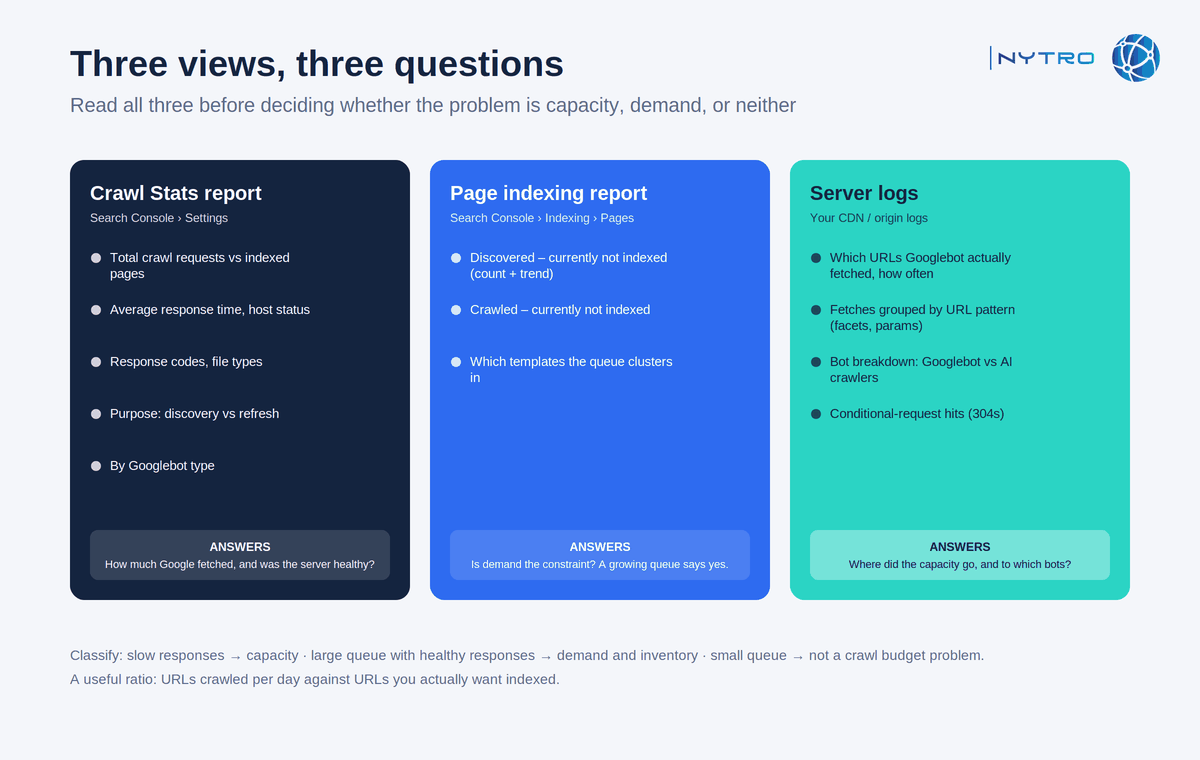
The three views above answer three different questions: how much Google fetched, how healthy the server was, and which bots spent the capacity.
The Crawl Stats report, under Settings in Search Console, shows the last ninety days of Googlebot activity: total crawl requests, total download size, average response time, host status, and breakdowns by response code, file type, crawl purpose, discovery versus refresh, and Googlebot type. Read three things from it. The trend of total requests against your indexed-page count tells you whether Google is fetching more or less over time. Average response time and host status tell you whether capacity is being constrained; a rising response time or any host-status warning is a capacity problem. The purpose split tells you whether Google is discovering new URLs or refreshing known ones, and a site that is mostly refreshing while its discovered queue grows has a demand problem.
The Page indexing report gives the demand-side symptom. A large or growing count of “discovered, currently not indexed” is Google telling you it knows about URLs it has chosen not to spend fetches on. Our guide to discovered currently not indexed covers what to do with the queue, and our guide to crawl efficiency and prioritising non-indexed URLs covers triage on very large inventories.
Server logs give you what neither report does: which URLs Googlebot actually fetched, how often, and which other bots consumed capacity alongside it. Google’s guidance explicitly recommends examining site logs to see when specific URLs were crawled. A log analysis that groups fetches by URL pattern will show you the parameter and facet paths eating the budget, and a bot breakdown will show whether AI crawlers are a material share of load. Our older note on why server logs matter for SEO still holds; the bot mix has changed since it was written.
A useful ratio: URLs crawled per day against URLs you actually want indexed. If Google fetches far more than the number of valuable pages you have and the valuable pages are still slow to be indexed, the fetches are going to the wrong URLs, and the fix is inventory.
Crawl budget optimization: the seven fixes that move the number
Crawl budget optimization is mostly subtraction. In order of impact on most large sites:
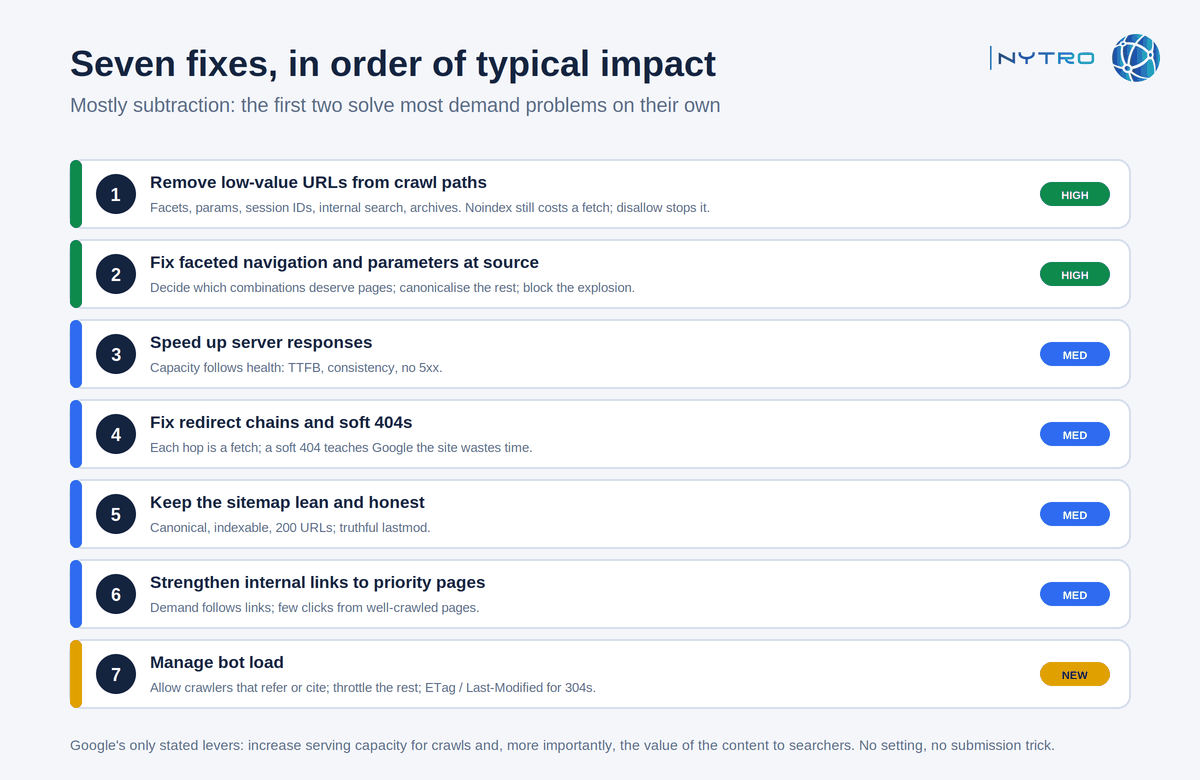
The seven fixes above are ordered by the impact they usually have; the first two solve most demand problems on their own.
- Remove low-value URLs from crawl paths. Faceted navigation, sort and filter parameters, session identifiers, internal search results, calendar and tag archives, and infinite pagination generate the URLs that consume demand. Consolidate them with canonical tags where they are true duplicates, and stop linking to the ones that should never be crawled. Noindex is not a crawl saver: Google has to fetch a page to see the noindex, so it costs a fetch every time; robots.txt disallow is what stops the fetch, at the price of the page never being indexed.
- Fix faceted navigation and parameters at the source. Decide which facet combinations deserve to exist as indexable pages, canonicalise the rest to their parent, and block the combinatorial explosion in robots.txt. Our guide to the alternative page with proper canonical tag status covers the canonical side, and our note on what large ecommerce sites do differently covers the catalogue case.
- Speed up server responses. Capacity follows health. Time to first byte, consistent response times and an absence of 5xx errors raise the limit; every improvement in server performance is a crawl budget improvement.
- Fix redirect chains and soft 404s. Each hop in a chain is a fetch; a soft 404, a page that returns 200 with “not found” content, is a fetch that teaches Google the site wastes its time. Return real 404 or 410 codes for gone pages and collapse chains to a single hop.
- Keep the sitemap to canonical, indexable, 200 URLs with honest lastmod. The sitemap is Google’s candidate list; a lean, truthful one raises the credibility of everything in it. Our guide to XML sitemap strategy for large sites covers the rules.
- Strengthen internal links to priority pages. Demand follows links. Pages you want crawled often should be reachable within a few clicks from pages Google already fetches often.
- Manage bot load. Allow the crawlers that refer or cite you, throttle or block the ones that only consume, and serve correct caching headers so well-behaved bots can use conditional requests instead of full re-fetches. This is the fix the 2026 rewrite made official, and the next section explains why.
Fixes one, two and five are inventory rules, and inventory rules drift: a new facet, a plugin update, a template change reintroduces the URLs you removed. NytroSEO keeps the canonical hints and sitemap scope consistent by rule and monitors the indexing statuses that reveal drift; it does not change server performance or URL architecture, which remain platform work. Book a strategy meeting with the NytroSEO team if you manage a large site or a client portfolio and want the inventory audit run as one project.
AI crawlers and seo crawl budget in 2026
Seo crawl budget used to be a conversation about Googlebot alone. Two facts changed that.
Google’s rewritten guidance states that a site’s crawl capacity is shared across all of Google’s crawlers. Google-Extended, the token that governs use of content for Google’s AI training, and Google’s other fetchers draw on the same capacity as Googlebot’s search crawling. Allowing everything is a choice with a cost; the guidance now says so.
Outside Google, the load is larger and less efficient. Cloudflare’s July 2026 announcement of its crawler-category controls reported that more than half of AI crawler requests re-fetch pages that have not changed, and that AI training requests had grown to roughly half of all crawler traffic on its network. Those requests do not consume Google’s budget directly, but they consume the server capacity that Google’s capacity limit is measured against. A server slowed by AI crawlers re-fetching unchanged pages responds more slowly to Googlebot, and Google lowers the limit.
The practical response has three parts. Decide crawler by crawler which AI bots you want: the search-and-cite crawlers that can send visits and name your brand are worth their fetches; training-only crawlers may not be; our guide to allowing AI crawlers while blocking AI training covers the separation. Serve caching headers, ETag and Last-Modified, so that any bot honouring conditional requests gets a 304 instead of a full page. And watch the bot breakdown in your logs monthly, because the mix changes: a crawler that was negligible last quarter can be a material share of load this one.
None of this argues for blocking AI crawlers wholesale. A page that AI search crawlers cannot fetch cannot be cited, and citations are now a channel. It argues for treating crawler access as an allocation decision, which is what the phrase crawl budget always meant.
Who should and should not act on this guide
- Under a few thousand pages, content changing infrequently, indexed within days: crawl budget is not your problem. Spend the time on content, links and structure.
- Ten thousand or more pages changing daily, or a large ecommerce or classifieds site with facets: run the measurement section monthly and the fixes in order.
- Any size, with a large and growing “discovered, currently not indexed” count: that is Google’s own signal that demand is the constraint; start with fixes one, two and six.
Frequently Asked Questions
Crawl budget is the set of URLs Googlebot can and wants to crawl on a site in a given period. Google defines it through the crawl capacity limit, the parallel connections and fetch delay your server can sustain, and crawl demand, how much Google wants to fetch given popularity, freshness and content value. The lower of the two sets the ceiling, and each hostname has its own.
Rarely. Google’s guidance says the sites that should care are those with more than a million unique pages changing weekly, ten thousand or more pages changing daily, or a large portion of URLs classified as discovered, currently not indexed. Sites with a few thousand infrequently changing pages are crawled efficiently without any budget work.
Open the Crawl Stats report under Settings to see total crawl requests, download size, average response time, host status and breakdowns by response code, file type, purpose and Googlebot type over ninety days. Read it alongside the Page indexing report’s discovered queue, and confirm which URLs and bots consumed capacity in your server logs.
Indirectly, yes. Google’s July 2026 guidance states that crawl capacity is shared across all of Google’s crawlers, and third-party AI crawlers consume the same server capacity Google measures when setting its limit. Cloudflare reports that over half of AI crawl requests re-fetch unchanged pages, which slows responses and can lower Googlebot’s crawl rate.
Remove low-value URLs from crawl paths: canonicalise or block faceted and parameter variants, stop linking to internal search and archive URLs, fix redirect chains and soft 404s, and keep the sitemap to canonical indexable URLs. That raises demand for the pages that matter. Faster, error-free server responses raise the capacity limit itself.
Ready to find out whether crawl budget is really your problem?
Google’s rewritten guidance makes the test simple: read Crawl Stats beside the discovered queue, then fix capacity, demand or neither. The inventory rules that keep demand pointed at the right pages are the part that drifts. Sign up for free to have NytroSEO keep canonical hints, sitemap scope and metadata consistent across every page, or book a strategy meeting if you manage a large site or a client portfolio and want the crawl budget audit run as one project.