Last updated: September 21, 2026
Microsoft Copilot AI Search Optimization is the work of being retrieved and cited when Copilot answers a question with web content. The retrieval layer is Bing’s index: Copilot grounds its answers in Bing, so a page that Bingbot cannot fetch or that Bing has not indexed cannot be cited, however well it performs in Google. That makes Copilot the most measurable of the major assistants, because since February 2026 Bing Webmaster Tools has shown site owners exactly which pages Copilot cites and which internal queries it used to find them, data that neither Google nor OpenAI has published. This guide explains how Copilot selects sources, how to read Bing’s AI Performance report, which content patterns earn citations, where Copilot SEO differs from optimising for Google’s AI Mode, and a ten-point checklist you can complete in a week.
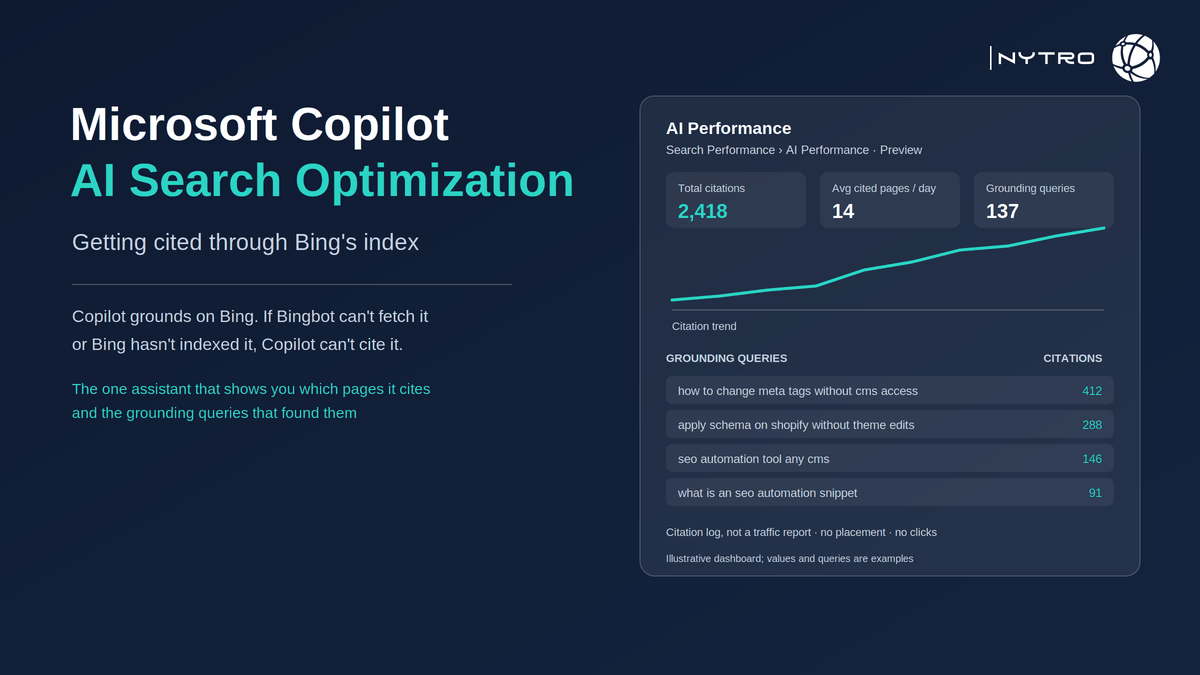
The reporting is the reason to take Copilot seriously as a channel you can manage. Search Engine Land reported the launch of AI Performance in Bing Webmaster Tools in February 2026: a dedicated dashboard showing where and how often a site’s content is cited in AI-generated answers across Microsoft Copilot, Bing’s AI summaries and selected partner integrations, with total citations, average cited pages per day, grounding queries, page-level citation activity and trends over time. Microsoft expanded the report in June 2026 with intent labels, topic groupings, citation share and comparison tools.
If you want the page-level layer that Bing and Copilot read kept consistent automatically while you work through this guide, sign up for free and NytroSEO will start from your sitemap.
Two caveats from Microsoft belong at the top rather than in a footnote. As PPC Land summarised, the citation counts show how often content was referenced as a source, without indicating placement or presentation within an answer; and Microsoft has said the grounding queries are a sample of citation activity rather than the complete set, and that the report does not reflect page importance, ranking or click-through. It is a citation log, not a traffic report, and there is no API for it yet.
Lee Agam, founder and CEO of NytroSEO, sees Copilot as the channel where the excuse “we cannot measure AI visibility” stopped being true first. In his experience, teams that verify a site in Bing Webmaster Tools for the first time are surprised twice: first that Copilot is already citing them, usually from a handful of pages, and second that the grounding queries look nothing like their keyword list, because they are the conversational phrasings a model generates rather than what a person types. His advice is to treat the report as a diagnostic in three moves: confirm Bingbot can reach the site and the pages are in Bing’s index, read the grounding queries as a statement of what Bing thinks the site is an authority on, and then bring the metadata and structure of the uncited pages into line with the cited ones, which is rules-based work that should not be done by hand on a large site.
What Microsoft Copilot AI Search Optimization is
Microsoft Copilot AI Search Optimization means structuring a website so that Copilot, Microsoft’s AI assistant across Bing, Windows, Edge and Microsoft 365, retrieves and cites its pages when it answers with web content. Copilot’s web grounding runs through Bing: when a question needs current or external information, Copilot generates one or more grounding queries, runs them against Bing’s index, fetches candidate pages, extracts passages and composes an answer with citations.
Three consequences follow. Bing indexing is the gate; a page absent from Bing is absent from Copilot. Bingbot access is the gate before the gate; a robots.txt rule, CDN setting or bot-management default that blocks Bingbot removes the site from Bing search and from Copilot at once. And the signals Bing uses to rank are the signals Copilot inherits, so classic Bing SEO, indexable pages, clear titles and descriptions, structured data, authority and freshness, is most of the work.
The vocabulary varies. Some practitioners say Microsoft Copilot Search Optimization, others Copilot Answer Engine Optimization or Copilot LLM SEO; all describe the same thing, being the source Copilot grounds on and cites. Whatever the label, the work is Bing-first.
What the discipline is not: it is not a separate content track for Copilot, not a special file, and not something you can do without a verified Bing Webmaster Tools property, because that is where the only official evidence lives.
Microsoft Copilot AI Search Optimization starts with Bing: indexing, IndexNow and Webmaster Tools
The sequence is fixed: verify, index, refresh, then read the report.
Verify the site in Bing Webmaster Tools. Verification is free and, for sites already verified in Google Search Console, can import the property. Once verified, submit the XML sitemap and confirm in the Site Explorer and indexing reports that the pages you care about are indexed. Sites that have never paid attention to Bing often find a meaningful share of their pages missing, usually because of crawl errors or blocked resources that Google tolerated.
Adopt IndexNow. IndexNow is a protocol Bing supports that lets a site notify the search engine the moment a page is added, updated or removed, so the index reflects the change within hours rather than after the next scheduled crawl. Google does not support it, which is why many sites have never set it up; for Copilot it matters, because a stale index means Copilot citing last year’s figures. Most CMS platforms have a plugin or native integration, and Cloudflare offers it at the CDN layer.
Then open Search Performance and AI Performance. Read it in four passes:
- Total citations and the trend: is Copilot citing you at all, and is it rising or falling.
- Page-level citation activity: which URLs carry the citations. Early accounts consistently show a small number of pages carrying most of the total, which tells you which pages Bing already trusts.
- Grounding queries: the conversational phrasings Copilot used to find you. Compare them with the topics you intended the site to be known for; gaps are content gaps.
- Average cited pages per day: whether the spread is widening as you improve uncited pages.
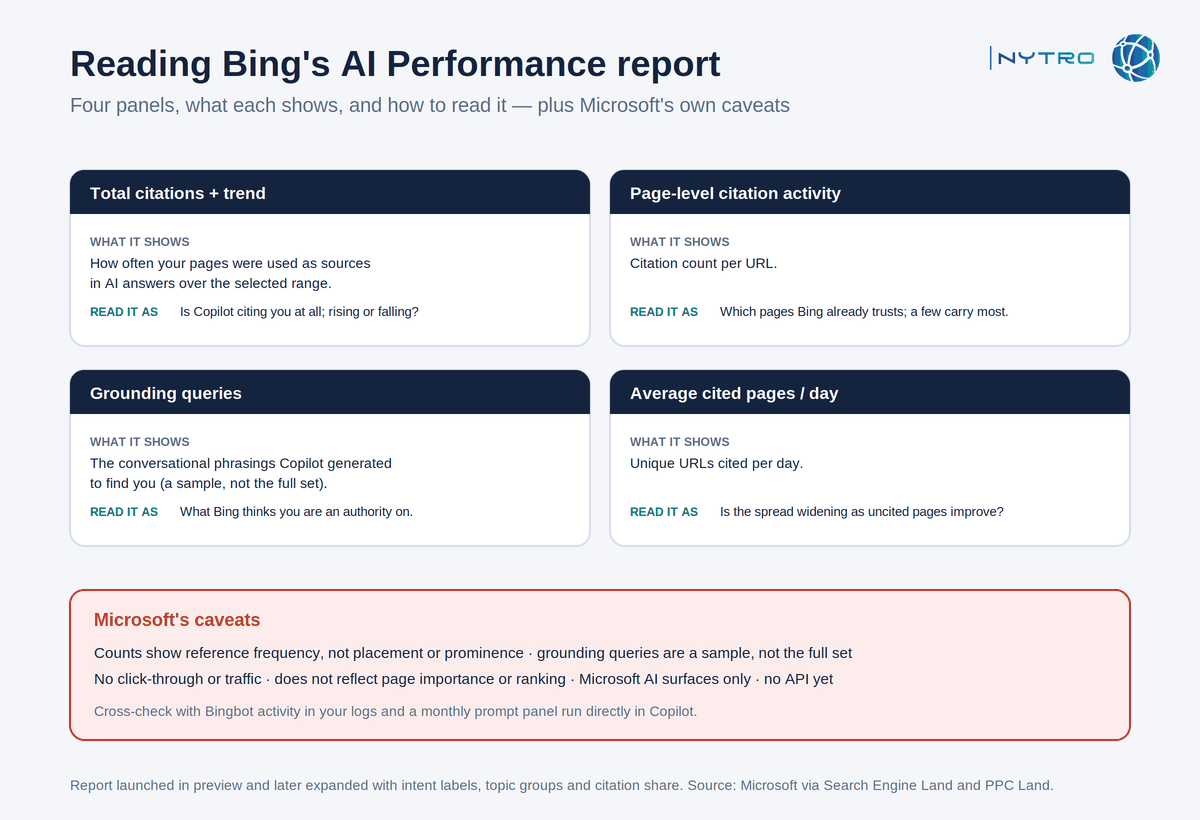
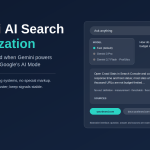
The annotated panels above show how to read each part of the report; the caveats on the right are Microsoft’s own.
Reading the grounding queries: a worked example
Suppose a software company expects to be cited for “SEO automation platform” and finds instead that its grounding queries cluster around “how to change meta tags without CMS access” and “apply schema on Shopify without theme edits”. That is not a failure of the report; it is Bing telling the company which questions its pages actually answer well. The right response is twofold. First, protect the pages that earn those citations: keep their titles, descriptions and structure stable, because they are working. Second, look at the intended topic and ask why no page answers it in a citable form; usually the platform page describes features rather than answering the question a buyer asks, and a direct definition in the opening paragraph, a comparison table and a named author close the gap. Re-check the grounding queries after thirty days and after IndexNow has pushed the changes.
The absence of an API matters for agencies. Every client property has to be opened in the interface and exported by hand, so build the monthly export into the reporting routine now and expect the API, which Microsoft has said is on its backlog, to arrive without a date.
Keep the caveats in view: the counts do not indicate placement, the grounding queries are a sample, nothing in the report shows clicks or traffic, and the report covers Microsoft’s AI surfaces only. Cross-check with your own referrer data and with Bingbot activity in your logs.
Copilot Conversational Search Optimization: content patterns that get cited
The pages Copilot cites share the structure every extraction-based system favours, and the grounding-query data lets you see it working.
Direct answers under question-shaped headings. A grounding query is conversational; the page that answers it in the first sentence under a heading that matches its shape is the page that gets lifted. Our guide to Perplexity AI search optimization describes the same pattern for a different engine, and it transfers.
Tables and lists for comparisons and specifications. Copilot cites structured comparisons readily because they are easy to extract and easy to attribute.
Cited statistics with dates. A figure with a source and a date next to it is more citable than an unsourced claim, and freshness, delivered through IndexNow, keeps the cited figure current.
Named authors and consistent entity data. Organization and Person structured data, one brand name everywhere, and sameAs links to verified profiles make attribution unambiguous. Our guide to ranking on ChatGPT and getting cited covers the entity side for another engine; the requirements are the same.
Accurate titles and descriptions. Copilot Conversational Search Optimization depends on Bing understanding what a page is about before it fetches the passage; a title that matches the page and a description that summarises it are the first signals Bing reads, and the ones most likely to drift on a large site.
Copilot LLM SEO vs Google AI Mode: what differs
The fundamentals are shared; four things differ, and they decide where to spend effort.
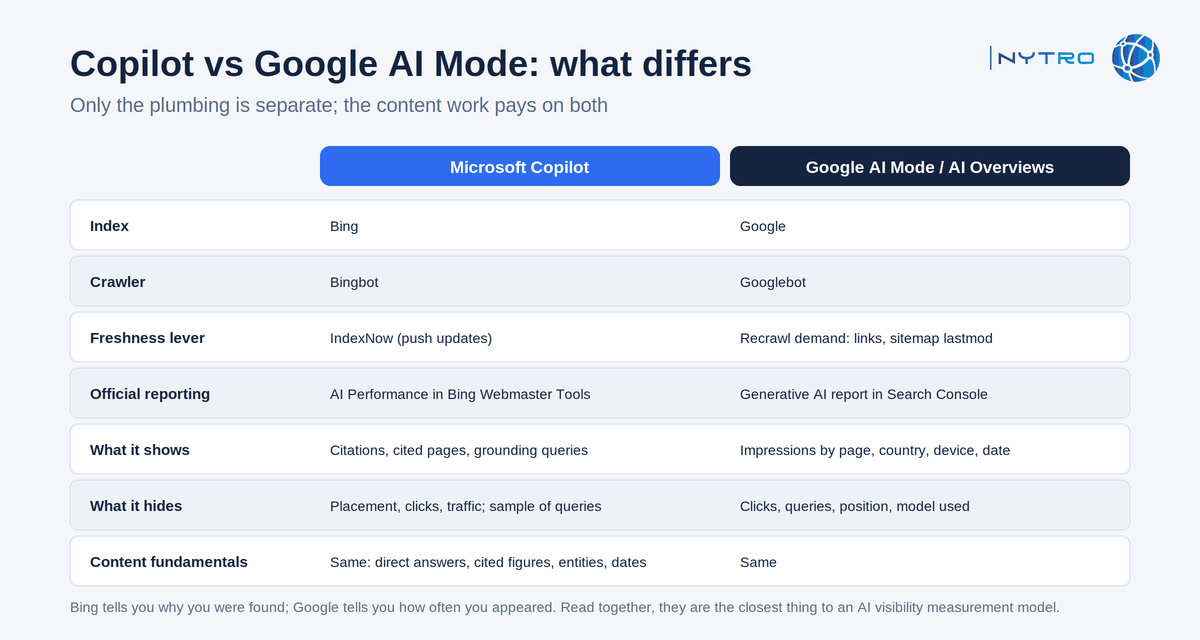
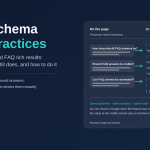
The comparison above lists the four operational differences; the content fundamentals are the same on both sides.
The index. Copilot uses Bing; AI Mode uses Google. A page can be indexed in one and not the other, so Copilot LLM SEO starts with a Bing indexing audit that most sites have never run.
The crawler. Bingbot for Copilot, Googlebot for AI Mode. Bot-management defaults and robots.txt rules frequently treat them differently, often by accident.
Freshness. Bing supports IndexNow; Google does not. For Copilot, pushing updates is a lever; for Google, it is recrawl demand earned through links and sitemap lastmod.
Reporting. Bing’s AI Performance report shows citations, cited pages and grounding queries; Google’s Search Console Generative AI report shows impressions in AI Overviews and AI Mode by page, with no queries. Bing tells you why you were found; Google tells you how often you appeared. Together they are the closest thing to a measurement model for AI visibility that exists, and our guide to getting AI-search ready with metadata and structured data sets both in the wider context.
One more difference is cultural rather than technical. Bing has historically been more responsive to explicit on-page signals, clear titles and descriptions, structured data, sitemap hygiene, than Google, which leans harder on links and behavioural signals. That makes the metadata layer proportionally more valuable for Copilot Answer Engine Optimization than for its Google equivalent, and it is the layer that drifts fastest on large sites.
What does not differ: extractable structure, cited figures, named expertise, consistent entities, and the requirement that the page be reachable. The content work you do for one pays on the other; only the plumbing is separate.
A Microsoft Copilot AI Search Optimization checklist you can run this week
Ten checks, in order, from access to measurement.
- Confirm Bingbot is allowed in robots.txt, in CDN bot rules and in any bot-management defaults; fetch a key page as Bingbot and confirm a 200 with full HTML.
- Verify the site in Bing Webmaster Tools and submit the XML sitemap.
- Check indexing coverage for your top fifty pages; fix crawl errors and blocked resources.
- Set up IndexNow through your CMS plugin, CDN or a direct integration, and confirm submissions are accepted.
- Open AI Performance; record total citations, cited pages and grounding queries as a baseline.
- Compare the grounding queries with your intended topics; list the gaps.
- For the top five uncited pages you expected to be cited, rewrite the opening to answer directly under a question-shaped heading, and add a table or list where the content compares or specifies.
- Confirm Organization and Person structured data on every page and one consistent brand name.
- Check titles and descriptions on the cited and uncited pages; align the uncited ones with the pattern that works, by rule rather than by hand.
- Set a monthly review: report, grounding queries, Bingbot log activity, and a fixed prompt panel of twenty questions run in Copilot to see citations and mentions directly.
Items eight and nine are the layer NytroSEO applies and monitors across a site through its header snippet, scoped by sitemap, with a change log; it does not write the answers or fix rendering. Our guide to allowing AI crawlers while blocking AI training covers item one in detail. Book a strategy meeting with the NytroSEO team if you manage a large site or a client portfolio and want the ten checks run across it.
Frequently Asked Questions
Copilot grounds its web answers in Bing’s index: it generates grounding queries, runs them against Bing, fetches candidate pages and extracts passages. It favours pages that are indexed in Bing, load cleanly, answer directly under clear headings, and carry authority signals such as cited sources and named authors. A page not in Bing’s index cannot be cited.
Yes, in practice. Verifying your site is free, lets you submit sitemaps and use IndexNow to push updates, and unlocks the AI Performance report, the only official view of which pages Copilot cites and which grounding queries found them. Without it you are guessing.
The content fundamentals are the same: extractable structure, cited statistics, expert attribution, consistent entities and freshness. The plumbing differs: Copilot relies on Bing’s index and Bingbot, supports IndexNow for fast updates, and reports citations and grounding queries, whereas Google’s AI Mode uses Google’s index and reports impressions only.
Copilot draws on Bing’s index, which is built by Bingbot. Blocking Bingbot in robots.txt, a CDN rule or a bot-management default removes your pages from both Bing search results and Copilot answers, so check every layer where bot rules are set, not only robots.txt.
Open AI Performance in Bing Webmaster Tools for total citations, cited pages and grounding queries; it is a citation log rather than a traffic report. Cross-check with Bingbot activity in your logs and a monthly panel of fixed prompts run directly in Copilot, recording citations and brand mentions.
Ready to make Microsoft Copilot AI Search Optimization measurable?
Copilot is the one assistant that tells you which pages it trusts and how it found them. The work is making the rest of the site match those pages and keeping it that way. Sign up for free to have NytroSEO align titles, descriptions and entity markup across every page automatically, or book a strategy meeting if you manage a large site or a client portfolio and want the Bing and Copilot checklist run as one project.