Last updated: September 23, 2026
An automated seo audit crawls a website on a schedule and reports what is wrong: missing titles, duplicated descriptions, broken canonicals, images without alt text, pages Google has not indexed. SEO automation takes the next step and applies the fix, generating and deploying the metadata, structured data and canonical hints across the pages in scope under rules you approve. Most tools sold as “SEO automation” are audit tools, and most buyers discover the difference only when a report with ten thousand rows lands on a team of three. This guide separates the two, explains the four categories of tool and what each can and cannot do, describes the four mechanisms by which automated tools actually change a page, argues that you still need an audit even when you automate, and ends with a decision matrix by site size and team.
The standard both kinds of tool have to meet is Google’s. Search Essentials require that pages have descriptive titles and descriptions that reflect their content, that structured data describe only what is visible on the page, and that nothing be built to deceive users or search engines. An audit tool measures a site against those requirements; an automation tool has to produce output that satisfies them, page by page, at scale, and the difference between good and bad automation is whether it can.
If you want to see the distinction on your own site, sign up for free and NytroSEO will show you, page by page, the changes it would apply before anything goes live.
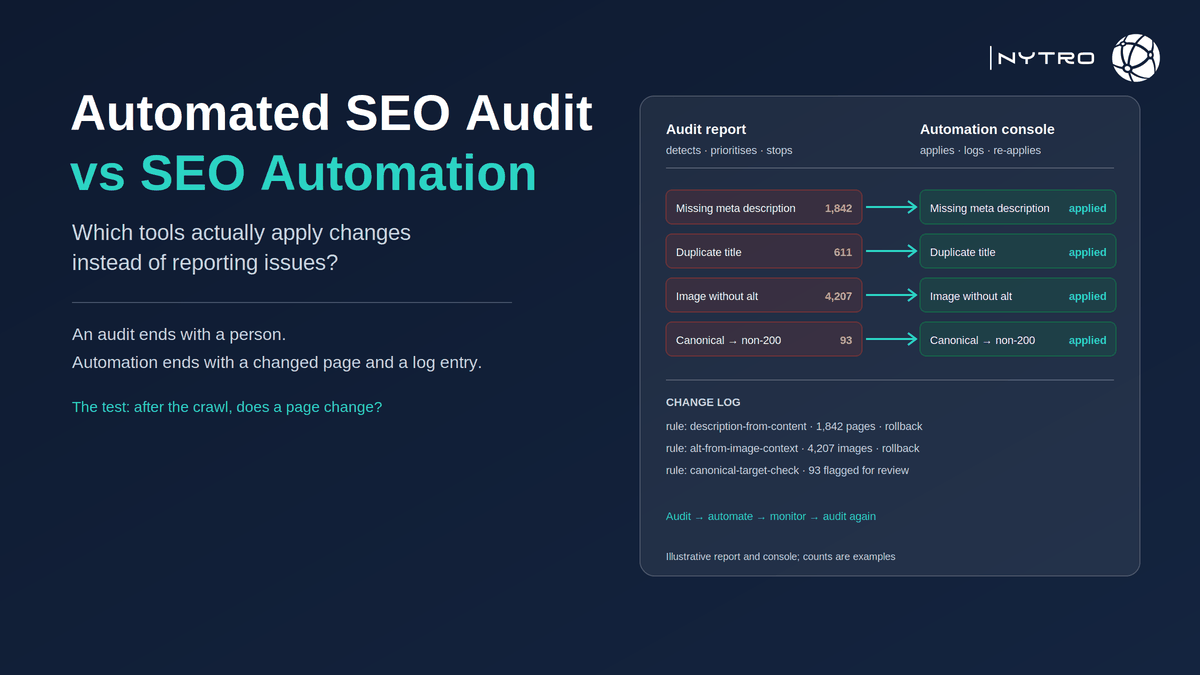
The confusion is understandable. Both kinds of tool crawl the site, both produce a list of issues, and both use the word “automated”. The difference is what happens after the list. An audit ends with a person; automation ends with a change on the page and an entry in a log. On a fifty-page site the difference is a Friday afternoon. On a fifty-thousand-page site it is the difference between a backlog that grows every month and one that clears.
Lee Agam, founder and CEO of NytroSEO, describes the gap between the two as the gap between knowing and doing, and he is careful not to disparage the first. In his experience an audit is the specification: it tells you what the site should look like and where it does not, and no automation should run without one. The failure he sees is not that teams buy audit tools; it is that they buy three of them, produce three overlapping reports, and never clear the findings because clearing them means editing pages one at a time in a CMS that was not built for it. His test for any tool that calls itself automation is simple: after the crawl, does a page change? If the answer is that a person receives a recommendation, the tool is an audit, whatever the label says.
What is the difference between seo automation and seo audits?
An SEO audit is a diagnostic. It crawls the site, checks each page against a set of rules, technical, on-page, structural, and reports the pages that fail, usually ranked by severity. An automated seo audit is the same diagnostic run on a schedule without a person starting it, so that new failures are detected as they appear. Its output is a list.
SEO automation is an intervention. It takes a rule, every indexable page must have a unique title under sixty characters that describes its content, and applies it to every page in scope, generating the missing titles, correcting the duplicates, and re-applying the values if a template or plugin overwrites them. Its output is a changed page and a log entry.
The two are complementary, not competing. The audit defines what “correct” means and finds where the site falls short; automation makes the site correct and keeps it there; and a second audit confirms the automation did what it should. A site that audits without automating documents its decline in detail. A site that automates without auditing has no specification for what the automation should do and no check on whether it did it.
What is the difference between seo automation and seo audits in cost terms? An audit costs the subscription plus the hours to read it. Automation costs the subscription plus the hours to define the rules and review exceptions; the per-page hours disappear. On a small site the audit is cheaper; on a large one the automation is, because the per-page hours are the whole cost.
What an automated seo audit finds (and what it cannot do)
An automatic seo audit is good at anything a crawler can observe about a page and compare with a rule. The list is long and useful:
- Missing, duplicate, over-length or under-length titles and meta descriptions.
- Missing or multiple H1s, skipped heading levels.
- Missing alt attributes, oversized images.
- Canonical tags that are missing, self-inconsistent or point at non-indexable targets.
- Broken internal links, redirect chains, 4xx and 5xx responses.
- Pages excluded from the index, from Search Console’s Page indexing report, and the reasons.
- Structured data that fails validation.
- Slow responses, render-blocking resources, Core Web Vitals in the field.
- Thin or near-duplicate content, by word count or similarity.
What it cannot do is change any of it. It also cannot judge the things that need a person: whether a page is worth having, whether the content is accurate, whether the brand voice is right, whether a link should be earned or a section rewritten. An audit that reports “thin content” on four hundred pages has done its job; the four hundred decisions that follow are editorial.
The backlog problem is structural, not a failure of effort. A large site generates findings faster than a team can clear them by hand: new products, new posts, a theme update, a plugin release, a migration. The audit re-runs, the list grows, and the team prioritises the top fifty forever. That is the gap automation exists to close, and it is why the most useful question to ask about an audit tool is what it hands off to.
Which seo tools actually apply changes instead of reporting issues?
Which seo tools actually apply changes instead of reporting issues? The honest answer is a small minority, and the way to tell is by category rather than by brand. Four categories cover the market.
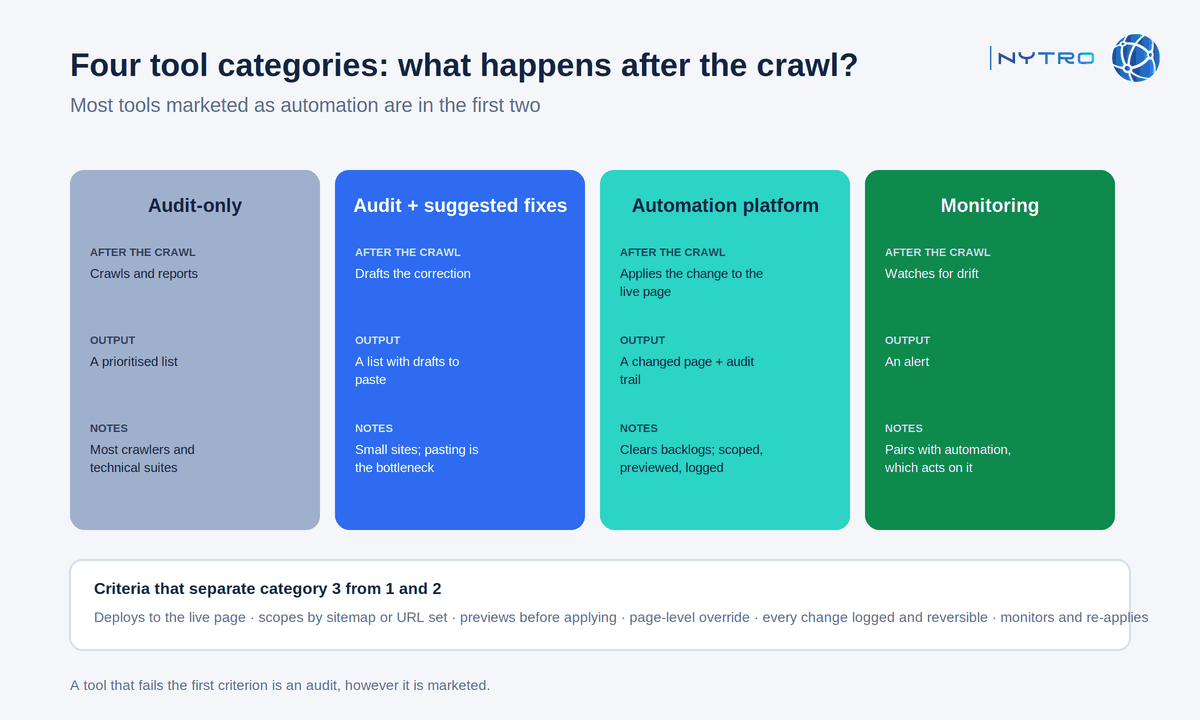
The four categories above are distinguished by what happens after the crawl; most tools are in the first two.
Audit-only tools crawl and report. They are the largest category and include most site crawlers and technical SEO suites. Output: a prioritised list, exportable, sometimes with a task assigned to a person.
Audit tools with suggested fixes go one step further and draft the correction: a proposed title, a rewritten description, a schema snippet. Output: a list with drafts attached, which a person still has to paste into the CMS. Useful on small sites; on large ones the pasting is the bottleneck.
Automation platforms apply the change to the live page. They hold approved rules, generate the per-page values, deploy them through a snippet, plugin, API or edge layer, and let you export the original and optimized value for every page. Output: a changed page and a before-and-after record you can verify. This is the category that clears backlogs.
Monitoring tools alert on drift. They watch for changes to indexing, metadata, crawler access and rankings and raise an alert when something moves. Output: an alert. They pair naturally with automation, which is what acts on the alert, and our guide to automated SEO monitoring covers the pairing.
Evaluation criteria that separate the third category from the first two: does the tool deploy to the live page without a person pasting; does it scope by sitemap or URL set; does it preview a rule’s output before applying it; can any page be overridden by hand; can the original and optimized values be exported for every page; does it monitor for drift and re-apply. A tool that fails the first criterion is an audit, however it is marketed. Our guide to automated SEO software sets out a twelve-point checklist for the third category.
How do automated seo tools apply changes to a website?
How do automated seo tools apply changes to a website? Through one of four mechanisms, and the mechanism decides what the tool can change and what access it needs.
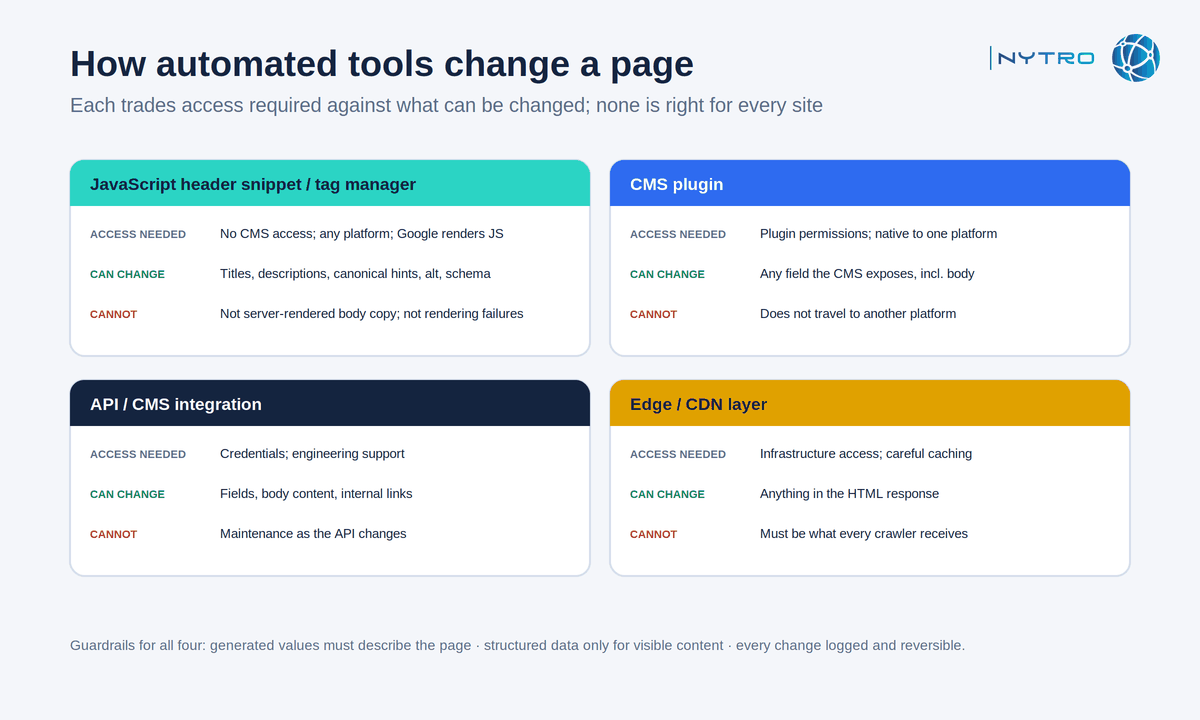
The four mechanisms above trade off access required against what can be changed; none is right for every site.
A JavaScript header snippet or tag-manager tag runs when the page loads and rewrites head elements: title, meta description, canonical link, structured data, image alt attributes. It needs no CMS access and works on any platform, which is why agencies favour it for client sites. Google renders JavaScript and reads head elements from the rendered page, as its JavaScript SEO documentation describes, so the changes are indexed; the snippet must load early and must not leave conflicting duplicates of the server-rendered tags. It cannot change server-rendered body copy, and it cannot fix a page that fails to render in the first place.
A CMS plugin writes to the stored fields inside the content system. It is native to one platform, needs plugin permissions, and can edit any field the CMS exposes, including body content. It does not travel to the next platform.
An API or CMS integration writes fields through the platform’s interface. It suits publishers with engineering support and can extend to body content and internal links. It needs credentials and maintenance as the platform’s API changes.
An edge or CDN layer modifies the HTML in transit between the origin and the visitor. It is platform-independent and can change anything in the response, but it needs infrastructure access, careful caching, and confidence that the modified response is what every crawler receives.
NytroSEO uses the first mechanism: a snippet installed once in the header, processing on its cloud platform, changes scoped by sitemap, previewed, overridable per page, with original and optimized values exportable. Stated plainly, it applies titles, descriptions, canonical hints, alt text and structured data; it does not fix rendering or server problems, does not write body copy, and inserts body links only where that is configured. Our guide to installing the NytroSEO snippet covers the mechanics.
Whatever the mechanism, three guardrails apply. The generated value must describe the page; automation that stuffs or duplicates has automated a spam risk. Structured data must describe visible content only, and should be checked with the Schema Markup Validator. And every change must be visible and correctable, by exporting the before-and-after values and by editing or switching off the rule, because a rule that is wrong is wrong on every page at once.
Seo automation without audits: why the automated seo audit still matters
Seo automation without audits is possible and it is a mistake, for three reasons.
The audit sets the scope. It tells you which pages have which problems, which lets you define rules that address them and exclude the pages that should not be touched. Automation applied to a site nobody has audited applies rules to problems nobody has confirmed exist.
The audit catches what automation should not touch. Thin content, wrong content, duplicated pages that should be merged, site architecture that buries important pages, rendering failures: these are findings that need a person, and an audit is how they surface. Automation that runs over them makes the metadata on a bad page consistent, which is not the same as fixing the page.
The audit verifies the automation. After the rules run, a second crawl should show the findings cleared and nothing new introduced. Without it, you are trusting the export to describe the live site, and the live site is what Google reads.
The efficient model is a loop: audit to define the rules, automate to clear the backlog, monitor to catch drift, audit again to verify and find the next set. Our guide to when to automate SEO and when to keep it manual works through which findings belong in which half of the loop, and our older note on whether an SEO team should invest in tools predates the automation category but still frames the buying decision usefully.
A decision matrix by site size and team
- Under a thousand pages, one person: an audit tool and a checklist. The backlog is small enough to clear by hand, and the findings that matter are editorial.
- One to ten thousand pages, a small team: an audit tool plus automation for the metadata layer. The per-page work is now the majority of hours; automate it and spend the people on content and structure.
- Over ten thousand pages, or an agency portfolio: audit, automation and monitoring, as a loop. Hand editing is not a strategy at this scale, and drift between audits is guaranteed. Book a strategy meeting with the NytroSEO team if this is your situation and you want the loop set up as one project.