Last updated: September 30, 2026
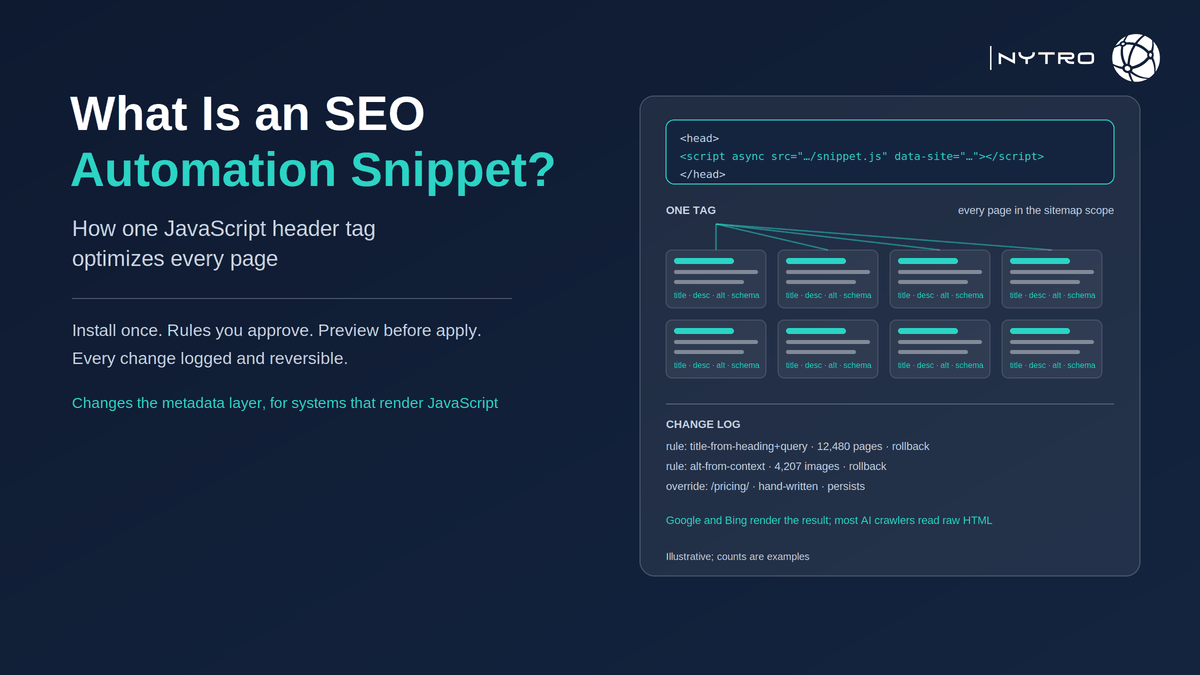
What is an SEO automation snippet? It is a small JavaScript tag installed once in a website’s header that applies approved on-page optimisations when each page loads: titles, meta descriptions, canonical hints, image alt attributes and structured data, generated by rules and delivered without anyone editing the page in the CMS. It is the mechanism behind snippet-based platforms such as NytroSEO, and it is the reason an agency can optimise a client site it does not have CMS access to, or a large site can keep thousands of pages consistent after a template change. This guide explains what the snippet does and how search engines read the result, how it affects visibility, the install-to-optimise workflow, the agency and multi-site case, and the guardrails and limits that separate a safe snippet from a liability.
Google’s documentation is the basis for the central question, whether tags added by JavaScript count. Google’s JavaScript SEO basics describe a two-phase process: Googlebot fetches the initial HTML, queues the page for rendering, and once rendered with its evergreen Chromium, reads the rendered DOM, including title, meta description, structured data and links added by JavaScript. The same documentation is precise about one element: Google can process a rel=canonical link added by JavaScript but does not recommend it, and if a canonical is set or changed after rendering it must not diverge from the one in the initial HTML, or Google may fall back on other signals.
If you want to see what the snippet would change on your own pages before it changes anything, sign up for free and NytroSEO will show you a page-by-page preview.
The honest framing from the start: a snippet changes the metadata and structured-data layer of a page, and it changes it for systems that render JavaScript. Google renders. Bing renders. Most third-party AI crawlers fetch raw HTML and do not execute scripts, so for those crawlers a JavaScript-only change is invisible unless the same values are also served in the initial HTML. That single fact decides what a snippet is for, and the rest of this guide is built around it.
Lee Agam, founder and CEO of NytroSEO, describes the snippet as a way of making a decision once and having it hold everywhere. In his experience, the problem it solves is not that teams do not know what a good title is; it is that on a site with ten thousand pages the good title exists on the two hundred someone edited and nowhere else, and the next theme update erases even those. A rule that generates the title from the page’s content and the queries it already earns, applied at load and re-applied when the page changes, is the difference between an intention and a fact. He is equally clear about what the snippet is not: it does not fix a page that fails to render, does not write body content, and does not reach crawlers that never run the script, which is why he tells clients to treat it as the consistency layer over a healthy site rather than a substitute for one.
What is an SEO automation snippet, technically?
An SEO automation snippet is a script tag, a few lines long, placed in the head of every page, either directly in the site template or through a tag manager. When a page loads, the script requests the approved values for that URL from the automation platform, then applies them to the document: it sets or replaces the title element, the meta description, image alt attributes, and inserts or updates structured data, and, where configured, adjusts canonical hints and internal-link markup. The rules that generate those values live on the platform, not on the page; the snippet is the delivery.
Three properties distinguish a well-designed snippet from an arbitrary script that rewrites tags:
- Scope. The platform decides which URLs are in scope, usually from the sitemap, and the snippet does nothing on pages outside it.
- Precedence and de-duplication. The snippet replaces the existing element rather than adding a second one, so the rendered page has one title, one description and one canonical, not two.
- Timing. The script loads early and asynchronously, so the head is updated before rendering completes and without delaying the visible page.
NytroSEO’s snippet follows that pattern: one tag, processing on its cloud platform, values previewed before rules apply, every change logged and reversible. Our guide to installing the snippet in the page header covers the install itself; this guide covers what it means.
How do SEO automation snippets impact my website’s visibility?
How do SEO automation snippets impact my website’s visibility? Through the elements they change and the systems that read those elements, and it is worth being exact about both.
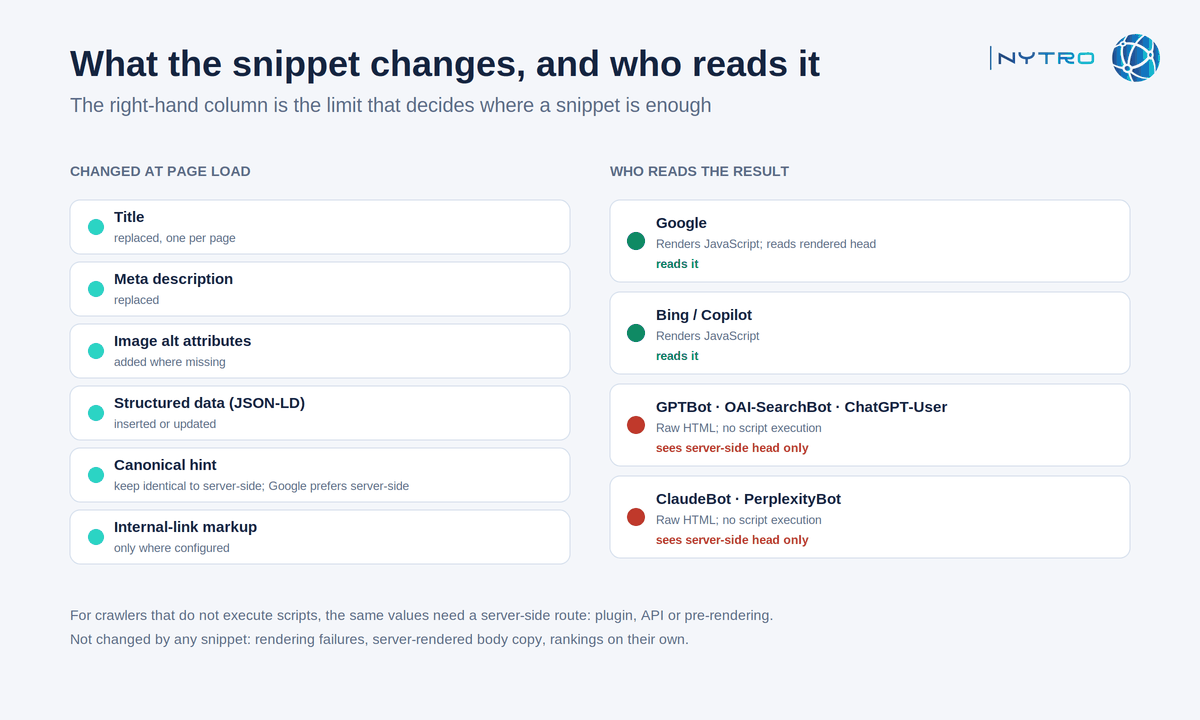
The diagram above shows what the snippet changes and who reads it; the right-hand column is the limit that decides where a snippet is enough and where server-side output is needed.
What improves. Titles and descriptions that match the page and the queries it earns raise the click-through on the search result and tell Google’s systems what the page is about before they read it. Alt text where none existed makes images indexable and the page more accessible. Structured data from visible fields, Organization, Person, Article, FAQPage, Product, gives search engines the entity and content map that rich features and AI answers draw on. Consistency across thousands of pages is itself a signal: Google’s AI features attribute impressions to canonical URLs, and drifted metadata corrupts both measurement and retrieval.
What is read, by whom. Google renders JavaScript and reads the rendered head, so every element above is picked up, subject to the canonical caveat: keep the JavaScript canonical identical to the server-side one, or set canonicals server-side. Bing also renders. Most third-party AI crawlers, including the search and user-fetch agents from OpenAI and Anthropic, retrieve raw HTML and do not execute scripts; they see the server-rendered head, not the snippet’s changes. For sites where citation by those assistants matters, the values the snippet generates need a server-side route to the initial HTML as well, through a plugin, an API or pre-rendering. Our guide to JavaScript SEO for AI agents covers what each crawler can and cannot see.
What does not change. Rankings are not moved by the snippet itself; they move when the page it describes is worth ranking and the description is accurate. A snippet cannot fix a page that fails to render, cannot change server-rendered body copy, and only inserts links where that has been configured and confirmed. Any tool that claims a snippet alone lifts rankings is describing a metadata layer as if it were a content strategy.
Update seo tags without editing code: the workflow
To update seo tags without editing code, the sequence is the same on every platform, and it is designed so that nothing reaches a live page without a person having seen it.
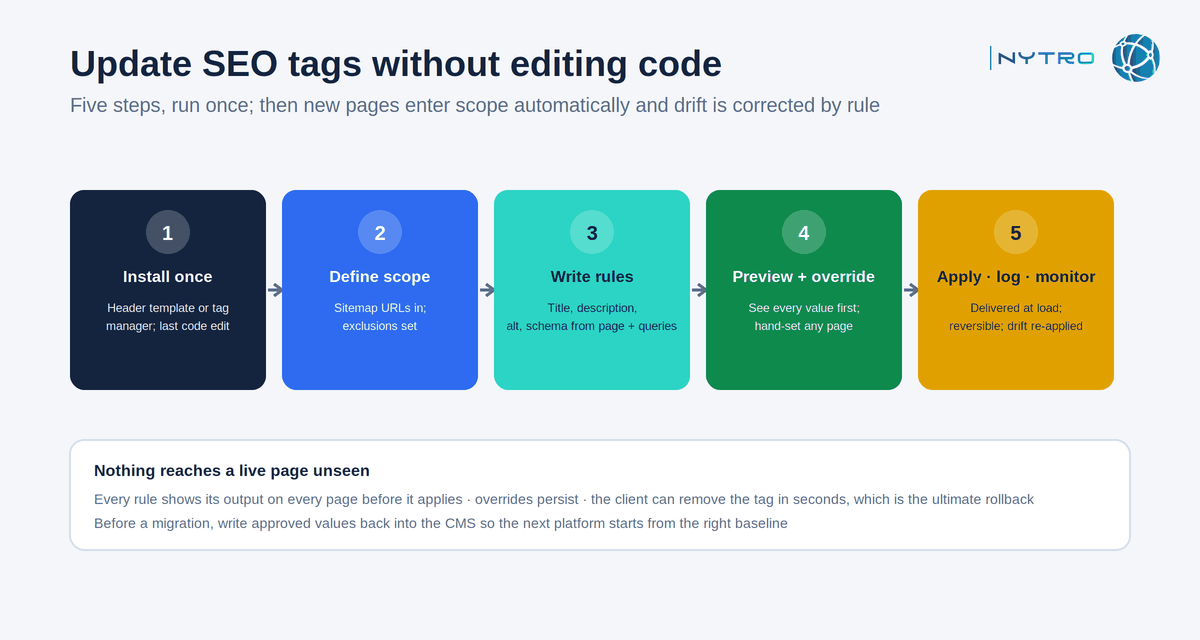
The five steps above run left to right once; after that, new pages enter scope automatically and drift is corrected by rule.
- Install once. Paste the tag into the site header template or add it as a tag in the tag manager. That is the last time anyone edits code.
- Define scope. The platform reads the sitemap and lists the URLs in scope. Exclusions are set here: utility pages, pages a person will always hand-edit, sections that should not be touched.
- Write rules. For each element, a rule generates the value from page content and, where connected, from Search Console queries: a title pattern that uses the page’s heading and the query it ranks for; a description drawn from the opening paragraph; alt text from image context; FAQPage markup from visible question headings; Organization and Person markup from a single approved source.
- Preview and override. Every rule shows the value it would produce on every page before it applies. Pages that need hand-written values get them here, and the override persists.
- Apply, log, monitor. The snippet starts delivering the values. Every change is logged with a timestamp; any change or rule can be rolled back; a drift monitor re-fetches rendered pages and re-applies approved values when a template or plugin overwrites them.
Can I change meta tags without editing my cms? Yes, and that is the practical answer to the question most agencies ask: the CMS field can stay as it is, the snippet supplies the rendered value, and the two never need to agree because the rendered one is what Google reads. On a site that will be migrated, though, plan to write the approved values back into the CMS before the move, so the next platform starts from the right baseline.
Can seo changes be deployed without cms access? Agency and multi-site use
Can seo changes be deployed without cms access? They can, and this is the case the snippet was designed for. An agency managing forty client sites on twelve platforms cannot maintain twelve sets of plugin skills and forty logins. A single tag, installed once per site by whoever holds the header or the tag manager, gives the agency one console for all forty: shared rule libraries, per-site scope, per-page overrides, and a change log the client can audit.
Three practices keep the arrangement safe for both sides. Permissions: the client keeps control of the tag itself and can remove it in seconds, which is the ultimate rollback. Transparency: the change log is visible to the client, so every value applied to their site is on record. Boundaries: the agency agrees in writing which elements the snippet manages and which the client’s own team owns, so a hand-edited hero page is never overwritten by a rule.
Our guides to automated SEO software and to meta-tag automation for large websites cover the wider platform and the large-site case; our page for website developers covers the install on custom stacks.
What is an SEO automation snippet? Safety, performance and guardrails
A seo automation snippet is safe when it is small, fast, honest and reversible, and dangerous when it is any of the opposites.
Performance. The script should be a few kilobytes, load asynchronously, and change only the head, so it causes no layout shift and adds no measurable delay to the visible page. Test it: run a page with and without the tag through a performance tool such as PageSpeed Insights and confirm the difference is negligible. If the tag is delivered through a tag manager, load it in the head container rather than the body, and give it a firing priority above marketing tags so the head is updated before rendering completes.
Honesty. The values a rule generates must describe the page. Google’s Search Essentials require descriptive, accurate titles and descriptions and structured data that reflects visible content; a snippet that stuffs keywords, generates near-duplicate descriptions, or marks up content that is not on the page has automated a spam risk; validate generated markup in the Schema Markup Validator before a rule goes live, and Google’s spam policies now extend to content built to manipulate AI answers. Never use a snippet for cloaking: what the crawler sees must be what the user sees.
Canonical discipline. Given Google’s stated preference, set canonicals server-side wherever you can and use the snippet only to keep the JavaScript value identical to it, or to add a self-referencing canonical where none exists. Never let a script point a canonical somewhere the initial HTML does not.
Reversibility. Every change logged; every rule and every page revertible; the tag itself removable. If a rule is wrong, it is wrong on every page at once, and the rollback has to be as fast as the deployment was.
When not to use it. A site that fails to render for Googlebot needs rendering fixed first. A site whose main visibility goal is citation by assistants that do not execute JavaScript needs a server-side route for the same values. And a site that can be fully rebuilt with the approved values in its templates does not need a snippet at all; the snippet is for the sites that cannot. Book a strategy meeting with the NytroSEO team if you manage a large site or a client portfolio and want the snippet’s scope, rules and delivery route decided as one project.
What is an SEO automation snippet? A pre-install checklist
- Does the site render for Googlebot? Fetch a key page with URL Inspection and confirm.
- Where will the tag live: template header or tag manager? Who controls it?
- Which URLs are in scope, and which are excluded?
- Are canonicals set server-side? If not, plan to.
- Which crawlers matter beyond Google and Bing, and do they render? If not, what serves them?
- Who reviews previews, and who can roll back?