Last updated: October 1, 2026
The best seo automation tools are the ones that automate the part of the work you are actually stuck on, and most buyers discover after purchase that they bought the wrong part. The category is sold with one word, automation, and covers four different jobs: crawling a site and reporting what is wrong, watching for changes and alerting, drafting and optimizing content, and applying on-page changes to the live site without a person editing each page. Only the last one clears a backlog. This guide sorts the market by that distinction rather than by brand, sets out the twelve features the best automated seo software should have, names the established tools in each category with their capabilities stated as their vendors document them, explains where NytroSEO fits and where it does not, and ends with a two-week evaluation you can run on any candidate.
Whatever the tool, the output has to meet Google’s standard. Search Essentials require descriptive, accurate titles and descriptions, structured data that describes only visible content, and nothing built to deceive users or search engines; Google’s spam policies now extend explicitly to content built to manipulate AI answers. A tool that mass-generates near-duplicate metadata or marks up content that is not on the page has automated a spam risk, and no amount of automation compensates for a page that fails Google’s people-first content guidance.
If you would rather see what an apply-changes platform would do on your own pages before you compare vendors, sign up for free and NytroSEO will show you a page-by-page preview.
A note on method, because comparison articles from tool vendors, this one included, deserve scepticism. No tool is ranked here. Tools are grouped by category, described by capability, and named only where the capability is stable and widely documented; pricing tiers change often enough that none are quoted, and the reader should verify every capability against the vendor’s current documentation before buying. Independent review platforms such as G2’s SEO software category are useful for current user feedback across vendors.
Lee Agam, founder and CEO of NytroSEO, tells buyers to ask one question of every tool before reading its feature list: after the crawl, does a page change? In his experience most tools called automation stop at a report, which is valuable and is not automation, and the teams that end up with three overlapping subscriptions bought three reports. His second question is what the tool cannot do, because the answer reveals whether the vendor understands its own product; a platform that applies metadata should say plainly that it does not fix rendering or write body copy, and a crawler should say plainly that it does not change anything. He is candid that NytroSEO belongs in one category only, the apply-changes layer, and that a serious programme usually runs a crawler, a monitor and an apply-changes platform together rather than expecting one product to do all three.
What “seo automation” should mean before you compare the best seo automation tools
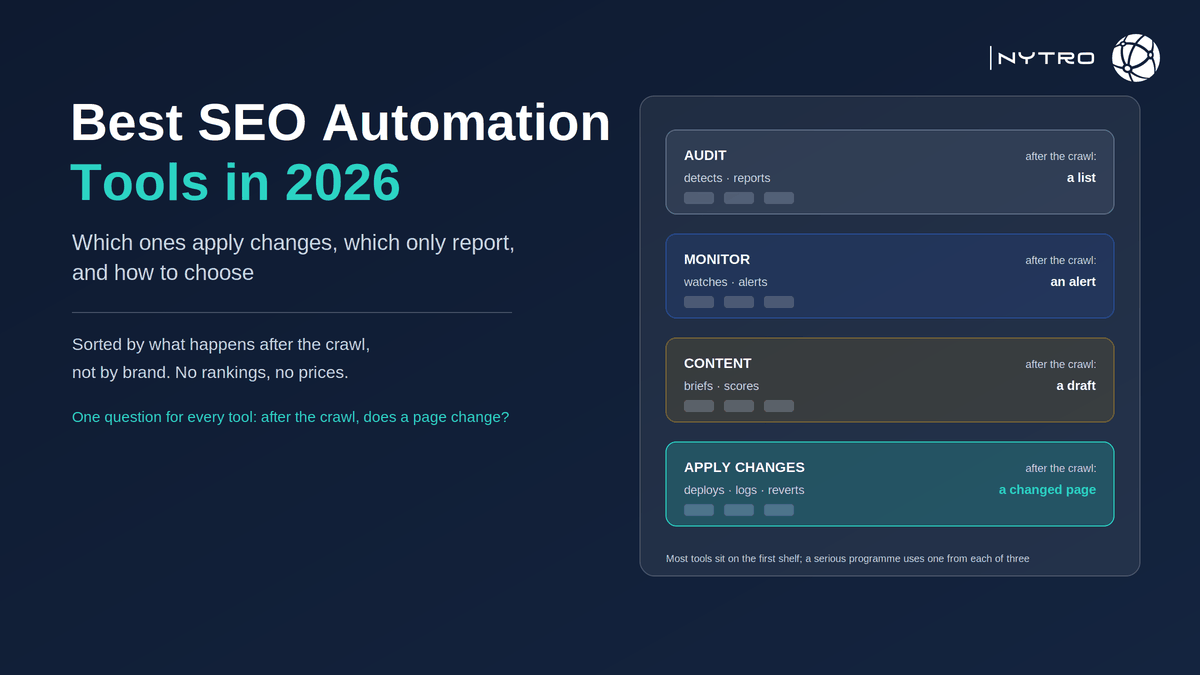
Before comparing best seo automation software, separate the four jobs, because a tool that is excellent at one is usually absent from the others.
Audit tools crawl the site on a schedule and report issues: missing or duplicate titles, broken canonicals, images without alt text, slow pages, pages excluded from the index. Output: a prioritised list.
Monitoring tools watch for change: indexing state, crawler access, metadata drift, rankings, and now AI impressions and citations. Output: an alert.
Content tools research, draft, brief and optimize text against what ranks. Output: a draft or a score.
Apply-changes platforms take approved rules and deploy titles, descriptions, canonical hints, alt text and structured data to live pages through a snippet, plugin, API or edge layer, with a preview and page-level overrides. Output: a changed page.
Our guide to automated SEO audit vs SEO automation works through the first and fourth in detail. The practical point for a buyer is that a well-run programme usually needs one tool from each of the first, second and fourth categories, and the fourth is the one most often missing.
How to read vendor comparisons, including this one
Three habits protect a buyer. First, check who published the comparison; a ranking in which the publisher’s own product scores highest is a sales page, and several of the most-read 2026 comparisons are exactly that. Second, translate every feature claim into the four jobs above and ask which one it belongs to; “AI-powered optimization” can mean a content score or a changed page, and the difference is the whole purchase. Third, ask the vendor what its product cannot do; a clear answer is a sign of a product that knows its category, and a vague one is a sign you will discover the limits after the invoice. Independent review platforms such as Capterra’s SEO software category and G2 aggregate user experience across vendors and are worth reading alongside any vendor page, including ours.
What features should best automated seo software include?
What features should best automated seo software include? Twelve, grouped by what they govern, and the first is the one that sorts the market.
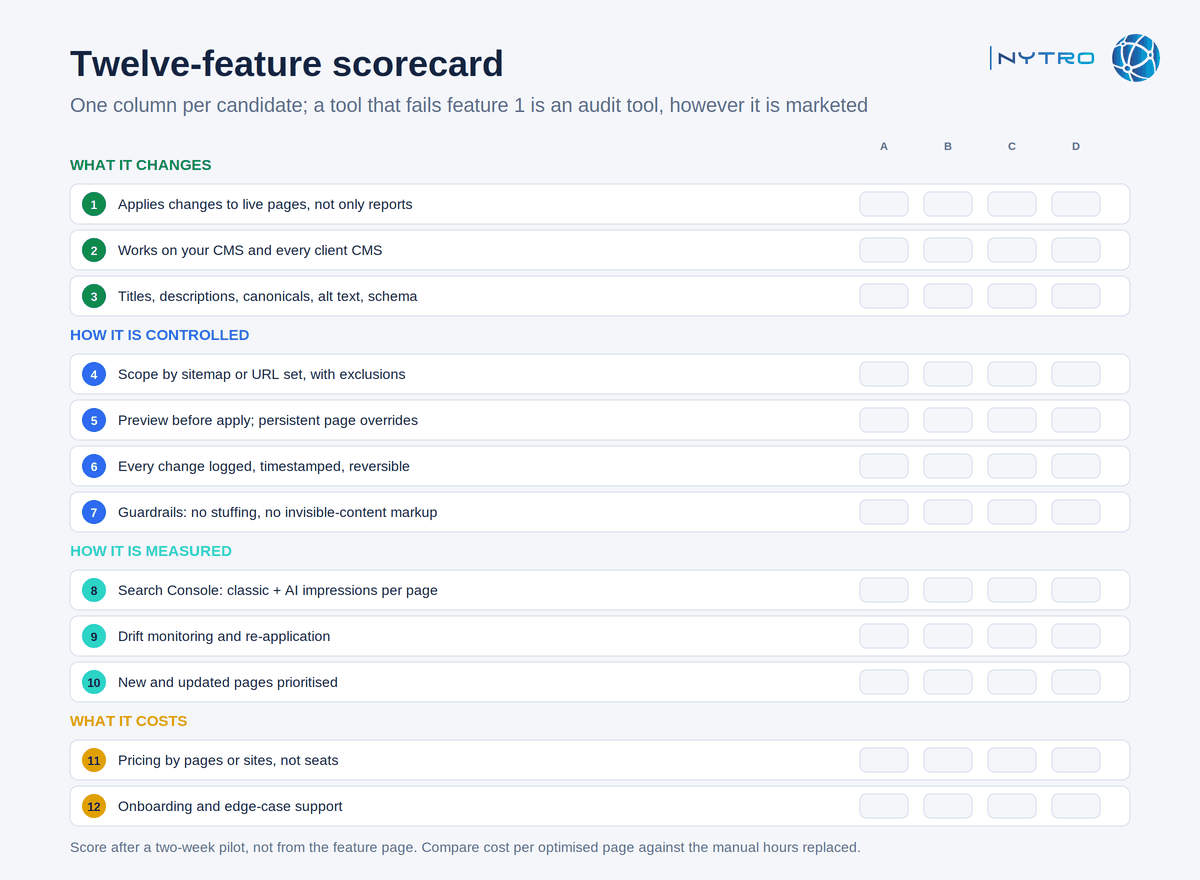
The scorecard above is the one to fill in per candidate; a tool that fails feature one is an audit tool, however it is marketed.
What it changes
- Applies changes to live pages rather than reporting them.
- Works on your CMS, and on every CMS your clients use, without a platform-specific plugin, or has a plugin for each one you run.
- Covers titles, descriptions, canonical hints, alt text and structured data, not titles alone.
How it is controlled
- Scope by sitemap or URL set, with exclusions.
- Preview of every rule’s output before it applies; page-level overrides that persist.
- The original and the optimized value for every page can be exported, so you can see what the tool changed and compare it with what was there before.
- Guardrails against keyword stuffing, duplication and markup for invisible content.
How it is measured
- Search Console connection, reporting classic and AI impressions per page.
- Drift monitoring that re-applies approved values after a template or plugin change.
- Priority for new and updated pages.
What it costs
- Transparent pricing that scales by pages or sites rather than by seat.
- Onboarding and edge-case support.
For a fuller treatment of each feature, our guide to automated SEO software sets them out as a buyer’s checklist.
The best seo automation tools in 2026 by category
What are the best SEO automation tools on the market? Sorted by category, with capabilities described as the vendors document them; verify current tiers before buying.
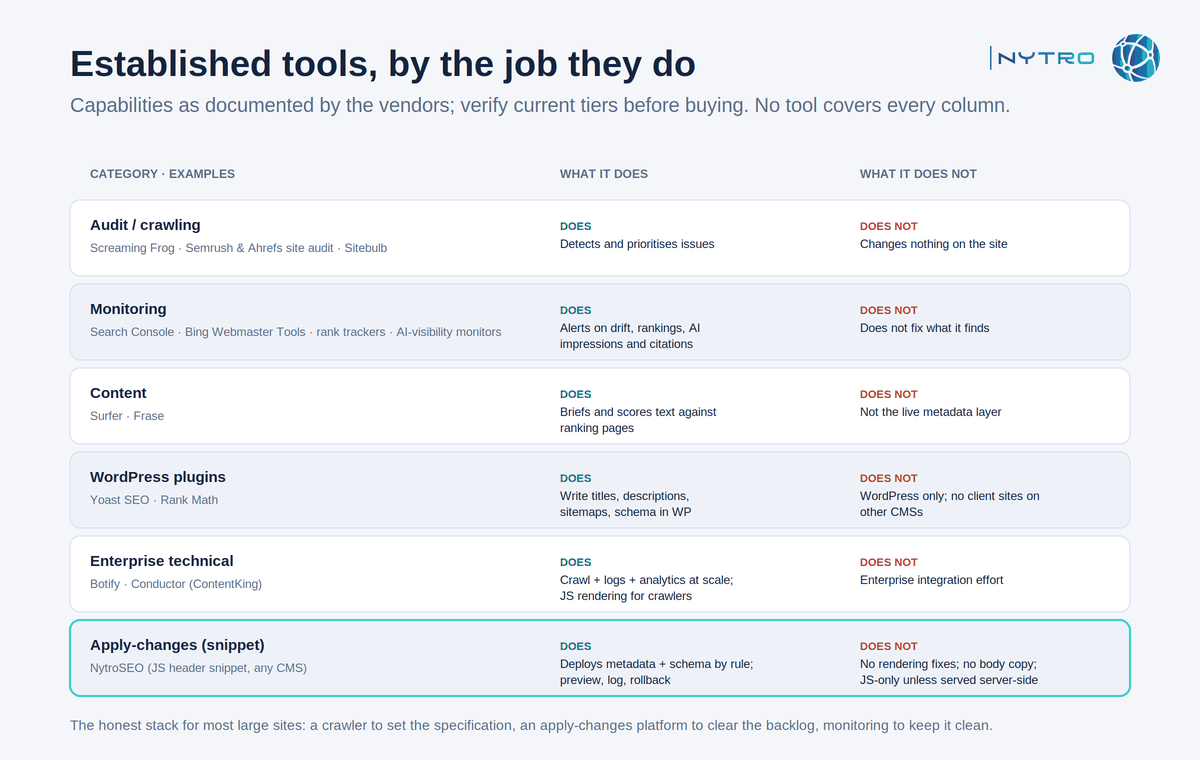
The table above groups established tools by the job they do; no tool covers every column, which is the point.
Audit and crawling. Screaming Frog’s SEO Spider is the reference desktop crawler for technical audits at any site size; the site-audit modules inside Semrush and Ahrefs run scheduled crawls with issue prioritisation; Sitebulb adds visualisation and explanation for each finding. All four detect; none applies a change to the site. Best for: establishing the specification the automation should follow, and verifying it afterwards.
Monitoring. Google Search Console and Bing Webmaster Tools are free and now report AI visibility, impressions in AI Overviews and AI Mode from Google, citations and grounding queries from Bing. Rank trackers inside Semrush, Ahrefs and SE Ranking record positions on a fixed keyword list. Dedicated AI-visibility monitors, a category that grew through 2025 and 2026, run prompt panels across assistants and report citations and mentions; capabilities differ widely, so evaluate them on prompt coverage and methodology. Best for: catching the losses that produce no error. Our guide to automated SEO monitoring covers what to watch.
Content. Tools such as Surfer and Frase brief and score content against ranking pages; their automation is analytical and editorial, inside an editor, not on the live site’s metadata layer. Best for: writers who want guardrails; not a substitute for the on-page layer.
WordPress plugins that write metadata. Yoast SEO and Rank Math are the two dominant WordPress plugins; both write titles, descriptions, sitemaps and schema into the CMS and can apply templated titles and descriptions across post types. They are native to WordPress and do not travel to Shopify, custom stacks or client sites on other platforms. Best for: WordPress-only sites that want automation inside the editor.
Enterprise technical platforms. Botify unifies crawl data, log files and search analytics for very large sites and, through its SpeedWorkers product, renders JavaScript pages for crawlers; its automation is oriented to indexing and crawl budget at enterprise scale. Conductor, which acquired ContentKing, offers always-on monitoring and enterprise content workflows. Best for: sites with millions of URLs and engineering teams to integrate with.
Snippet-based apply-changes platforms. NytroSEO applies titles, descriptions, canonical hints, image alt text and structured data through a JavaScript header snippet or tag manager on any CMS, scoped by sitemap, with preview, page-level overrides, export of original and optimized metadata, and drift monitoring. Other platforms deliver the same layer through plugins, CMS APIs or edge rewrites. Best for: large sites and agency portfolios where the per-page work is the bottleneck. Read the next section for its limits before deciding.
Where NytroSEO fits among the best automated seo tools, and where it does not
Among the best automated seo tools, NytroSEO belongs in one row, the apply-changes layer, and it is more useful to state its edges than its strengths.
What it does. It applies the metadata and structured-data layer by rule across every page in scope, on any CMS, without CMS access, with a preview before rules apply and a log of every change. It re-applies approved values when a template or plugin overwrites them. It connects to Search Console. On a large site, that is the majority of the on-page hours.
What it does not do. It does not fix rendering or server problems; a page Googlebot cannot render needs that fixed first. It does not write body content, brief writers or score drafts; pair it with a content tool. It does not crawl the site for issues beyond its own layer; pair it with an audit tool. It inserts body links only where configured. And because it delivers through JavaScript, its changes are read by systems that render, Google and Bing, and are invisible to third-party AI crawlers that fetch raw HTML unless the same values are also served server-side; our explainer on what an SEO automation snippet is covers that limit in detail.
The honest stack for most large sites is therefore three tools: a crawler to set the specification, an apply-changes platform to clear the backlog, and monitoring to keep it clean. Our guide to when to automate SEO and when to keep it manual covers the human side of that stack.
How to run a two-week evaluation of any best seo automation tools shortlist
A shortlist of best seo automation tools is only as good as the pilot you run on it. Two weeks is enough if the scope is small and the metrics are fixed in advance.
Days 1 to 2. Pick one section of the site, two hundred to two thousand URLs, with a known backlog: missing descriptions, missing alt text, inconsistent titles. Baseline it: metadata coverage, Page indexing status, classic and AI impressions from Search Console.
Days 3 to 5. Install the candidate. Confirm it works on your CMS without a developer. Define scope and exclusions. Write three rules and review the preview on every page; if there is no preview, note it.
Days 6 to 9. Apply the rules. Export the original and optimized values and confirm every page in scope shows the value the preview promised. Change one rule and confirm the pages pick up the new value on the next fetch. Edit a page by hand and confirm the override persists.
Days 10 to 12. Change the theme or a plugin setting that would normally overwrite metadata and confirm the tool detects and re-applies. Fetch a page as Googlebot and confirm the rendered head carries the new values.
Throughout, keep one guardrail in force: the automation must not modify canonical URLs, hreflang tags or robots.txt without a person approving each rule, because those are the changes that can remove pages from the index at scale, and no evaluation is worth that risk.
Days 13 to 14. Re-measure coverage and indexing; impressions will not have moved yet, so record the baseline for a 28-day follow-up. Score the candidate on the twelve features and on cost per optimized page against the manual hours it replaced.
Book a strategy meeting with the NytroSEO team if you want the pilot designed for a large site or a client portfolio, including which crawler and monitor to pair it with.