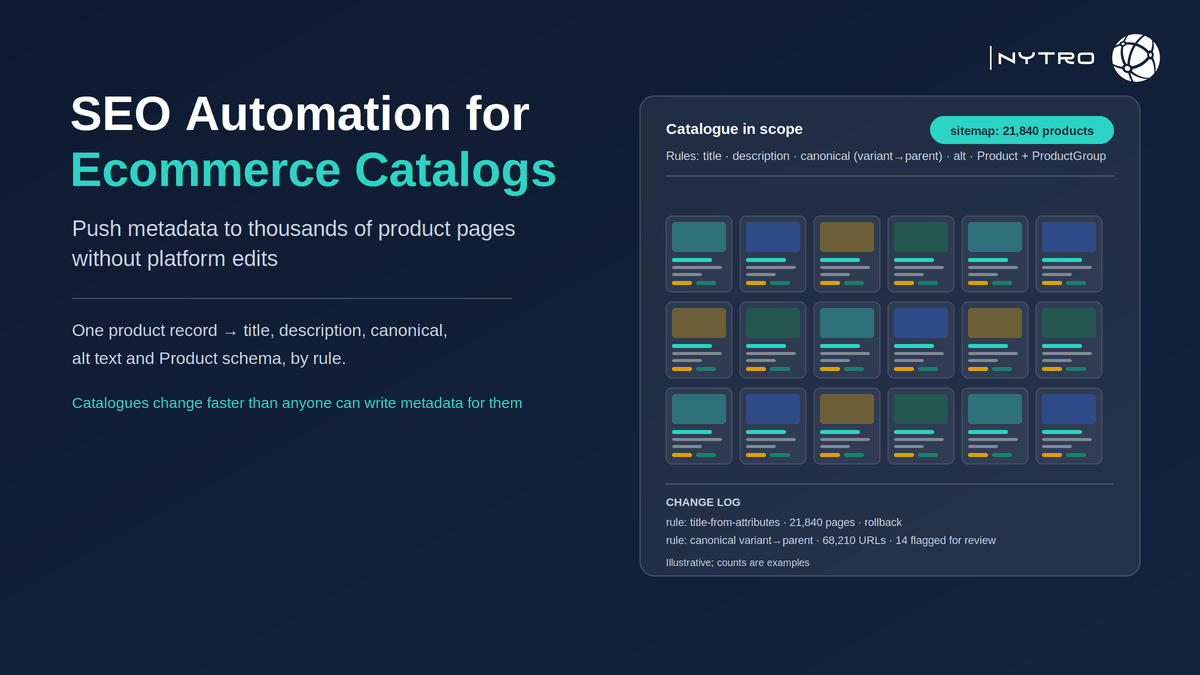
Last updated: October 5, 2026Seo automation for ecommerce catalogs is the practice of generating and maintaining the on-page layer of every product and category page by rule: titles and descriptions built from product attributes, canonical rules for variants and out-of-stock pages, alt text from product data, Product and ProductGroup structured data from visible fields, all scoped to the catalogue’s sitemap and re-applied as the catalogue changes. It exists because a catalogue is the one kind of site where hand-editing is not merely slow but structurally impossible: products arrive, change price, sell out, gain variants and retire faster than any team can keep the metadata current. This guide explains why ecommerce SEO breaks at catalogue scale, why product pages end up crawled but not indexed, how to build the rules-based layer, how to deploy it without editing the platform, and what AI shopping agents actually read from a product page.
Google’s own ecommerce guidance sets the data requirements. Its page on structured data relevant to ecommerce lists Product and ProductGroup for products and variants, BreadcrumbList for hierarchy, Organization for the business and LocalBusiness for physical stores, and points to Merchant Center’s structured-data setup for shopping experiences. Its merchant listing documentation adds two rules that decide automation design: product rich results support only pages that focus on a single product or its variants, and for merchants optimising across shopping results Google recommends putting Product structured data in the initial HTML for best results.
If you want to see how many of your product pages are missing descriptions, alt text or Product markup before reading further, sign up for free and NytroSEO will inventory the catalogue from your sitemap and preview the rules it would apply.
The scale problem is arithmetic. A catalogue of twenty thousand SKUs with four colour and three size variants can expose several hundred thousand URLs to crawlers, most of them near-duplicates. Each needs a title that says what it is, a description that earns a click, a canonical that tells Google which version to index, alt text for every image, and structured data with a price that matches the page. Multiply by the rate of change and the backlog is permanent unless the metadata is generated rather than written.
Lee Agam, founder and CEO of NytroSEO, describes catalogues as the case that made the company’s approach necessary. In his experience the sites that struggle are not the ones with bad products but the ones where the platform’s defaults became the SEO: titles that are the product name and nothing else, descriptions copied from the manufacturer across every retailer in the category, every colour variant indexed as its own thin page, and Product markup that disagrees with the price on screen because a feed updated and the template did not. His rule for catalogues is that every element should be derived from a single product record, the one that already feeds the cart and the Merchant Center feed, so that the title, the description, the schema and the visible price cannot drift apart, and that the rules should be previewed on a hundred products before they touch ten thousand.
Why seo automation for ecommerce catalogs exists: ecommerce seo breaks at scale
Ecommerce seo fails on large catalogues for five reasons, and all five are structural rather than editorial.
Template sprawl. Platforms generate the title and description from a template, usually the product name plus the store name, so thousands of pages carry near-identical metadata that says nothing a buyer searches for and gives Google no reason to prefer one over another.
Duplicate variants. Every size and colour gets a URL. Without a canonical rule mapping variants to a parent, or a ProductGroup declaring them as variants, Google sees hundreds of thousands of near-duplicate pages and indexes a fraction, not always the ones you would choose.
Thin and duplicated descriptions. Manufacturer copy is reproduced across every retailer that sells the product, so the page adds nothing Google has not already indexed elsewhere.
Faceted navigation. Filters and sorts generate combinatorial URLs that consume crawl demand and crowd out the product pages themselves; our guide to crawl budget covers the mechanics.
Churn. Products sell out, prices change, seasons end. Metadata written in March describes a catalogue that no longer exists by June, and structured data that says a product is in stock at a price it no longer carries is a policy problem as well as a conversion one.
Our note on what large ecommerce sites do differently covers the organisational side; this guide covers the rules.
Why are product pages crawled currently not indexed?
Why are product pages crawled currently not indexed? Because Google fetched them and judged them not worth adding to the index, and on a catalogue the judgement usually falls on one of five causes.
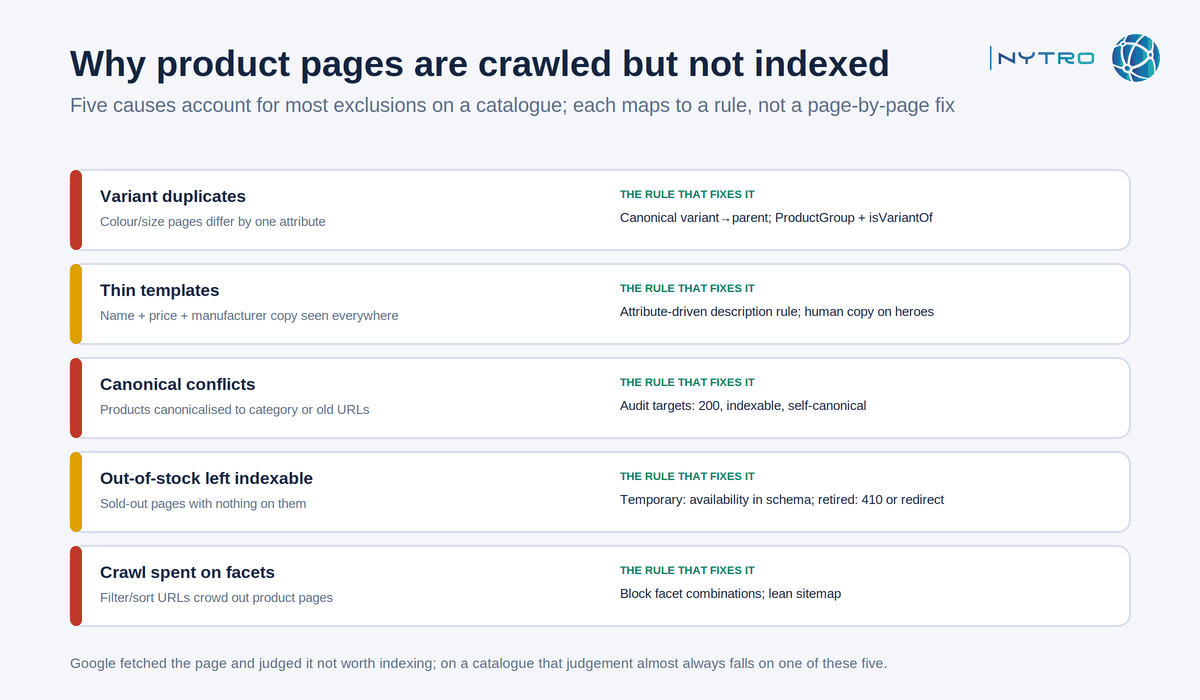 The five causes above account for most product-page exclusions; each maps to a rule rather than a page-by-page fix.
Variant duplicates. Colour and size pages that differ by one attribute are duplicates to Google. The fix is a canonical rule mapping each variant to its parent, plus ProductGroup markup that declares the relationship, so Google indexes one page and understands the rest.
Thin templates. A product page whose only text is a name, a price and manufacturer copy found on a hundred other sites has nothing to index. The fix is a description rule that assembles unique, attribute-driven text, material, dimensions, compatibility, use case, from the product record, and a person-written paragraph on the products that matter commercially.
Canonical conflicts. A template that canonicalises every product to its category, or a migration that left canonicals pointing at old URLs, tells Google the page is a duplicate of something else. Our guide to the alternative page with proper canonical tag status covers the audit.
Out-of-stock pages left indexable. A sold-out product with no return date is a thin page. The rule depends on the product: temporary stock-outs keep the page indexable with availability marked correctly in Product schema; permanently retired products return a 410 or redirect to the nearest replacement.
Crawl budget spent elsewhere. When facets and parameters consume the crawl, product pages are fetched less often and judged more harshly. Our guide to crawled, currently not indexed covers the general case; on a catalogue the fix is blocking facet combinations that should never have been crawlable.
How can I automate seo for large catalogs? The rules-based layer
How can I automate seo for large catalogs? By treating the product record as the source of truth and deriving every on-page element from it with a rule, in this order.
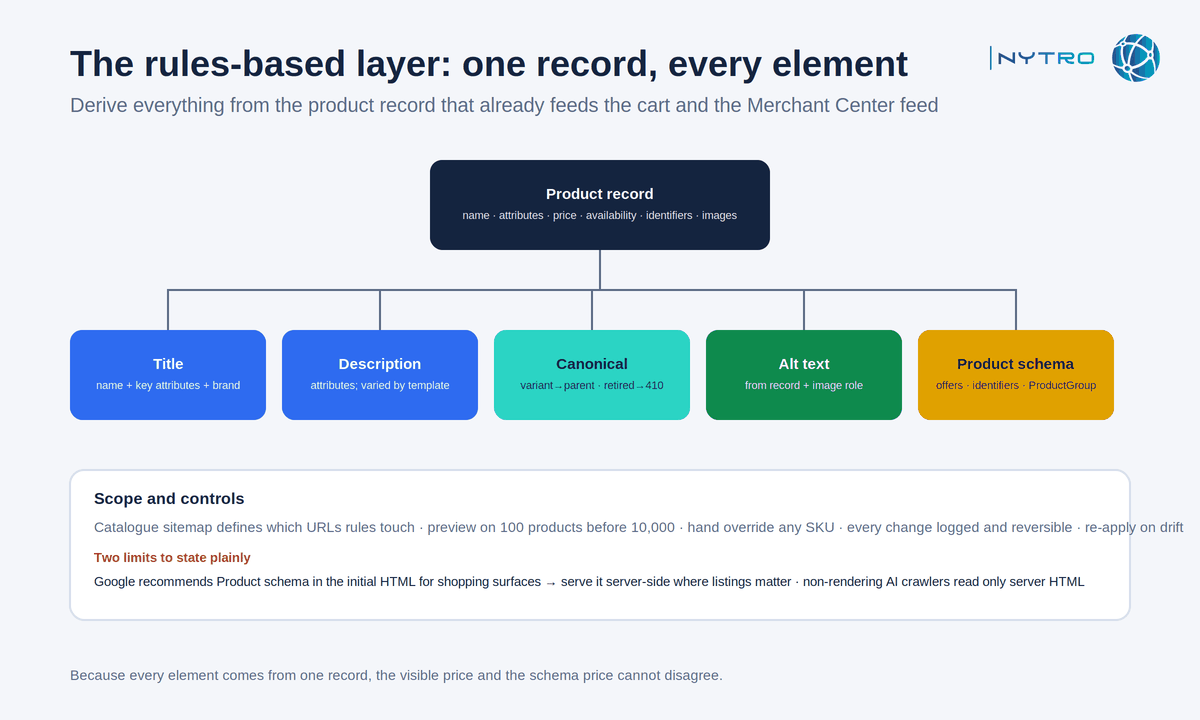 Everything in the layer above derives from one product record, which is why the visible price and the schema price cannot disagree.
Title rule. Product name, the one or two attributes buyers search for, and the brand, in that order, within the length Google displays. “Trail-running shoe, blue, size 9 to 12 | Brand” beats “Product 4471 | Store”. Titles for category pages state the category and the range, not the store slogan.
Description rule. Assemble from attributes the buyer cares about: material, dimensions, compatibility, what is in the box, delivery. Vary the sentence structure by template so descriptions are not near-duplicates of each other, and reserve person-written copy for hero products.
Canonical rule. Variants to parent, parameter and tracking URLs to the clean URL, retired products to a replacement or a 410. Never canonicalise a product to a category. Exclude any target that is not indexable and returns 200.
Alt text rule. From the product record and the image’s role: “Blue trail-running shoe, side view” for the main image, “sole detail” for the second, empty alt for decorative badges.
Structured data rule. Product with name, image, description, brand, sku and offers carrying price, priceCurrency and availability, all taken from the same record that renders the page; Google’s product variant documentation covers the ProductGroup pattern. Variants declared with ProductGroup and isVariantOf. AggregateRating and Review only where real reviews are visible. Category and shipping and return properties where the data exists.
Scope and controls. The catalogue sitemap defines which URLs the rules touch. Every rule previews on a sample before it applies, every product can be overridden by hand, every change is logged and reversible, and a monitor re-applies values when the platform overwrites them.
How can i push seo changes to ecommerce product pages? Four routes, no platform edits
How can i push seo changes to ecommerce product pages when the platform’s theme is locked, the developer queue is three months long, or the store is one of forty an agency manages? Through one of four delivery routes, chosen by what you need to change and who the reader is.
A JavaScript header snippet or tag-manager tag applies the layer at load on Shopify, Magento, BigCommerce, WooCommerce or a custom stack without touching the theme. Google renders JavaScript and reads the result, so titles, descriptions, canonical hints, alt text and schema applied this way are indexed. Two limits are specific to catalogues and should be stated plainly. Google recommends Product structured data in the initial HTML for the best results across shopping surfaces, so a store whose priority is merchant listings should serve Product markup server-side and use the snippet for the rest. And AI crawlers that do not execute JavaScript read only the server’s HTML, so price and availability must be visible there regardless. Our explainer on what an SEO automation snippet is covers both limits.
A platform app or plugin writes to the product fields in the CMS. Native to one platform; does not travel.
A feed-driven integration writes metadata from the same product feed that supplies Merchant Center, which has the advantage that the schema and the feed can never disagree.
An edge or CDN layer rewrites the HTML in transit, platform-independent and server-side, at the cost of infrastructure access.
NytroSEO delivers through the first route: one snippet, rules scoped by the catalogue sitemap, preview, overrides, change log and rollback, with the recommendation above about server-side Product markup made explicitly to every ecommerce client. It does not change URL structure, stop the platform generating facet URLs or write hero-product copy, which remain platform and merchandising work. Our ecommerce case study shows the approach on a consumer-goods catalogue, and our guide to meta-tag automation for large websites covers the mechanics. Book a strategy meeting with the NytroSEO team if you run a large catalogue or an agency portfolio of stores and want the rules and the delivery route designed together.
Seo automation for ecommerce catalogs and AI shopping agents: what they read
AI shopping agents, the assistants that compare products and increasingly complete purchases on a person’s behalf, read product pages the way crawlers and screen readers do: through the rendered HTML, the DOM and the structured data, not through the visual design. Google’s guidance for generative AI features asks for the same semantic HTML structure for people and agents, and its ecommerce guidance points to Merchant Center feeds as the structured catalogue behind shopping experiences. Preparing a product page for agents therefore means making its facts machine-readable and consistent across every source.
Visible facts in HTML. Price, availability, specifications, variants, delivery and returns in text an agent can read without executing scripts or opening a modal. If the price only appears after a JavaScript call, a non-rendering agent sees no price.
Consistent across sources. The page, the Product schema and the Merchant Center feed must agree on price, availability and identifiers; Google cross-checks them, and an agent that finds disagreement treats the listing as unreliable. Product feeds for other assistants, where offered, should be generated from the same record.
One product per page. Merchant listing rich results, and agents comparing items, need a page about one product or its variants, not a list.
Complete identifiers. GTIN, MPN, brand and sku in the schema and the feed let an agent match the page to the product it is being asked about.
Stable metadata. The title and description an agent read last week should describe the same product this week; drift between a template update and the feed is how agents and shoppers end up with different prices.
Our shopify seo guide, published alongside this one, covers the platform-specific settings for Shopify stores; this page covers the layer that is the same on every platform.
A seo automation for ecommerce catalogs checklist
- Product record is the single source for title, description, alt, schema and visible price.
- Canonical rule: variants to parent, parameters to clean URL, retired products to replacement or 410; never product to category.
- ProductGroup and isVariantOf declared for variants; one product per page.
- Product schema with offers, availability and identifiers; ratings only where real; served in the initial HTML where shopping surfaces matter.
- Facet combinations that should not be crawled are blocked; the sitemap lists canonical product and category URLs only.
- Rules previewed on a hundred products, logged, reversible, and monitored for drift.
- Indexing status of product templates reviewed weekly.