Last updated: October 10, 2026
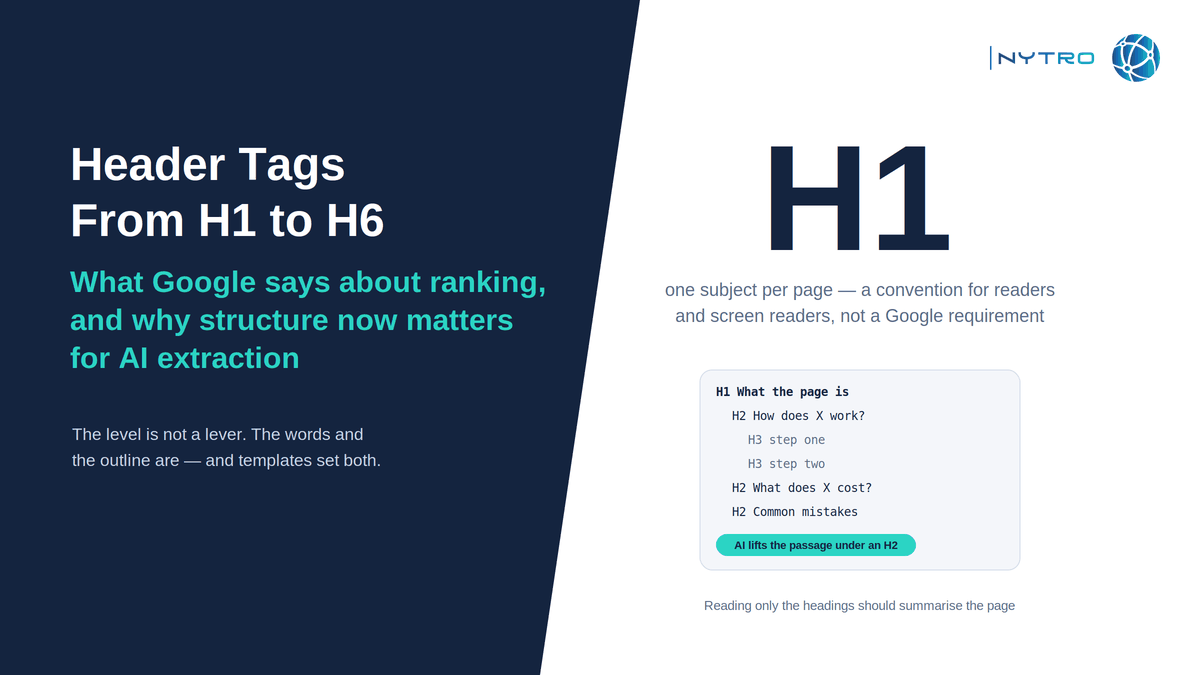
Header tags, the HTML heading elements from H1 to H6, tell every reader of a page what each part of it is about and how the parts relate. Google’s position on them has been stable for years and is often misread in both directions: headings are a strong signal of what a section covers, and whether a given heading is an H1, an H2 or an H5 matters little to ranking. The level is not a lever; the words and the structure are. What has changed since this page was first written is who reads the structure. Screen readers always did. AI Overviews, AI Mode and third-party assistants now lift passages from beneath headings and use the heading as the label for what they lifted, which makes a page’s outline the map an answer engine follows. This guide sets out what Google actually said, how the hierarchy should work, why it now matters for extraction, how to write headings that get lifted, and how to audit heading structure across a large site.
The source for Google’s position is John Mueller’s August 2020 explanation, which Search Engine Journal’s ranking-factor analysis quotes: a heading is a really strong signal telling Google that this part of the page is about this topic, and whether that heading is an H1, an H2, an H5 or whatever does not matter so much. The same analysis records the other half of the evidence: pages rank with no heading tags at all, and putting a keyword in a heading does not move a page to the top. Both halves are true at once. Headings help Google understand a page; the level you choose is not what does the helping.
If you want heading structure, titles and structured data audited and kept consistent across every page automatically, sign up for free and NytroSEO will inventory the pages in your sitemap and show which ones have no H1, several H1s or skipped levels.
Google’s guidance for generative AI features adds the second reader. It asks sites to use the same semantic HTML structure for people and for AI agents, with clear headings that organise the content, because its AI features draw on the same index and understanding as Search. The W3C’s page-structure tutorial describes the third: assistive technology navigates a page by its heading outline, so nested headings that reflect the content’s organisation are an accessibility requirement, not a style preference.
Lee Agam, founder and CEO of NytroSEO, puts the ranking question to one side and asks what a heading is for. In his experience, the pages that are retrieved and quoted by AI systems have headings a person would type as a question and a first paragraph beneath each that answers it; the pages that are passed over have headings that are clever, vague or decorative, and body text that wanders before it answers. He describes the common failure on large sites as visual rather than editorial: a theme that styles paragraphs to look like headings, or wraps the logo and the promo banner in H1 tags, so that the page looks structured to a person and reads as a flat wall or a confused outline to everything else. His rule is that the outline should summarise the page on its own, and that it should be audited by rule across the site, because the heading structure of ten thousand pages is set by templates, not by writers.
What Google says about header tags and ranking
What Google says about header tags has not changed since Mueller’s 2020 explanation, and it is worth restating precisely because the original title of this page compressed it into something it did not quite say.
Headings are a signal. Google uses the text in headings, alongside the rest of the page, to understand what each section is about. That understanding feeds relevance, which feeds ranking, which is why pages with clear headings tend to do well. It is not a direct, isolated factor that rewards the presence of a tag.
The level matters little. Whether a section’s heading is an H1, an H2 or an H4 does not change how strongly Google weights it. Google has also said repeatedly that multiple H1 tags on a page are fine and that it does not require one; the one-H1 convention exists for people and accessibility, not for ranking.
Keywords in headings are not a lever. A heading that says what the section is about naturally contains the words the section is about. A heading stuffed with variants of a target phrase reads as what it is, and Google has filtered that pattern for well over a decade.
Pages rank without headings. They do, and they would do better with them, because the understanding headings provide has to come from somewhere, and without headings it comes from the body text alone.
A fair summary: header tags seo is content architecture, not a tag trick. The earlier title of this page, which said the level does not matter in ranking, was correct about the level and silent about everything else that does.
H1 Tag, H2 and the hierarchy: how header tags should be structured
The H1 Tag is the title of the page’s content: one per page by convention, matching the subject of the page and, usually, the gist of the title tag without being identical to it. H2 headings are the page’s major sections. H3 headings are subsections within an H2. H4 to H6 exist for deeper nesting and are rarely needed; a page that uses them often is usually a page that should be split.
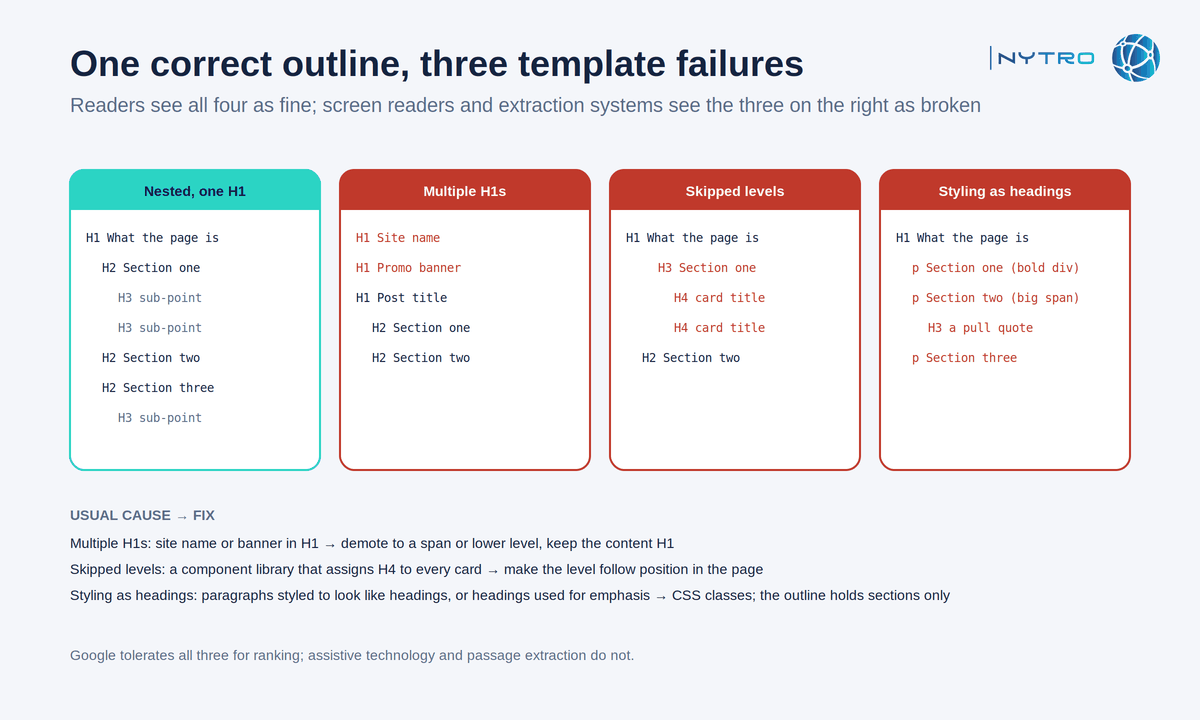
The outline on the left is what every reader expects; the three on the right are the failures that templates produce without anyone deciding to.
Three rules cover the hierarchy.
Nest, do not skip. An H3 belongs under an H2, an H2 under the H1. Jumping from an H1 to an H3, or from an H2 to an H4, breaks the outline for screen readers and for any parser that builds a tree from it. Google tolerates it; assistive technology does not.
Headings are structure, not style. A heading element says “this is a section about X”. If a designer wants large text, that is a CSS job. Wrapping a promo line, a logo or a sidebar title in an H1 or H2 because it needs to look big puts non-content into the outline, and every automated reader believes it.
One H1 for content pages. Google does not require it, but a single H1 gives screen-reader users one landmark for “what is this page” and gives extraction systems one unambiguous subject. Templates that emit an H1 for the site name and another for the post title are the most common multi-H1 cause and the easiest to fix in the theme.
Our hub on search optimization places heading structure within the four pillars; this page covers the structure itself.
Headings seo for AI extraction: the outline is the map
Headings seo has acquired a purpose that did not exist when the first version of this page was written: being the map an answer engine follows.
AI Overviews, AI Mode and third-party assistants answer a question by retrieving candidate pages, extracting the passage that answers the sub-question they are working on, and attributing it. The heading above a passage is how the system labels what it found and how it decides which passage to lift. A page whose outline reads “What is X; How X works; How to set X up; What X costs; Common mistakes” presents five extraction targets with five labels. A page whose outline reads “Introduction; Our approach; Why it matters; Final thoughts” presents none.
Three consequences for writing.
Phrase headings the way the audience asks. A heading that is the question, or the plain statement of what the section answers, matches the sub-queries an engine fans a question into. “How do header tags affect SEO?” is a target; “Thoughts on headings” is not.
Answer in the first sentence beneath the heading. The passage lifted is usually the opening of the section. If the answer is three paragraphs down, the engine lifts the preamble or passes the page over.
Keep the outline faithful. If reading only the headings summarises the page, an engine that reads only the headings to decide whether to fetch the body will decide correctly. If the headings promise what the body does not deliver, the page is retrieved and then discarded, which is the worst of both outcomes.
Our guide to getting cited in Google AI Overviews rather than just ranked covers the passage structure in detail, and our guide to FAQ schema best practices covers the case where the headings are literally questions.
Heading tags seo: how to write headings that get lifted
Heading tags seo, in practice, is six habits.
Write the H1 as the subject, not a slogan. “Header Tags From H1 to H6: What Google Says About Ranking” tells a reader and a machine what the page is. “Heads Up!” tells neither.
Make each H2 a complete claim or question. A reader scanning the H2s should be able to decide whether to read the section; an engine scanning them should be able to decide whether the section answers its sub-query.
Front-load the specific words. The first few words of a heading carry the most weight for a scanning reader and a truncating display; put the subject there, not “A guide to” or “Everything about”.
Keep headings short enough to be a label. Roughly eight to twelve words is usual; a heading that needs a second line is often two headings.
Use H3s for steps, options and sub-questions, not for emphasis. A how-to with five steps gets five H3s under the H2; a paragraph that deserves attention gets a sentence, not a heading.
Match the title tag and the H1 in meaning, not necessarily in text. The title tag is written for the results page and may be shorter or sharper; the H1 is written for the page. Google has said it may use the H1 where it rewrites a title, which is one more reason the H1 should be the honest subject.
Avoid the two patterns that read as spam: the same keyword repeated across every heading, and headings that are keywords rather than sentences. Google’s guidance on keyword stuffing applies to headings as it does to everything else.
Auditing headers tags across a large site
Headers tags, as audit tools often label them, are set by templates on most sites, which means the same error appears on every page a template renders. An audit therefore finds patterns, not pages, and fixes them in the template or by rule.
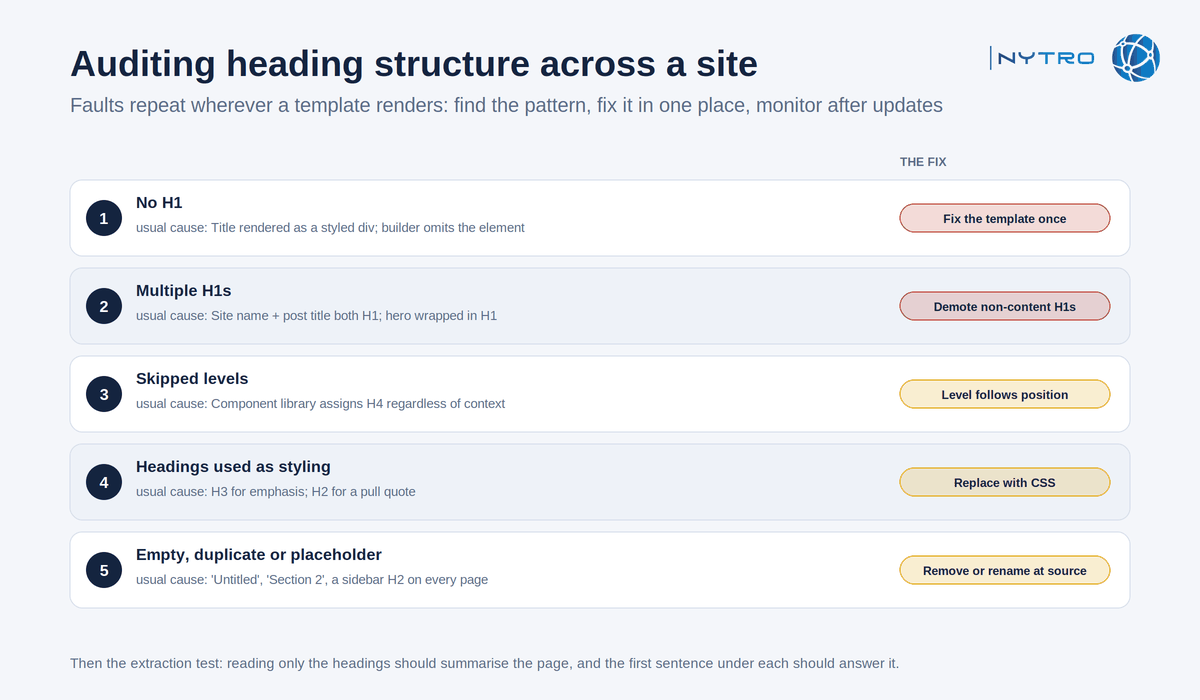
The five checks above find template faults, which is why the fix is almost always one change in one place.
- No H1. Usually a template that uses the page title as a styled div, or a builder that omits the heading element. Fix the template; one change corrects every page.
- Multiple H1s. Usually the site name in the header and the post title both in H1, or a hero banner wrapped in one. Demote the non-content H1s to a span or a lower level.
- Skipped levels. Usually a component library that assigns H4 to card titles regardless of context. Make the component’s heading level follow its position in the page.
- Headings used as styling. Paragraphs in H3 for emphasis, or H2 for a pull quote. Replace with CSS classes; the outline should contain only sections.
- Empty, duplicate or placeholder headings. “Untitled”, “Section 2”, or an H2 repeated on every page by a sidebar. Remove or rename at the source.
Run the audit with a crawler that reports heading counts and levels per page, group by template, and fix at the template. Then monitor: a theme update or a plugin can reintroduce every one of these overnight, and heading structure is not something anyone re-checks by hand. NytroSEO’s audit inventories H1 presence, count and level skips per page and keeps the title, description and structured-data layer consistent by rule; it does not rewrite headings in the body, which is template and editorial work, and our guide to automated SEO audit vs SEO automation explains that boundary. Our guide to JavaScript SEO for AI agents covers the case where headings are injected by scripts and invisible to crawlers that do not render. Book a strategy meeting with the NytroSEO team if you manage a large site or a client portfolio and want the heading audit run with the rest of the on-page layer.
A heading checklist for one page
- One H1 that states the subject; title tag matches it in meaning.
- H2s that a reader could use to decide whether to read each section; H3s for steps and sub-questions.
- No skipped levels; nothing decorative in a heading element; styling done in CSS.
- The first sentence under each heading answers what the heading promises.
- Reading only the headings summarises the page.
Frequently Asked Questions
Indirectly. Google’s John Mueller has said headings are a strong signal of what a section is about and that the level, H1, H2 or H5, does not matter much. Headings help Google and AI systems understand a page, which supports relevance; they are not a ranking lever on their own, and pages rank without them.
Google does not require it and handles multiple H1s, but one H1 that states the page’s subject is the clean convention for screen-reader users and for AI systems that need one unambiguous topic. Multiple H1s usually come from templates wrapping the site name or a banner in H1; demote those rather than the content heading.
Yes. AI Overviews, AI Mode and assistants extract passages from beneath headings and use the heading as the label for what they lifted, so a clear outline with question-shaped H2s and answers in the first sentence beneath each is what gets a page retrieved and quoted. Google’s AI guidance asks for the same semantic structure for people and agents.
Only where they are the honest description of the section. A heading that states what the section is about will contain the right words naturally; repeating a target phrase across every heading reads as keyword stuffing to readers and to Google. Phrase headings the way the audience asks the question.
Crawl the site and report, per page, whether an H1 exists, how many there are, whether levels are skipped and whether headings carry non-content text, then group the results by template, because the faults are template faults. Fix each at the template or by rule, and monitor after theme or plugin updates, which reintroduce them.
Ready to make every page’s outline say what the page is?
The level of a heading is not a lever; the words and the structure are, and both are set by templates on a large site. Sign up for free to have NytroSEO inventory heading structure across your pages and keep the on-page layer consistent, or book a strategy meeting if you manage a large site or a client portfolio and want the audit run as one project.